

惯性聚合 高效追踪和阅读你感兴趣的博客、新闻、科技资讯
阅读原文 在惯性聚合中打开

推荐订阅源

Engineering at Meta
Engineering at Meta
博客园_首页
H
Help Net Security
WordPress大学
WordPress大学
让小产品的独立变现更简单 - ezindie.com
罗磊的独立博客
博客园 - 三生石上(FineUI控件)
B
Blog
I
InfoQ
SecWiki News
SecWiki News
T
Tailwind CSS Blog
Spread Privacy
Spread Privacy
freeCodeCamp Programming Tutorials: Python, JavaScript, Git & More
V
Vulnerabilities – Threatpost
N
Netflix TechBlog - Medium
P
Palo Alto Networks Blog
CTFtime.org: upcoming CTF events
Vercel News
Vercel News
Threat Intelligence Blog | Flashpoint
K
Kaspersky official blog
M
MIT News - Artificial intelligence
S
Schneier on Security
T
Threat Research - Cisco Blogs
F
Fortinet All Blogs
Cyberwarzone
Cyberwarzone
Scott Helme
Scott Helme
aimingoo的专栏
aimingoo的专栏
Martin Fowler
Martin Fowler
MyScale Blog
MyScale Blog
The Cloudflare Blog
Recent Announcements
Security Latest
Security Latest
G
GRAHAM CLULEY
IT之家
IT之家
Y
Y Combinator Blog
The Last Watchdog
The Last Watchdog
腾讯CDC
Google DeepMind News
V
V2EX
S
Securelist
TaoSecurity Blog
TaoSecurity Blog
B
Blog RSS Feed
S
SegmentFault 最新的问题
博客园 - 叶小钗
P
Proofpoint News Feed
云风的 BLOG
云风的 BLOG
Project Zero
Project Zero
G
Google Developers Blog
Google DeepMind News
F
Full Disclosure

博客园 - 菲一打

【转】Linux从入门到精通——运维工程师成长路线图——CTO马哥Linux视频教学 【转】 要做linux运维工程师的朋友,必须要掌握以下几个工具才行 【转】Linux shell笔记 【转】Linux上vi(vim)编辑器使用教程 无法远程连接SQLSERVER2000的解决方法 Python类的__getitem__和__setitem__特殊方法 让Python支持中文注释 【转】python入门指引 【转】布同:如何循序渐进学习Python语言 在nagios中监控windows主机系统地址的状态 nagios中监测dns 227.7.128.68的网络状态 【转】新手该如何学python怎么学好python? 在nagios中使用python脚本监控linux主机 【转】手游公司运维之从一个人运维到运维主管 【转】sed & awk常用正则表达式 【转】Linux 服务器安全配置 【转】shell脚本实现多台服务器自动巡检--可参考学习 【转】nagios 命令解释 在nagios中使用nrpe自定义脚本
【转】VMware 克隆 Linux 系统后找不到 eth0 网卡问题
菲一打 · 2014-04-08 · via 博客园 - 菲一打

问题描述

使用 VMware 虚拟机的克隆功能,快速复制已安装好的 Linux 系统。

克隆完成之后,发现没有 eth0 网卡。
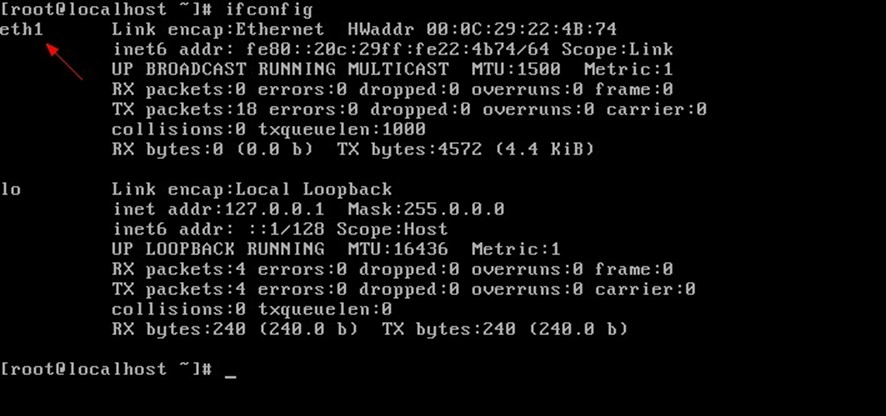
解决方法

1. 编辑 /etc/udev/rules.d/70-presistent.rules 文件
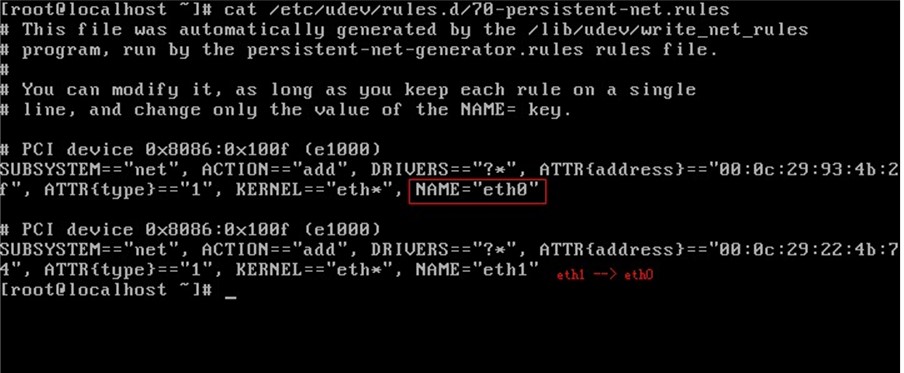
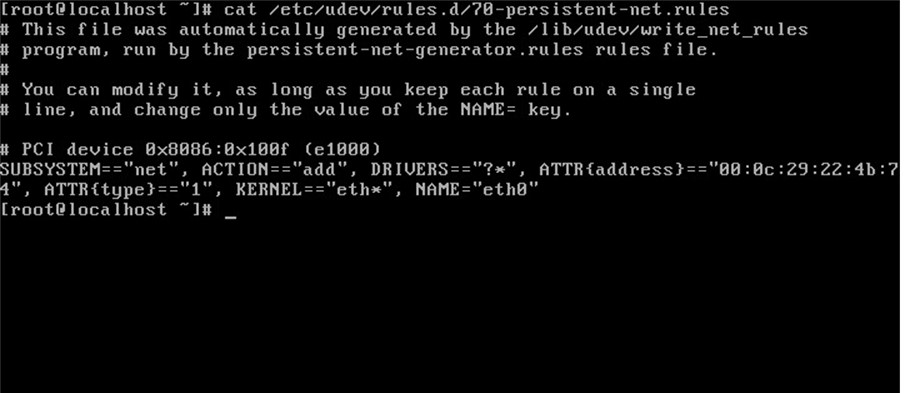
NAME="eth0" 所在行配置注释掉或删除,将 NAME="eth1" 修改为 NAME="eth0",修改后如下图:
2. 修改网卡配置文件

修改前配置如下图:
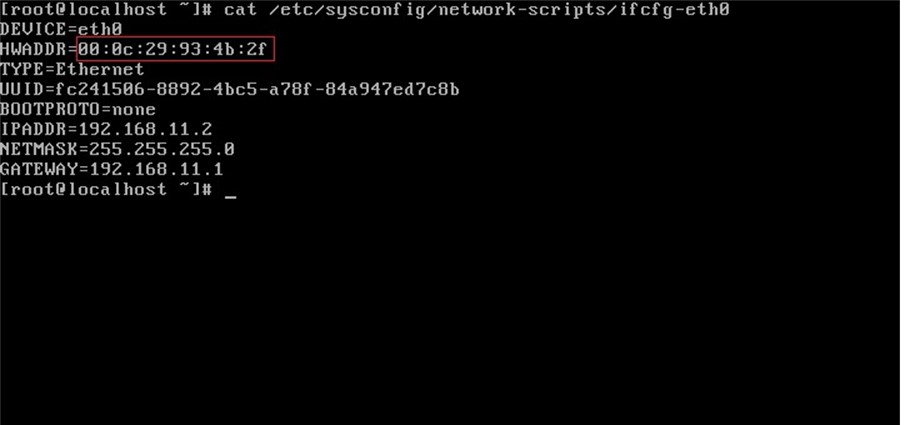
HWADDR 值修改为  /etc/udev/rules.d/70-presistent.rules 文件中的新值:

HWADDR=00:0c:29:93:4b:2f --> HWADDR=00:0c:29:22:4b:74

修改后配置如下图:

3. 重启即可。

转自:http://blog.csdn.net/ccie38499/article/details/12783771