








不用着急,tesseract-ocr本身的工具中提供了使用你提供的素材进行人工修正以提高识别率的方法。下面我们就来看一下。
参考:
http://my.oschina.net/lixinspace/blog/60124
1 下载并安装3.02版本的tesseract
2 如果你的训练素材是很多张非tiff格式的图片,首先要做的事情就是将这么图片合并(个人觉得素材越多,基本每个字母和数字都覆盖了训练出来的识别率比较好)
http://sourceforge.net/projects/vietocr/files/latest/download?source=files
下载这个工具:VietOCR.NET-3.3.zip
首先进行jpg,gif,bmp到tiff的转换,这个用自带的画图就可以。然后使用VietOCR.NET-3.3进行多张 tiff的merge。
3 Make Box Files。在orderNo.tif所在的目录下打开一个命令行,输入
C:\Program Files\Tesseract-OCR>tesseract.exe lang.jhy.exp8.TIF lang.jhy.exp8 batch.nochop makebox
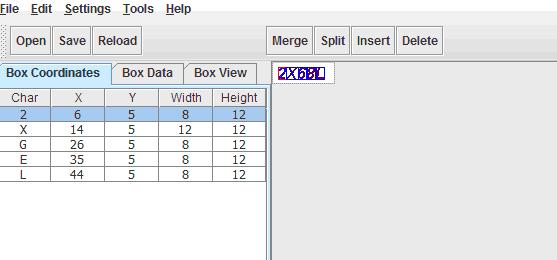
4 使用jTessBoxEditor打开orderNo.tif文件,需要记住的是第2步生成的orderNo.box要和这个orderNo.tif文件同在一个目录下。逐个校正文字,后保存。
http://sourceforge.net/projects/vietocr/files/
下载jTessBoxEditor工具进行每个自的纠正(注意有nextpage逐页进行纠正)
5 Run Tesseract for Training。输入命令:
C:\Program Files\Tesseract-OCR>tesseract.exe lang.jhy.exp8.TIF lang.jhy.exp8 nob
atch box.train
补充关于命名格式解释:lang.jhy.exp8.TIF
Make Box Files
For the next step below, Tesseract needs a 'box' file to go with each training image. The box file is a text file that lists the characters in the training image, in order, one per line, with the coordinates of the bounding box around the image. Tesseract 3.0 has a mode in which it will output a text file of the required format, but if the character set is different to its current training, it will naturally have the text incorrect. So the key process here is to manually edit the file to put the correct characters in it.
Run Tesseract on each of your training images using this command line:
tesseract [lang].[fontname].exp[num].tif [lang].[fontname].exp[num] batch.nochop makebox
6 Compute the Character Set。输入命令:
C:\Program Files\Tesseract-OCR>unicharset_extractor.exe lang.jhy.exp8.box
Extracting unicharset from lang.jhy.exp8.box
Wrote unicharset file ./unicharset.
7 新建文件“font_properties”。如果是3.01版本,那么需要在目录下新建一个名字为“font_properties”的文件,并且输入文本 :(这里的jhy就是lang.jhy.exp8的中间字段)
jhy 1 0 0 1 0
C:\Program Files\Tesseract-OCR>mftraining.exe -F font_properties -U unicharset
ang.jhy.exp8.tr
Warning: No shape table file present: shapetable
Reading lang.jhy.exp8.tr ...
Flat shape table summary: Number of shapes = 18 max unichars = 1 number with mu
tiple unichars = 0
Done!
8 Clustering。输入命令:
C:\Program Files\Tesseract-OCR>cntraining.exe lang.jhy.exp8.tr
Reading lang.jhy.exp8.tr ...
Clustering ...
Writing normproto ...
9 此时,在目录下应该生成若干个文件了,把unicharset, inttemp, normproto, pfftable这几个文件加上前缀“selfverify.”。然后输入命令:

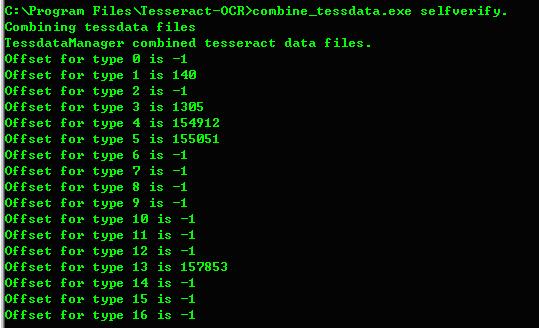
必须确定的是1、3、4、5、13行的数据不是-1,那么一个新的字典就算生成了。
此时目录下“selfverify.traineddata”的文件拷贝到tesseract程序目录下的“tessdata”目录。
以后就可以使用该该字典来识别了,例如:
tesseract.exe test.jpg out –l selfverify
通过训练出来的新语言,识别率提高了不少。
此内容由惯性聚合(RSS阅读器)自动聚合整理,仅供阅读参考。 原文来自 — 版权归原作者所有。