






Areas是ASP.NET Mvc 2.0版本中引入的众多新特性之一,它可以帮你把一个较大型的Web项目分成若干组成部分,即Area。实现Area的功能可以有两个组织形式:
第2种结构比较复杂,但第1种结构同样可以做到每个Area之间的并行开发,互不影响,所以不推荐第2种方法。
以ASP.NET Mvc 2.0的默认模板为例:
1. 首先要新建一个ASP.NET Mvc 2.0的Project,在Project上点击鼠标右键选择Add->Area,在打开的窗口中输入Area的名子(例如:Profile),点击Add按钮,然后将看到下面的结构。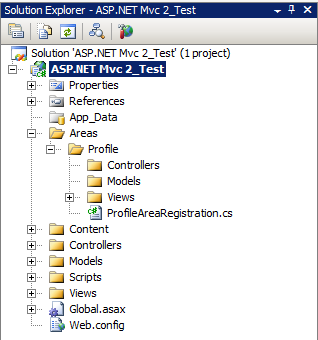
名子叫做Profile的Area的结构与根目录下的Controllers,Models和Views的结构是一样的,唯一区别是Profile下面多了一个ProfileAreaRegistration.cs文件。它继承自AreaRegistration类,ProfileAreaRegistration 必须实现AreaRegistration类中的AreaName属性和RegisterArea(AreaRegistrationContext context)方法
using System.Web.Mvc;

namespace ASP.NET_Mvc_2_Test.Areas.Profile
{
    public class ProfileAreaRegistration : AreaRegistration
    {
        public override string AreaName
        {
            get
            {
                return "Profile";
            }
        }

        public override void RegisterArea(AreaRegistrationContext context)
        {
            context.MapRoute(
                "Profile_default",
                "Profile/{controller}/{action}/{id}",
                new { action = "Index", id = UrlParameter.Optional }
            );
        }
    }
}
AreaName属性用来定义Area的名子, RegisterArea(AreaRegistrationContext context) 方法中可以看出在浏览器的地址栏中URL的样式为Profile/{controller}/{action}/{id},是4级构结,只要将context.MapRoute(…)改为
public override void RegisterArea(AreaRegistrationContext context)
        {
            context.MapRoute(
                "Profile_default",
                "Profile/{action}/{id}",
                new { controller = "要访问的controller名子", action = "Index", id = UrlParameter.Optional }
            );
        }
URL的样式会再变为三级结构 Profile/{action}/{id}。
2. 修改根目录下Views/shared/Site.Master文件,并添加一个名为o”Your Profile”的菜单项并指定area的名子, 示例中Area的名子为Profile。
<ul id="menu">
                    <li><%= Html.ActionLink("Home", "Index", "Home", new { area = ""}, null)%></li>
                    <li><%= Html.ActionLink("Your Profile", "ViewProfile", "Profile", new { area = "Profile" }, null)%></li>
                    <li><%= Html.ActionLink("About", "About", "Home", new { area = ""}, null)%></li>
</ul>
注意:Home和About不属于任何Area,但是也要通过匿名对象的方式声明area,如果没有声明Area,当进入到Profile的某个view时, Home和About的会的URL会变为Profile/Home, Profile/About,点击Home或About时会有异常抛出,所以当页面上的某个链接不属于任何一个Area并且有可能被多个Area可享的话,一定要加上new { area = ""}
3. 只有匹配正确的Route才能显示Area中的View,Area中的Route已经配置好,但它是如何被加入到RouteTable中的?
3.1 首先在Global.asax.cs的Application_Start()方法中调用了AreaRegistration.RegisterAllAreas()方法,这个方法的目地主是找出所有继承了AreaRegistration的类,并执行RegisterArea(…)方法来完成注册
public static void RegisterAllAreas() {
            RegisterAllAreas(null);
        }

        public static void RegisterAllAreas(object state) {
            RegisterAllAreas(RouteTable.Routes, new BuildManagerWrapper(), state);
        }

        internal static void RegisterAllAreas(RouteCollection routes, IBuildManager buildManager, object state) {
            List<Type> areaRegistrationTypes = TypeCacheUtil.GetFilteredTypesFromAssemblies(_typeCacheName, IsAreaRegistrationType, buildManager);
            foreach (Type areaRegistrationType in areaRegistrationTypes) {
                AreaRegistration registration = (AreaRegistration)Activator.CreateInstance(areaRegistrationType);
                registration.CreateContextAndRegister(routes, state);
            }
        }
3.1.1 TypeCacheUtil.GetFilteredTypesFromAssemblies(…)方法用来找出所有继承了AreaRegistration类的Type对象:
public static List<Type> GetFilteredTypesFromAssemblies(string cacheName, Predicate<Type> predicate, IBuildManager buildManager) {
            TypeCacheSerializer serializer = new TypeCacheSerializer();

            // first, try reading from the cache on disk
            List<Type> matchingTypes = ReadTypesFromCache(cacheName, predicate, buildManager, serializer);
            if (matchingTypes != null) {
                return matchingTypes;
            }

            // if reading from the cache failed, enumerate over every assembly looking for a matching type
            matchingTypes = FilterTypesInAssemblies(buildManager, predicate).ToList();

            // finally, save the cache back to disk
            SaveTypesToCache(cacheName, matchingTypes, buildManager, serializer);

            return matchingTypes;
        }
在GetFilteredTypesFromAssemblies(…)方法中,先从缓存中读取匹配的类型(缓存用于.Net Framework 4.0中,示例程序用VS2008在.NET 3.5环境下,暂不讨论缓存的应用)。缓存没有数据返回,调用FilterTypesInAssemblies(…)方法返回List<Type>对象, 这时返回的List<Type>才是继承了AreaRegistration类的Type对象, 下面的代码是FilterTypesInAssemblies方法的源码:
private static IEnumerable<Type> FilterTypesInAssemblies(IBuildManager buildManager, Predicate<Type> predicate) {
            // Go through all assemblies referenced by the application and search for types matching a predicate
            IEnumerable<Type> typesSoFar = Type.EmptyTypes;

            ICollection assemblies = buildManager.GetReferencedAssemblies();
            foreach (Assembly assembly in assemblies) {
                Type[] typesInAsm;
                try {
                    typesInAsm = assembly.GetTypes();
                }
                catch (ReflectionTypeLoadException ex) {
                    typesInAsm = ex.Types;
                }
                typesSoFar = typesSoFar.Concat(typesInAsm);
            }
            return typesSoFar.Where(type => TypeIsPublicClass(type) && predicate(type));
        }
与寻找controll的方法相似,找出所有assembly中的所有Type并通过TypeIsPublicClass和predicate的过滤出继承了AreaRegistration类的Type对象
3.1.2 在GetFilteredTypesFromAssemblies(…)方法中如果.Net Framework的版本不是4.0, 最后的SaveTypesToCache(…)方法也不会执行
以后会对.Net Framework 4.0下的ReadTypesFromCache(…)和SaveTypesToCache(…)进行补充
3.2 遍历返回的List<Type>对象,反射出AreaRegistration 对象并调用它的CreateContextAndRegister(…)方法
internal void CreateContextAndRegister(RouteCollection routes, object state) {
            AreaRegistrationContext context = new AreaRegistrationContext(AreaName, routes, state);

            string thisNamespace = GetType().Namespace;
            if (thisNamespace != null) {
                context.Namespaces.Add(thisNamespace + ".*");
            }

            RegisterArea(context);
        }
在CreateContextAndRegister(…)方法中创建一个AreaRegistrationContext 对象并做为RegisterArea(…)方法的参数,RegisterArea刚好是AreaRegistration 的继承类中重写方法,在RegisterArea方法只要调用AreaRegistrationContext 类的MapRoute(…)方法就可能完成一个新的Route的注册。
【示例代码 下载】
此内容由惯性聚合(RSS阅读器)自动聚合整理,仅供阅读参考。 原文来自 — 版权归原作者所有。