惯性聚合 高效追踪和阅读你感兴趣的博客、新闻、科技资讯
阅读原文 在惯性聚合中打开

推荐订阅源

V
Visual Studio Blog
Engineering at Meta
Engineering at Meta
月光博客
月光博客
钛媒体:引领未来商业与生活新知
钛媒体:引领未来商业与生活新知
T
Tailwind CSS Blog
博客园 - Franky
The GitHub Blog
The GitHub Blog
大猫的无限游戏
大猫的无限游戏
The Cloudflare Blog
B
Blog RSS Feed
云风的 BLOG
云风的 BLOG
小众软件
小众软件
罗磊的独立博客
Microsoft Azure Blog
I
InfoQ
美团技术团队
H
Hackread – Cybersecurity News, Data Breaches, AI and More
OSCHINA 社区最新新闻
OSCHINA 社区最新新闻
V
V2EX
C
Check Point Blog
WordPress大学
WordPress大学
博客园 - 【当耐特】
博客园 - 司徒正美
D
Docker

博客园 - skyfei

查看iOS模拟器应用的沙箱文件 Show in Finder OC代码 C# x86应用x64系统上读取x64位应用的注册表 Make webclient support upload the large file which are larger than 1G Shortcut key for WPF get Android information with adb, the build version Decodes a QuotedPrintable encoded string C# USB Detection - winform and WPF [转] 线程同步 C# 常见面试题(2) 转:C# Interview Questions Openxml: 导出excel 设置 cell的格式 - skyfei OpenXML: excel 插入BarChart图表 OpenXML: Asp.net利用OpenXML 导出Excel. TRIGGERS :Cannot use text, ntext, or image columns in the 'inserted' and ' deleted' tables. 'String or binary data would be truncated' error message .net Create Excel 2007 file with open xml 利用.Net Framework2.0 zip压缩、解压 string 数据 C#中文和UNICODE字符转换方法 - skyfei - 博客园
Xcode 文档注释方法
skyfei · 2015-12-03 · via 博客园 - skyfei

摘自:http://www.cnblogs.com/bomo/p/4815963.html

文档注释,可以在调用时显示注释信息,让调用者更好的理解方法的用途。

注释方法:

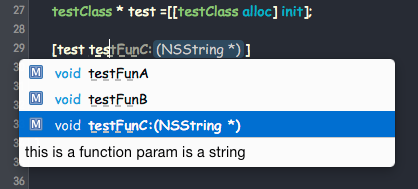
  • /// 注释 和 /** 注释 */  在调用时,Xcode可以显示注释信息,注意 "/**" 是两个"*", 一颗星注释时,不能显示提示。
  • 多行注释,提示时只能显示一行。
  • 在行尾注释 需要加"<" 符号,否则不会显示, 如:///< 注释 或 /**< 注释 */

下面几种方式都是可以的

@interface testClass : NSObject

/// property A is XXXX
@property (nonatomic) NSString *propertyA;
@property (nonatomic) NSString *propertyB; ///< property B is XXX;

/** property C is XXX */
@property (nonatomic) NSString *propertyC;
@property (nonatomic) NSString *propertyD; /**< property D is XXX */

/// this is a function ;
-(void) testFunA;

/** this is a function */
-(void) testFunB;

/**
 * this is a function 
 * param is a string
 * @param input  a string
 * @return  no return
 */
-(void) testFunC:(NSString *) input;
@end

@interface ASNavigationController : UINavigationController

@end