
惯性聚合 高效追踪和阅读你感兴趣的博客、新闻、科技资讯
阅读原文 在惯性聚合中打开

推荐订阅源

酷 壳 – CoolShell
酷 壳 – CoolShell
T
Threatpost
Latest news
Latest news
N
News | PayPal Newsroom
Threat Intelligence Blog | Flashpoint
Help Net Security
Help Net Security
D
Darknet – Hacking Tools, Hacker News & Cyber Security
AI
AI
Simon Willison's Weblog
TaoSecurity Blog
TaoSecurity Blog
The Last Watchdog
The Last Watchdog
L
LINUX DO - 热门话题
Google DeepMind News
T
Threat Research - Cisco Blogs
O
OpenAI News
钛媒体:引领未来商业与生活新知
钛媒体:引领未来商业与生活新知
T
The Exploit Database - CXSecurity.com
NISL@THU
NISL@THU
Application and Cybersecurity Blog
S
Securelist
小众软件
小众软件
cs.CL updates on arXiv.org
Martin Fowler
Martin Fowler
S
SegmentFault 最新的问题
Cisco Talos Blog
Cisco Talos Blog
云风的 BLOG
云风的 BLOG
AWS News Blog
AWS News Blog
GbyAI
GbyAI
N
News and Events Feed by Topic
cs.CV updates on arXiv.org
美团技术团队
Engineering at Meta
Engineering at Meta
A
About on SuperTechFans
博客园 - 三生石上(FineUI控件)
S
Schneier on Security
博客园 - 聂微东
V2EX - 技术
V2EX - 技术
T
Troy Hunt's Blog
SecWiki News
SecWiki News
S
Secure Thoughts
B
Blog RSS Feed
Hugging Face - Blog
Hugging Face - Blog
WordPress大学
WordPress大学
腾讯CDC
H
Heimdal Security Blog
Exploit-DB.com RSS Feed
Apple Machine Learning Research
月光博客
月光博客
www.infosecurity-magazine.com
P
Privacy International News Feed

博客园 - Alen在西安

(转)关于教育些微的几个想法 寻找完美的 URL 验证正则表达式 【转发】 解决VS2012 Find and Replace (Ctrl+Shift+F) 不能正常工作的问题 会让你人生失败的31种原因(图 VS2012 DesignTime 笔记 DTE(vs2012) 编程相关笔记 免费用电信的wifi 简单反编译 chm 文件 读书笔记 - .net2.0 异步编程模型: 使用 IAsyncResult 调用异步方法 测试绑定新浪微博 (转)Debug Silverlight in FireFox [转]CLR 全面透彻解析 - 将 APTCA 程序集迁移到 .NET Framework 4 在VS2010 "Choose Toolbox Item" Dialog 中显示自定义控件 笑话一则 Assembly 的 Shadow-Copy 所在的folder Silverlight 控件开发记录之 "extern alias” 关键字 安装完vS2010Beta2后请重置IDE设置 设置保护眼睛的背景色 又到五一了
如何减少silverlight XAP包的尺寸
Alen在西安 · 2011-03-25 · via 博客园 - Alen在西安

这次得到了一个做Silverlight应用开发的机会,在发布时遇到 xap 包太大的问题,上网看了半天,最后把微软的这个文档 “如何使用应用程序库缓存” 翻来覆去看了半天,终于搞明白了它说的内容,晕啊,真应了 “会者不难” 这句老话。

最后决定把这个其实很简单的东西总结一下,避免别的新学者浪费时间。   
开发场景:    
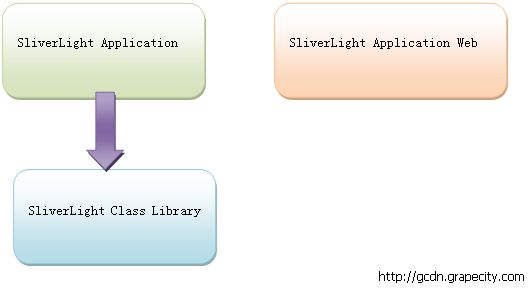

   
Silverlight Application: 与Web交互, 程序集名:SilverlightApplication10.dll
Silverlight Class Library: 被SilverlightApplication10引用,程序集名:SilverlightClassLibrary1.dll
目标:
编译后的ClientBin中,SilverlightApplication10.xap包中不包含SilverlightClassLibrary1.dll, SilverlightClassLibrary1.dll 以SilverlightClassLibrary1.zip新式单独存在。
OK, 现在说说这核心三部曲:
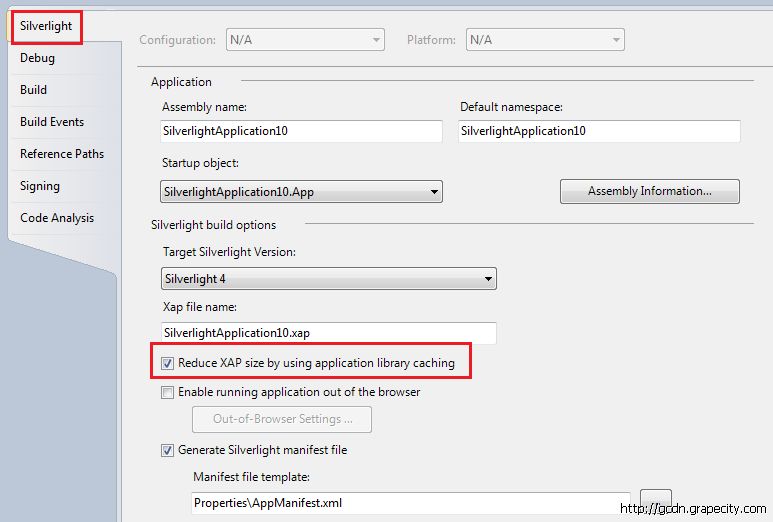
1.        SilverlighApplication10工程属性里”Silverlight”标签下勾上 “Reduce XAP size by using application library caching”    
   
2.        在保存SilverlightClassLibrary1.dll的地方增加一个extmap文件” SilverlightClassLibrary1.extmap.xml”    


SilverlightClassLibrary1.extmap.xml 的内容说明

  1. <?xml version="1.0"?>
  2. <manifest xmlns:xsi="http://www.w3.org/2001/XMLSchema-instance"
  3.           xmlns:xsd="http://www.w3.org/2001/XMLSchema">
  4.   <assembly>
  5.     <name>SilverlightClassLibrary1</name>
  6.     <version>1.0.0.0</version>
  7.     <publickeytoken>ee6c3f173c1a51b5</publickeytoken>
  8.     <relpath>SilverlightClassLibrary1.dll</relpath>
  9.     <extension downloadUri="SilverlightClassLibrary1.zip" />
  10.   </assembly>
  11. </manifest>

name: SilverlightClassLibrary1 的程序集名字
version: assembly version.
publickeytoken: 打上签名后的public key
没什么太多解释的,微软的文档“如何使用应用程序库缓存” 里说的很清楚了。对于version和publikeytoken如果你拿不准的话,可以用reflector看,简单直接:

    
   
另外,extension downloadUri的内容注意别写错了,是 .zip结尾!我有个配置给copy成.dll了,老不成功,以为还需要设置别的配置,在快把我搞死的时候,才发现这儿写错了,唉......
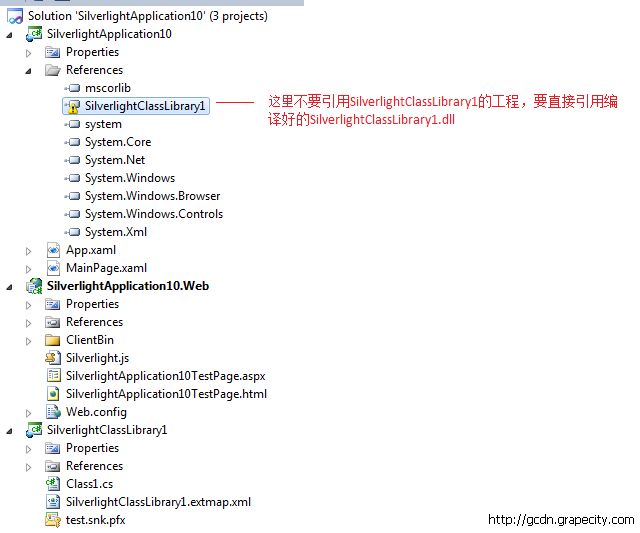
3.        SilverlightApplication10 不要引用SilverlightClassLibrary1的工程,要直接引用编译好的SilverlightClassLibrary1.dll

   
OK,最后结果如图:
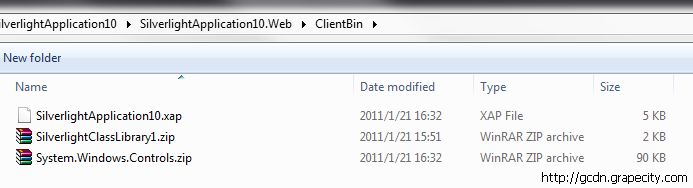

   
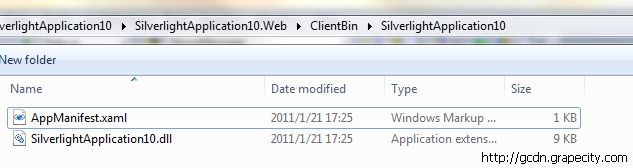
清爽的xap包!把它改名成SilverlightApplication10.zip,打开看看:

   
最后,附上我的测试程序供大家参考: