

惯性聚合 高效追踪和阅读你感兴趣的博客、新闻、科技资讯
阅读原文 在惯性聚合中打开

推荐订阅源

K
KPMG report finds enterprise disconnect between AI and its ROI | CIO
H
Help Net Security
博客园_首页
P
Privacy International News Feed
钛媒体:引领未来商业与生活新知
钛媒体:引领未来商业与生活新知
T
Tenable Blog
Latest news
Latest news
D
Darknet – Hacking Tools, Hacker News & Cyber Security
爱范儿
爱范儿
Cyberwarzone
Cyberwarzone
P
Palo Alto Networks Blog
月光博客
月光博客
有赞技术团队
有赞技术团队
Know Your Adversary
Know Your Adversary
博客园 - 叶小钗
P
Proofpoint News Feed
让小产品的独立变现更简单 - ezindie.com
S
Schneier on Security
A
About on SuperTechFans
F
Full Disclosure
The Cloudflare Blog
T
The Exploit Database - CXSecurity.com
S
SegmentFault 最新的问题
Apple Machine Learning Research
Microsoft Security Blog
cs.AI updates on arXiv.org
N
News and Events Feed by Topic
www.infosecurity-magazine.com
cs.CL updates on arXiv.org
Webroot Blog
Webroot Blog
量子位
大猫的无限游戏
大猫的无限游戏
小众软件
小众软件
WordPress大学
WordPress大学
Last Week in AI
Last Week in AI
美团技术团队
Help Net Security
Help Net Security
Microsoft Azure Blog
GbyAI
GbyAI
云风的 BLOG
云风的 BLOG
Y
Y Combinator Blog
博客园 - 司徒正美
N
Netflix TechBlog - Medium
S
Security @ Cisco Blogs
B
Blog
P
Privacy & Cybersecurity Law Blog
Security Archives - TechRepublic
Hacker News - Newest:
Hacker News - Newest: "LLM"
V
Visual Studio Blog
NISL@THU
NISL@THU

博客园 - 蝈蝈

LAMPR Ver 1.0 发布 - 轻松搞定LAMP环境 在Windows Server下集成Apache、Tomcat和IIS Windows Workflow 学习笔记二 序语言流行度最新排行榜,C和C++正在衰落 Windows Workflow学习笔记 EAI,ESB与SOA How to Building ASP.NET AJAX Controls 使用页面Gzip压缩提速 Microsoft AJAX Library 简介 开源的内容管理系统 Windows Live Writer截屏插件 试用Windows Live Writer写博客 wcf step by step:服务的状态 wcf step by step:消息交换模式 wcf step by step:如何保护你的wcf服务 wcf step by step之异常处理 wcf step by step:改进HelloWorld程序 wcf step by step:host服务与多次Endpoint wcf step by step之HelloWorld
Configuration Section Designer示例
蝈蝈 · 2008-03-22 · via 博客园 - 蝈蝈

Configuration Section Designer是一个图型化设计.net的配置块和自动生成需要代码和schema定义的codeplex上的一个开源项目。它是vs的一个插件,需要Microsoft Visual Studio 2008 Standard Edition or better的版本.

http://www.codeplex.com/csd下载最新的安装文件,目前最新的是1.1.1版本。安装完后会在vs2008中多一个工程模板Configuration Section Project,你也可以在现有的工程中添加一个ConfigurationSectionDesigner项,效果是一样。

这是一个基于微软领域特定语言(DSL)工具 - Visual Studio DSL Tool设计的项目,关于DSL可以从以下站点获得相关知识。

  • Visual Studio Extensibility
  • DSL Tools
  • Visual Studio Domain Specific Language tools
  • 作者没有提供示例程序,我琢磨了一会写了个,研究的不深,仅供参考。

    一、新建一个控制台程序

    二、添加ConfigurationSectionDesigner子项
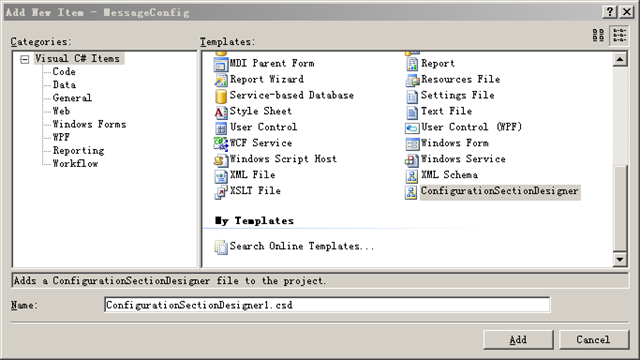
    newitem

    三、生成的解决方案如下,红框中的4个文件是ConfigurationSectionDesigner生成的。

    project

  • ConfigurationSection.csd: 图型设计文件.
  • ConfigurationSectionCode.tt: a text template code generator that generates the C# code for the configuration section.
  • ConfigurationSectionSample.tt: generates a sample configuration file.
  • ConfigurationSectionSchema.tt: generates the XSD schema representing the configuration section.
  • 三、通过从工具箱中拖拽Configuration Sections, Configuration Elements and Configuration Element Collections完成中间的图型设计的

    me

    四、读取配置文件

    result

    Demo下载