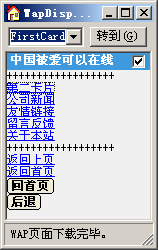
QuickWAP自2005后,包括2005、2.0、2.x版本中都有了智能型框架函数AutoHeader和AutoFooter,他们能够根据浏览器自动产生不同的语言的代码,比如在IE中使用HTML代码,在WAP浏览器中使用WML代码。
名称 AutoHeader
函数声明 Public Sub AutoHeader(Optional ByVal HtmlCssFileName As String)
作用 用于根据终端浏览器类型输出WAP文件的头部的函数。
例句 Wap.AutoHeader "css.css"
名称 AutoFooter
函数声明 Public Sub AutoFooter()
作用 用于根据终端浏览器类型输出WAP文件的末尾的函数。
例句 Wap.AutoFooter
下面我们就可以通过一个例子来看看效果,当然在浏览器中我们自己可查看IE和WAP浏览器中产生的源代码是不同的,我们主要比较一下在IE中CSS对QuickWAP显示结果的影响,在WAP中影响是不明显的。
<%
Set Wap=Server.CreateObject("QuickWAP.WAP")
Wap.CardTitle="中国被爱可以在线"
Wap.AutoHeader
'以下为文件正文。
Wap.WriteRow "++++++++++++++++++"
Wap.WriteRow Wap.Anchor("确定","#SecondCard","第二卡片")
Wap.WriteRow Wap.Anchor("新闻","NewsList.asp","公司新闻")
Wap.WriteRow Wap.Anchor("确定","FriendLink.asp","友情链接")
Wap.WriteRow Wap.Anchor("留言","GuestBook.asp","留言反馈")
Wap.WriteRow Wap.Anchor("进入","About.asp","关于本站")
Wap.WriteRow "++++++++++++++++++"
'以下为返回链接等信息。
Wap.WriteRow Wap.BackA("返回上页")
Wap.WriteRow Wap.ImgA("",Wap.WapPath,"返回首页")
Wap.WriteRow Wap.DoGo(Wap.WapPath, "option", "回首页")
Wap.WriteRow Wap.DoPrev("prev", "后退", "ToBack")
Wap.AutoFooter
Set Wap=Nothing
%>
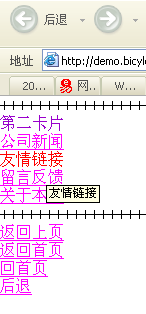
我们在IE中浏览该文件,如下图:

我们可以看到代码Wap.AutoHeader并没有加CSS样式,但是在QuickWAP内部却集成了CSS样式,样式文件如下代码:
BODY
{
margin-top: 0px;
margin-left: 0px;
margin-right: 0px;
margin-bottom: 0px;
font-size: 9pt;
}
TD {
FONT-SIZE: 11px;
color: #000000;
font-family: "Arial", "Helvetica", "sans-serif"
}
P {
FONT-SIZE: 11px;
color: #000000;
font-family: "Arial", "Helvetica", "sans-serif"}
LI
{
FONT-SIZE: 11px;
text-decoration: none;
color: #000000;
font-family: "Arial", "Helvetica", "sans-serif"
}
INPUT
{
FONT-SIZE: 11px;
color: #000000;
font-family: "Arial", "Helvetica", "sans-serif"
}
A:link
{
COLOR: #0000FF;
TEXT-DECORATION: underline
}
A:visited
{
Text-DECORATION: none;
color: #9900CC
}
A:active
{
COLOR: #FF00FF;
TEXT-DECORATION: none
}
A:hover {
COLOR: #FF0000;
TEXT-DECORATION: none}
.button
{
background: #ffffff;
border: #333333 1px solid;
cursor: hand;
font-size: 9pt;
height: 20px;
padding: 1px;
COLOR: #009900;
BORDER-TOP-STYLE: none;
BORDER-RIGHT-STYLE: none;
BORDER-LEFT-STYLE: none;
BORDER-BOTTOM-STYLE: none
}我们把上边的CSS代码保存为style.css,并修改相关参数。比如Body中字体改为12pt。
BODY
{
margin-top: 0px;
margin-left: 0px;
margin-right: 0px;
margin-bottom: 0px;
font-size: 12pt;
}
A:link
{
COLOR: #FF00FF;
TEXT-DECORATION: underline
}同时修改我们的主文件,如下边红色文字,同时加上了样式的文件地址,这时内部CSS失效,将启用设置的CSS样式表,记得一定要采用相对路径:
<%
Set Wap=Server.CreateObject("QuickWAP.WAP")
Wap.CardTitle="中国被爱可以在线"
Wap.AutoHeader "Style.css"
'以下为文件正文。
Wap.WriteRow "++++++++++++++++++"
Wap.WriteRow Wap.Anchor("确定","#SecondCard","第二卡片")
Wap.WriteRow Wap.Anchor("新闻","NewsList.asp","公司新闻")
Wap.WriteRow Wap.Anchor("确定","FriendLink.asp","友情链接")
Wap.WriteRow Wap.Anchor("留言","GuestBook.asp","留言反馈")
Wap.WriteRow Wap.Anchor("进入","About.asp","关于本站")
Wap.WriteRow "++++++++++++++++++"
'以下为返回链接等信息。
Wap.WriteRow Wap.BackA("返回上页")
Wap.WriteRow Wap.ImgA("",Wap.WapPath,"返回首页")
Wap.WriteRow Wap.DoGo(Wap.WapPath, "option", "回首页")
Wap.WriteRow Wap.DoPrev("prev", "后退", "ToBack")
Wap.AutoFooter
Set Wap=Nothing
%>下面我们看一下修改后的在IE浏览器中的效果:
但是无论是否加样式文件在WAP中都不会产生影响,这就是QuickWAP的智能性。很多有趣的东西还等你去发现... ...
此内容由惯性聚合(RSS阅读器)自动聚合整理,仅供阅读参考。 原文来自 — 版权归原作者所有。