一、Git的特性
Speed 速度(git是用c语言写的。一般都是提交到本地)
Simple design
Strong support for non-linear development (thousands of parallel branches)(强有力的支持非线性开发)
Fully distributed(分布式)
Able to handle large projects like the Linux kernel efficiently (speed and data size)
二、Git的架构原理
1.快照和索引而不是增量,svn是增量
2.几乎所有的操作都是本地的
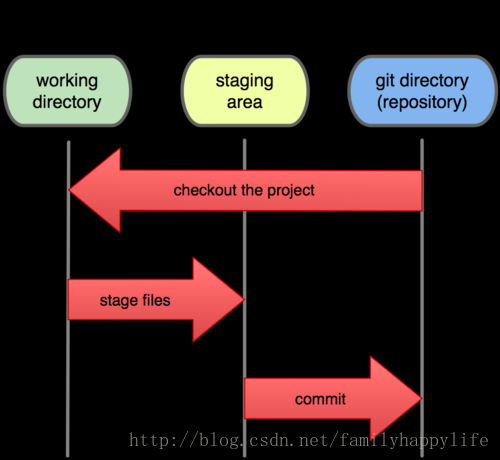
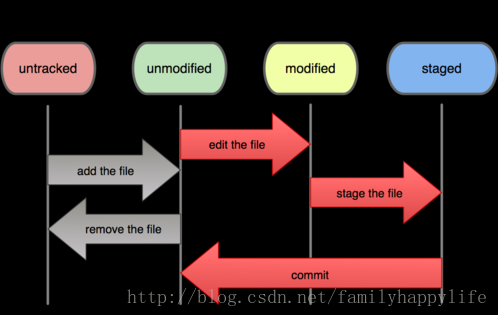
3.Git文件的三个状态
Committed :文件安全的存储在你的本地.
Modified :你修改了文件,但还未提交到你的仓库.
Staged : 已经标记了一个已修改文件到下一个版本的快照
相应流程如下:
(1),工作区修改文件
(2),adding 快照到stage区域
(3),commit 提交到仓库
4.文件状态生命周期
三、安装Git及使用前的准备
1.安装,直接上官网下载安装
2.安装完成之后查看系统环境变量,设置身份
(1),了解系统环境变量
/etc/gitconfig
.gitconfig
(2),设置身份
$ git config --global user.name "John Doe"
$ git config --global user.email johndoe@example.com
(3),设置编辑器(可选)
$ git config --global core.editor emacs
(4),设置你的比较工具(可选)
$ git config --global merge.tool vimdiff
(5),检查你的配置(可选)
$ git config --list
(6),帮助
$ git help <verb>
$ git <verb> --help
3.开发前需理解的四个区域
blessed (remote) repository 远程仓库
local repository 本地仓库
stage area 临时区
work area 工作区
四、Git相关命令
基本命令
1.初始化
(1)init 进入工作区间文件夹,git init
(2)clone 从远程服务器调用git clone git://github.com/wsj/test.git
2.由工作区workspace加入到临时区staged,add命令
git add *.java
git add wsj.txt
3.由临时区staged提交到本地仓库local repository
git commit -m "log"
4.查看提交状态
git status
5.忽略文件或文件夹
新建.gitignore文件,写入要忽略的文件名即可
6.查看三个区域文件的区别
$git diff --staged : workspace VS staged .
$git diff --cached :staged VS local repo
7.回滚 reset
git reset 三种模式
git reset --mixed 保留工作区源码,临时区和本地仓库回滚
git reset --soft 保留工作区和临时区源码,本地仓库回滚
git reset --hard 工作区,临时区,本地仓库都回滚
git reset --hard HEAD^ 回滚所有内容到上一个版本,后边可加上文件名
git reset --hard HEAD~3回滚到上3个版本
git reset --hard origin/master 回滚到和远程仓库一致
8.删除移动 rm mv
删除但未提交到本地仓库,这时如果想找回文件,使用git checkout filename
共享及更新项目
1.从远程仓库中更新 fetch pull
git fetch origin 相当于是从远程获取最新版本到本地,不会自动merge
git pull origin 相当于是从远程获取最新版本并merge到本地
2.提交到远程仓库
git push origin master
3.远程仓库 remote
列出远程仓库
git remote
git remote -v 显示远程地址
//添加远程仓库
git remote add pb git://github.com/sundyhome/ticgit.git
git remote rename pb paul
git remote rm paul
git remote show origin
观察比较 log diff
查找tag对应的commit id
git log --oneline --decorate
分支管理及合并
1.分支branch
git branch branchname创建分支
查看
git branch 列出分支
git show-branch 列出分支,并列出差异
git diff branch1 branch2
git whatchanged
2.切换分支checkout
3.分支合并merge
git merge "merge branch1 to master" HEAD branch1
另一种做法
git checkout master
git pull . branch1
4.版本tag
git tag -a ver1.0 -m "my version 1.0"
//show ver1.0 命令查看相应标签的版本信息,并连同显示打标签时的提交对象。
git show ver1.0
//switch ver1.0
git checkout ver1.0
此内容由惯性聚合(RSS阅读器)自动聚合整理,仅供阅读参考。 原文来自 — 版权归原作者所有。