惯性聚合 高效追踪和阅读你感兴趣的博客、新闻、科技资讯
阅读原文 在惯性聚合中打开

推荐订阅源

P
Privacy & Cybersecurity Law Blog
V
V2EX
月光博客
月光博客
奇客Solidot–传递最新科技情报
奇客Solidot–传递最新科技情报
The Register - Security
MongoDB | Blog
MongoDB | Blog
P
Privacy International News Feed
The Last Watchdog
The Last Watchdog
Security Archives - TechRepublic
美团技术团队
Stack Overflow Blog
Stack Overflow Blog
博客园 - 司徒正美
博客园 - 三生石上(FineUI控件)
V
Visual Studio Blog
cs.CV updates on arXiv.org
K
Kaspersky official blog
S
Secure Thoughts
T
Tenable Blog
Security Latest
Security Latest
The Cloudflare Blog
S
Security @ Cisco Blogs
H
Heimdal Security Blog
aimingoo的专栏
aimingoo的专栏
TaoSecurity Blog
TaoSecurity Blog
Blog — PlanetScale
Blog — PlanetScale
Microsoft Security Blog
Schneier on Security
Webroot Blog
Webroot Blog
G
Google Developers Blog
www.infosecurity-magazine.com
Scott Helme
Scott Helme
IT之家
IT之家
Latest news
Latest news
The Hacker News
The Hacker News
C
Check Point Blog
T
The Exploit Database - CXSecurity.com
H
Hackread – Cybersecurity News, Data Breaches, AI and More
腾讯CDC
C
CERT Recently Published Vulnerability Notes
NISL@THU
NISL@THU
N
News | PayPal Newsroom
Forbes - Security
Forbes - Security
P
Palo Alto Networks Blog
S
Security Affairs
S
Securelist
Google Online Security Blog
WordPress大学
WordPress大学
Last Week in AI
Last Week in AI
C
Cybersecurity and Infrastructure Security Agency CISA
A
About on SuperTechFans

博客园 - 大力

删除SQL架构的用户 支付宝 公钥 应用公钥 apidoc FlexCel 插入公式和插入新行 DataTable 修改列名 删除列 调整列顺序 SQL Server CTE 递归查询全解 HTML空格占位符 如何:在 ASP.NET 网页中检测浏览器类型 VS格式化代码 Newtonsoft.Json Dell DRAC的重启方法 iTunes Web.Config中的<compilation debug="true"/> C#转VB.NET thread.join 从异步执行变成同步 Java线程中带有返回值的线程Callable Android 子线程测试 JAVA下的Thread.sleep方法一定要try asp.net关于页面不回发,不生成__doPostBack方法问题的完美解决方案
解决Android Studio 和 Android SDK Manager 无法在线更新的问题.
大力 · 2015-05-04 · via 博客园 - 大力

升级时提示 Connection failed. Please check your network connection and try again

修改安装目录下bin\studio.exe.vmoptions文件,如E:\Android\android-studio\bin\studio.exe.vmoptions

添加内容:

-Djava.net.preferIPv4Stack=true
-Didea.updates.url=http://dl.google.com/android/studio/patches/updates.xml
-Didea.patches.url=http://dl.google.com/android/studio/patches/

重新启动..就可以在线更新了.

备注:如果是64位系统,那就应该修改bin\studio64.exe.vmoptions文件,大家别改错了,不然没用!

解决Android SDK Manager列表错误,或者无法更新下载的问题:

添加内容:
C:\Windows\System32\drivers\etc

74.125.237.1 dl-ssl.google.com

此ip一直在变,具体解决办法看以下方法

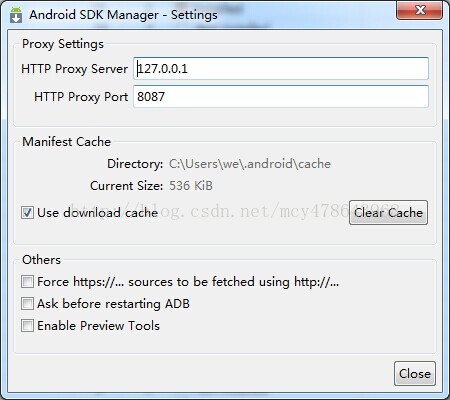
终极解决办法:(前提你有goagent)

直接用goagent做代理,那速度是刚刚的!!!!!!

原文:http://blog.csdn.net/mcy478643968/article/details/19609281