





In the past, if you broke or lost your phone, your Signal message history was gone. This has been a challenge for people whose most important conversations happen on Signal. Think family photos, sweet messages, important documents, or anything else you don’t want to lose forever. This explains why the most common feature request has been backups; a way for people to get Signal messages back even if their phone is lost or damaged.
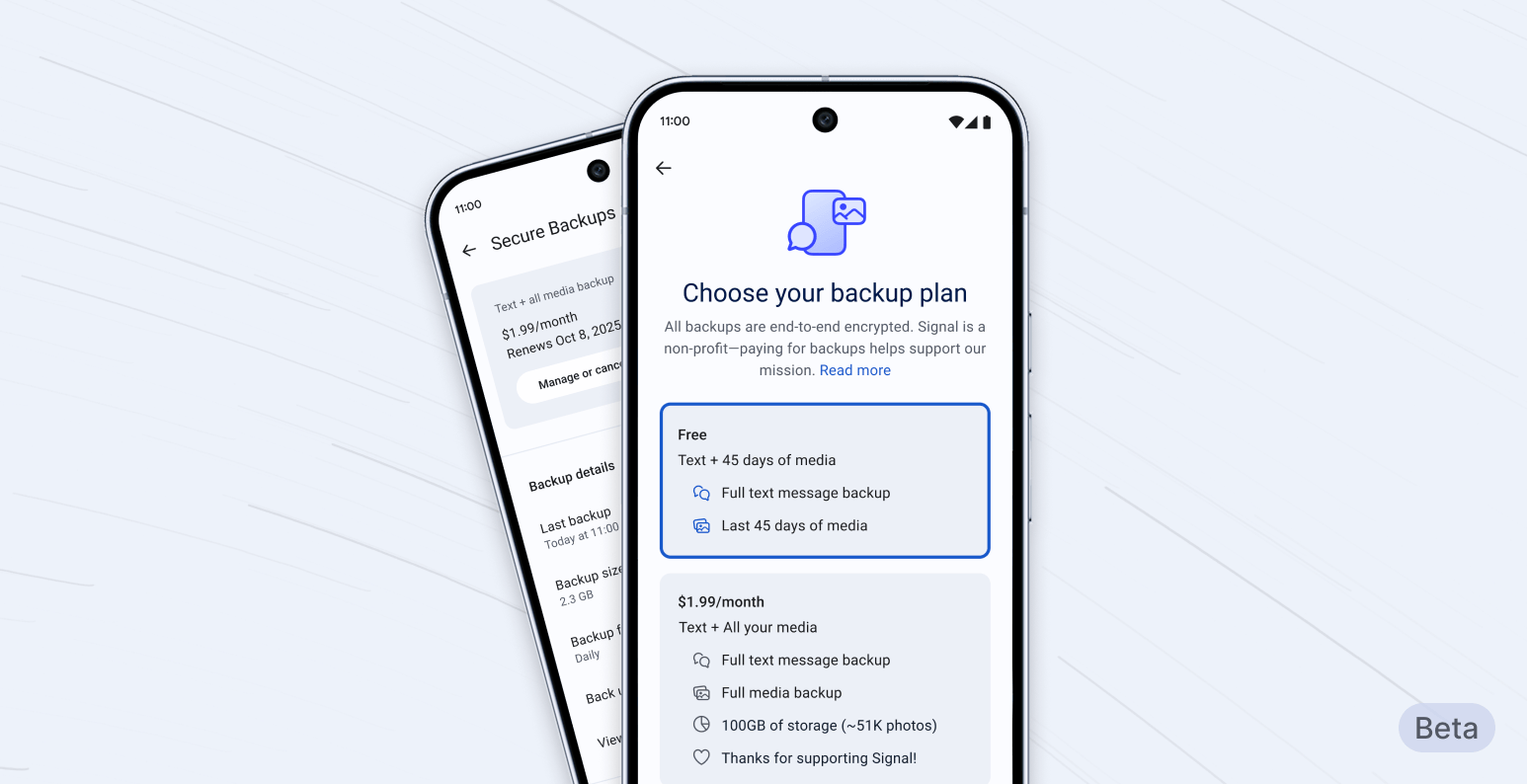
After careful design and development, we are now starting to roll out secure backups, an opt-in feature. This first phase is available in the latest beta release for Android. This will let us further test this feature in a limited setting, before it rolls out to iOS and Desktop in the near future.
Here, we’ll outline the basics of secure backups and provide a high-level overview about how they work and how we built a system that allows you to recover your Signal conversations while maintaining the highest bar for privacy and security.
Secure backups let you save an archive of your Signal conversations in a privacy-preserving form, refreshed every day; giving you the ability to restore your chats even if you lose access to your phone. Signal’s secure backups are opt-in and, of course, end-to-end encrypted. So if you don’t want to create a secure backup archive of your Signal messages and media, you never have to use the feature.1
If you do decide to opt in to secure backups, you’ll be able to securely back up all of your text messages2 and the last 45 days’ worth of media3 for free.
If you want to back up your media history beyond 45 days4, as well as your message history, we also offer a paid subscription plan for US$1.99 per month.5
This is the first time we’ve offered a paid feature. The reason we’re doing this is simple: media requires a lot of storage, and storing and transferring large amounts of data is expensive. As a nonprofit that refuses to collect or sell your data, Signal needs to cover those costs differently than other tech organizations that offer similar products but support themselves by selling ads and monetizing data.
At Signal, our commitment to privacy informs which features we build and the ways that we build them.
Using the same zero-knowledge technology that enables Signal groups to work without revealing intimate metadata, backup archives are stored without a direct link to a specific backup payment or Signal user account.
At the core of secure backups is a 64-character recovery key that is generated on your device. This key is yours and yours alone; it is never shared with Signal’s servers.6 Your recovery key is the only way to “unlock” your backup when you need to restore access to your messages. Losing it means losing access to your backup permanently, and Signal cannot help you recover it. You can generate a new key if you choose. We recommend storing this key securely (writing it down in a notebook or a secure password manager, for example).
These choices are part and parcel of Signal’s guiding mission to collect as close to no data as possible, and to make sure that any information that is required to make Signal robust and usable cannot be tied back to the people who depend on Signal.7 This is why wherever there’s a choice between security and any other objective, we’ve prioritized security.8
If you want to opt in to secure backups, you can do so from your Signal Settings menu. For now, only people running the latest beta version of Signal on Android will be able to opt in. But soon, we’ll be rolling this feature out across all platforms.
Once you’ve enabled secure backups, your device will automatically create a fresh secure backup archive every day, replacing the previous day’s archive.9 Only you can decrypt your backup archive, which will allow you to restore your message database (excluding view-once messages and messages scheduled to disappear within the next 24 hours). Because your secure backup archive is refreshed daily, anything you deleted in the past 24 hours, or any messages set to disappear are removed from the latest daily secure backup archive, as you intended.
We’re excited to introduce secure backups, making sure you can retain access to your Signal messages even when your phone is lost or destroyed. But secure backups aren’t the end of the road.
The technology that underpins this initial version of secure backups will also serve as the foundation for more secure backup options in the near future. Our future plans include letting you save a secure backup archive to the location of your choosing, alongside features that let you transfer your encrypted message history between Android, iOS, and Desktop devices.
Secure backups are available in today’s Android beta release. A full public release, along with iOS and Desktop support, is coming soon.
此内容由惯性聚合(RSS阅读器)自动聚合整理,仅供阅读参考。 原文来自 — 版权归原作者所有。