






Sometimes people dive into Signal’s code looking for domain names, and then they send us screenshots asking if they should be concerned:
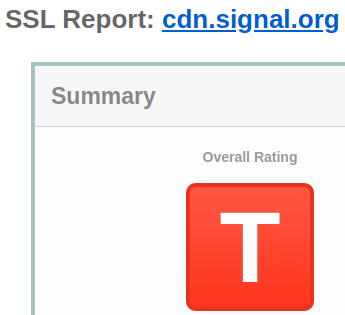
We reply with a short explanation that lays out why there’s nothing wrong, but we understand the confusion. Nobody would be excited about getting a grade like this on a homework assignment – and you’d have to stay after class and ask the teacher what the hell a “T” even means on your report about summer vacation (“T”oo cool for school?).
Let’s take a deeper look at what’s going on.
This screenshot (and others like it) come from SSL scanning utilities like the SSL Labs Server Test. SSL tests can be a helpful resource for quickly checking server configuration. However, they have a big blind spot because most of them tend to focus on web browser compatibility and web browser performance.
This used to be a much more reliable assumption before apps started taking over, but when you put a new server on the internet these days, there’s a good chance that a web browser isn’t going to be on the other side of the connection.
This distinction matters. The number of endpoints that a web browser can communicate with is essentially infinite. People can enter random URLs and follow links to any of the millions of websites that are already on the internet. New sites are launched all of the time (and the count will go up by one if you start that blog you’ve been thinking about) so in most cases there’s no way to know in advance what public key to expect on the other side of a connection. Instead, browsers ship with a predefined list of trusted root certificates from “certificate authorities” and effectively outsource verification to these third-party providers.
These lists get pretty big. For example, Mozilla Firefox includes more than 175 trusted root certificates. That’s a lot of trust! To make matters even more complicated, browser vendors and operating systems usually maintain their own unique lists, and there’s a lot of maneuvering and palace intrigue involved whenever anything is added or removed. Sometimes that palace intrigue even involves countries whose leaders live in actual palaces.
So here you are, trying to establish a secure connection to your new blog (congrats BTW), but there are tons of different root certificates out there that can generate a certificate for your domain. Any misbehaving, malicious, or compromised certificate authority can potentially enable silent man-in-the-middle attacks by unilaterally issuing a “valid” certificate that will be accepted by default because it was issued by a trusted entity. Efforts like certificate transparency are designed to help mitigate this threat by shedding light on what is otherwise a completely opaque process, but they can’t detect every instance of bad behavior.
It’s a bit like looking for a hidden object in a children’s book and learning that there are more than 175 different illustrators who could potentially draw an identical version of the real Waldo/Wally that you’re trying to find.
In the midst of this total chaos, it’s still possible to easily get an “A” in every SSL scanner. Just obtain a certificate from one of the certificate authorities that’s in the club, paste the right magic lines into a config file, and you’re good to go.
It doesn’t need to be this messy or this risky. Unlike a web browser, the number of endpoints that an app needs to communicate with can typically be counted on one hand – and more importantly, the app developer controls both sides of the connection!
This changes everything. It’s no longer necessary to live in a world where attackers can issue a phony (but working!) SSL certificate by compromising any root certificate. Instead, developers can “pin” their chosen certificate authority directly into the app and tell the app to reject any certificate that doesn’t match.
This is looking quite a bit better. An “A” grade is still just a scan away if the developer chooses a certificate authority that is trusted by the major browsers.
There’s still room for improvement though. It’s possible to further reduce the scope of potential compromise by generating your own unique offline trust root and pinning that signing certificate into the app.
This approach completely eliminates third-party trust from the certificate signature equation, and it’s exactly what Signal does.
Using our own trust root is a more secure way of handling SSL/TLS connections. The browser-centric certificate scanning tools always think that something is wrong, but everything is “F”ine. Browser trust doesn’t matter because Signal isn’t a web browser.
Sometimes we daydream about possible ways to solve this scanner conundrum. It would be great if there was a way to indicate to scanners when a domain is an application endpoint (instead of a browser endpoint) or when a domain is using a custom trust root embedded in the app for improved security. At least now we’ll have a more detailed explanation ready next time a screenshot of a big red letter arrives in our inboxes.
We’ll keep working hard every day to get a good grade from you. That’s the only one that really matters. Thanks for using Signal!
此内容由惯性聚合(RSS阅读器)自动聚合整理,仅供阅读参考。 原文来自 — 版权归原作者所有。