





The latest Signal beta includes some changes to the way safety numbers work. Back in November, we introduced experimental support for “advisory” safety number changes, with the objective of collecting feedback in order to eventually make this the default experience.
We’ve taken the feedback we’ve received over the past six months and incorporated it into a set of changes that we’re releasing into beta today.
Up until now, when a contact’s safety number changed, Signal has required a manual approval process before being able to send or receive any further messages with that user. This happens every time a contact reinstalls Signal or gets a new phone, and we’ve gotten a lot of feedback from users who would like to know when this occurs, but not necessarily be blocked by it.
In thinking about safety number changes, it’s easiest to discuss the process of sending and receiving messages separately.
On the receiving side, all the feedback we received suggested that this is the place where reducing friction makes the most sense. Instead of hiding the message behind a manual approval process, we always display it immediately along with a safety number change warning.
Old vs new:
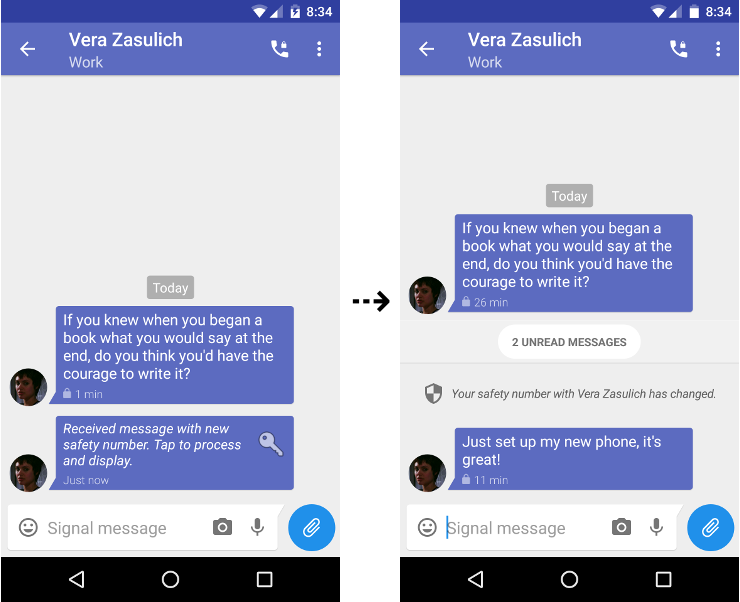
There was some concern that the safety number change warning could scroll off the screen if several new messages had come in since the conversation was last opened, so we introduced the unread message separator seen above. Opening a conversation will always scroll to the top of it, making it less likely that a safety number change warning goes unnoticed.
The sending side is where we received the most feedback, and where we believe that we need to take the most care. A purely “advisory” process is not as straightforward as the case of receiving a message, since many users don’t want to be surprised by a safety number change after they’ve already hit send. A lighter-weight process has to reduce friction without introducing the uncertainty that any sent message could be automatically encrypted to a different key with no warning.
To help make this possible, we’ve introduced some changes that more proactively display safety number change warnings as they occur, before sending a message.

Proactively displaying safety number change warnings allows us to strike a balance. If a user hasn’t had the opportunity to see a safety number change warning, the process of sending a message still requires manual approval. For instance, if the warning doesn’t appear until after you hit “send,” or if the warning only appears briefly before hitting “send,” the message will not be delivered unless you explicitly approve it. However, if you have had the opportunity to see the warning and make a decision, sending a message will not require manual approval.
For users who want even more certainty, we’ve introduced the ability to explicitly mark a safety number as “verified.”

If a verified safety number changes, sending a new message to that contact always requires manual approval.
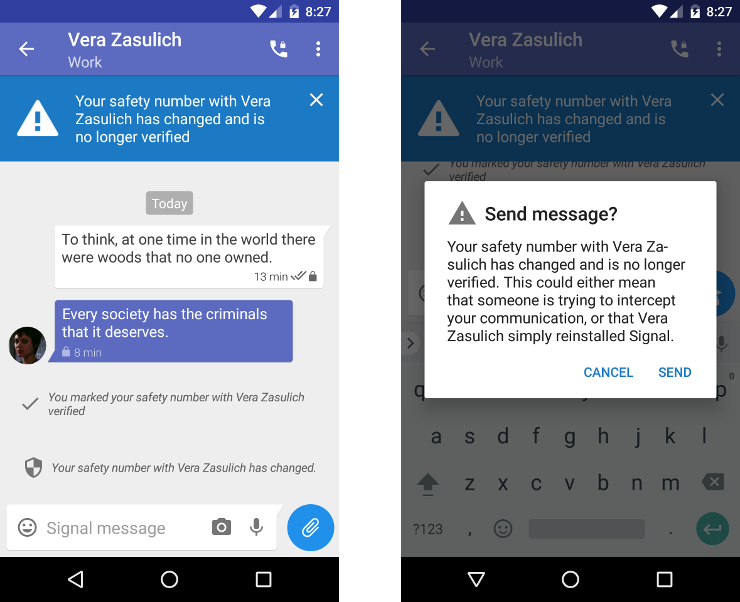
These changes are available for testing in the beta channels of the Android and iOS apps today. Give them a shot, help us kick the tires, and let us know what you think.
此内容由惯性聚合(RSS阅读器)自动聚合整理,仅供阅读参考。 原文来自 — 版权归原作者所有。