



惯性聚合 高效追踪和阅读你感兴趣的博客、新闻、科技资讯
阅读原文 在惯性聚合中打开

推荐订阅源

宝玉的分享
宝玉的分享
NISL@THU
NISL@THU
E
Exploit-DB.com RSS Feed
L
LINUX DO - 热门话题
L
Lohrmann on Cybersecurity
K
Kaspersky official blog
Project Zero
Project Zero
Cisco Talos Blog
Cisco Talos Blog
T
The Exploit Database - CXSecurity.com
P
Palo Alto Networks Blog
C
CXSECURITY Database RSS Feed - CXSecurity.com
T
Threatpost
S
Schneier on Security
G
GRAHAM CLULEY
The Hacker News
The Hacker News
T
Threat Research - Cisco Blogs
Scott Helme
Scott Helme
Threat Intelligence Blog | Flashpoint
P
Privacy & Cybersecurity Law Blog
C
Cyber Attacks, Cyber Crime and Cyber Security
Cyberwarzone
Cyberwarzone
C
CERT Recently Published Vulnerability Notes
T
Tor Project blog
AWS News Blog
AWS News Blog
Simon Willison's Weblog
cs.CL updates on arXiv.org
爱范儿
爱范儿
P
Privacy International News Feed
云风的 BLOG
云风的 BLOG
P
Proofpoint News Feed
S
Securelist
G
Google Developers Blog
The Last Watchdog
The Last Watchdog
Google Online Security Blog
美团技术团队
F
Fortinet All Blogs
小众软件
小众软件
Recorded Future
Recorded Future
V
Visual Studio Blog
B
Blog RSS Feed
H
Help Net Security
CTFtime.org: upcoming CTF events
Google DeepMind News
Blog — PlanetScale
Blog — PlanetScale
博客园 - 聂微东
Stack Overflow Blog
Stack Overflow Blog
Martin Fowler
Martin Fowler
Latest news
Latest news
Spread Privacy
Spread Privacy
H
Heimdal Security Blog

博客园 - onekey

MPU9250九轴陀螺仪--读接口数据 MPU9250九轴陀螺仪--连接MPU9250 Elasticsearch -- 索引管理 centos 7下rabbitmq安装(转) CentOS下Redis的安装(转) CentOS7.5 安装MySQL8 tar Ntrip协议简介(转) 路径规划(3)--搭建Ntrip环境:NtripServer,NtripClient and NtripCaster 路径规划(2)--设置基站和移动站 路径规划(1)--连接GPS接收端 环境搭建--使用pytharm远程调试树莓派 在CentOS 7上安装Nginx elasticsearch -- Logstash实现mysql同步数据到elasticsearch elasticsearch -- 安装 elasticsearch -- kibana安装配置 在Win10 Anaconda中安装Tensorflow TensorFlow官方文档中文版 myeclipse编译、输出 win7 64位下使用oracle ado.net entity framework
Elasticsearch -- Head插件安装
onekey · 2019-01-10 · via 博客园 - onekey

安装Head插件

由于head插件本质上还是一个nodejs的工程,因此需要安装node,使用npm来安装依赖的包。

<1>安装Node.js

下载解压

wget https://nodejs.org/dist/v6.10.2/node-v6.10.2-linux-x64.tar.xz
xz –d node-v6.10.2-linux-x64.tar.xz
tar xvf node-v6.10.2-linux-x64.tar
mv node-v6.10.2-linux-x64 /usr/local/node

 配置并生效

vim /etc/profile
export NODE_HOME=/usr/local/node
export PATH=$PATH:$NODE_HOME/bin

source /etc/profile

查看版本验证

[elsearch@imok bin]$ node -v
v6.10.2
[elsearch@imok bin]$ npm -v
3.10.10

<2>下载head插件

如果未安装git ,则先安装git工具

yum install –y git

git clone https://github.com/mobz/elasticsearch-head.git

<3>安装grunt

cd elasticsearch-head
npm install -g grunt --registry=https://registry.npm.taobao.org

<4>安装插件

npm install  --unsafe-perm

在elasticsearch-head目录下node_modules/grunt下如果没有grunt二进制程序,需要执行:

npm install grunt --save 

<5>修改配置 elasticsearch-head下Gruntfile.js文件

修改connect配置节点
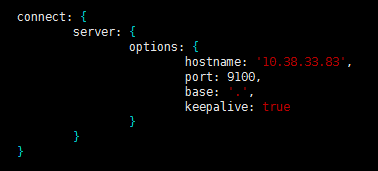
修改 _site/app.js 修改http://localhost:9200字段到本机ES端口与IP

 

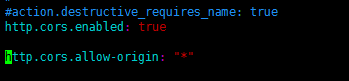
 <6>修改 elasticsearch配置文件 

 修改elasticsearch.yml文件加入以下内容:

# 是否支持跨域
http.cors.enabled: true

# *表示支持所有域名
http.cors.allow-origin: "*"
<7>启动head插件服务(后台运行)

/elasticsearch-head/node_modules/grunt/bin/grunt server &

 

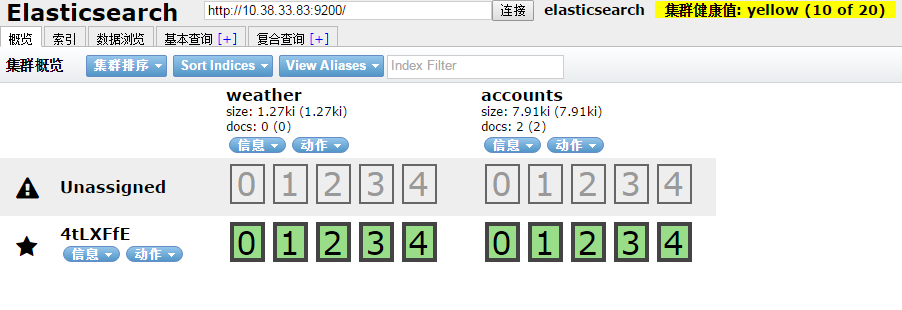
<8>查看

如下图说明安装OK
安装中文分词器

中文分词器的版本和elasticsearch的版本要一致。随笔中安装的是6.3.2版本

$ ./bin/elasticsearch-plugin install https://github.com/medcl/elasticsearch-analysis-ik/releases/download/v6.3.2/elasticsearch-analysis-ik-6.3.2.zip

 安装OK后重启elasticsearch服务

安装过程遇到的问题:

[1]: max file descriptors [4096] for elasticsearch process is too low, increase to at least [65536]

解决:vim /etc/security/limits.conf ,在文件末尾添加以下参数 (* 要带上)

复制代码

* soft nofile 65536

* hard nofile 131072

* soft nproc 2048

* hard nproc 4096

复制代码

ulimit -n查看进程数

[2]: max virtual memory areas vm.max_map_count [65530] is too low, increase to at least [262144]

解决:修改 /etc/sysclt.conf配置

添加一下配置参数

 执行命令

重启elasticsearch服务即可。

参考:

  https://www.cnblogs.com/hunttown/p/6723286.html

  https://www.cnblogs.com/lizichao1991/p/7809156.html