title: 自定义log4j2发送日志到Kafka
为了给公司的大数据平台提供各项目组的日志,而又使各项目组在改动上无感知。做了一番调研后才发现log4j2默认有支持将日志发送到kafka的功能,惊喜之下赶紧看了下log4j对其的实现源码!发现默认的实现是同步阻塞的,如果kafka服务一旦挂掉会阻塞正常服务的日志打印,为此本人在参考源码的基础上做了一些修改。
log4j2对于log4j在性能上有着显著的提升,这点官方上已经有了明确的说明和测试,所以不多赘述。在为了更熟练的使用,还是有必要了解其内部的工作流程。这是官网log4j的一张类图
Applications using the Log4j 2 API will request a Logger with a specific name from the LogManager. The LogManager will locate the appropriate LoggerContext and then obtain the Logger from it. If the Logger must be created it will be associated with the LoggerConfig that contains either a) the same name as the Logger, b) the name of a parent package, or c) the root LoggerConfig. LoggerConfig objects are created from Logger declarations in the configuration. The LoggerConfig is associated with the Appenders that actually deliver the LogEvents.
官网已经解释他们之间的关系了,这里不再对每个类的功能和作用做具体介绍,今天的重点是Appender类,因为他将决定将日志输出至何方。
The ability to selectively enable or disable logging requests based on their logger is only part of the picture. Log4j allows logging requests to print to multiple destinations. In log4j speak, an output destination is called an Appender. Currently, appenders exist for the console, files, remote socket servers, Apache Flume, JMS, remote UNIX Syslog daemons, and various database APIs. See the section on Appenders for more details on the various types available. More than one Appender can be attached to a Logger.
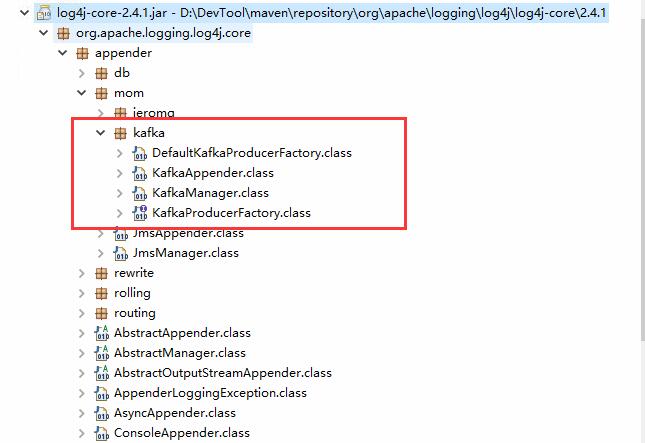
上图是log4j2发送日志到kafka的核心类,其实最主要的KafkaAppender,其他的几个类是连接kafka服务的。
@Plugin(name = "Kafka", category = "Core", elementType = "appender", printObject = true)
public final class KafkaAppender extends AbstractAppender {
<?xml version="1.0" encoding="UTF-8"?>
  ...
  <Appenders>
    <Kafka name="Kafka" topic="log-test">
      <PatternLayout pattern="%date %message"/>
        <Property name="bootstrap.servers">localhost:9092</Property>
    </Kafka>
  </Appenders>

    <Loggers>
    <Root level="DEBUG">
      <AppenderRef ref="Kafka"/>
    </Root>
<Logger name="org.apache.kafka" level="INFO" /> 其中@Plugin的name属性对应的xml配置文件里面Kafka标签,当然这个也可以自定义。与此同时,也需要将@Plugin的name属性改为MyKafka。如下配置:
<MyKafka name="Kafka" topic="log-test">有时候我们会用到的属性由于默认的KafkaAppender不一定支持,所以需要一定程度的改写。但是改写也比较方便,只需要从构造器的Properties kafkaProps属性中取值即可。为了满足项目要求,我这边定义了platform和serviceName两个属性。
通过KafkaAppender的源码可知,他发送消息采取的是同步阻塞的方式。经过测试,一旦kafka服务挂掉,那么将会影响项目服务正常的日志输出,而这不是我希望看到的,所以我对他做了一定的程度的修改。
feature::
kafka服务一直正常
这种情况属于最理想的情况,消息将源源不断的发送至kafka broker
kafka服务挂掉,过一段时间后恢复正常
当kafka服务在挂掉的那一刻,后续所有的消息将会输出至ConcurrentLinkedQueue队列里面去。同时该队列的消息也会不断的被消费,输出至本地文件。当心跳检测到kafka broker恢复正常了,本地文件的内容将会被读取,然后发送至kafka broker。需要注意的时候,此时会有大量消息被实例化为ProducerRecord对象,堆内存的占用率非常高,所以我用线程阻塞了一下!
所有的消息都会被输出至本地文件。
源码点我
此内容由惯性聚合(RSS阅读器)自动聚合整理,仅供阅读参考。 原文来自 — 版权归原作者所有。