


惯性聚合 高效追踪和阅读你感兴趣的博客、新闻、科技资讯
阅读原文 在惯性聚合中打开

推荐订阅源

S
Secure Thoughts
Security Latest
Security Latest
Simon Willison's Weblog
O
OpenAI News
GbyAI
GbyAI
L
LINUX DO - 最新话题
A
Arctic Wolf
T
Tor Project blog
G
GRAHAM CLULEY
I
InfoQ
博客园_首页
IT之家
IT之家
The Register - Security
Exploit-DB.com RSS Feed
P
Proofpoint News Feed
The GitHub Blog
The GitHub Blog
Blog — PlanetScale
Blog — PlanetScale
N
Netflix TechBlog - Medium
K
Kaspersky official blog
博客园 - 三生石上(FineUI控件)
S
SegmentFault 最新的问题
U
Unit 42
PCI Perspectives
PCI Perspectives
量子位
P
Palo Alto Networks Blog
S
Securelist
T
Troy Hunt's Blog
博客园 - 【当耐特】
Recorded Future
Recorded Future
K
KPMG report finds enterprise disconnect between AI and its ROI | CIO
S
Security Affairs
Engineering at Meta
Engineering at Meta
T
The Blog of Author Tim Ferriss
博客园 - 聂微东
罗磊的独立博客
N
News and Events Feed by Topic
人人都是产品经理
人人都是产品经理
B
Blog RSS Feed
NISL@THU
NISL@THU
C
Cisco Blogs
T
Threatpost
有赞技术团队
有赞技术团队
Forbes - Security
Forbes - Security
Hugging Face - Blog
Hugging Face - Blog
Last Week in AI
Last Week in AI
T
The Exploit Database - CXSecurity.com
Cloudbric
Cloudbric
Cyberwarzone
Cyberwarzone
Google DeepMind News
C
Cyber Attacks, Cyber Crime and Cyber Security

博客园 - 轻松

css div 垂直居中 How to create custom methods for use in spring security expression language annotations How to check “hasRole” in Java Code with Spring Security? Android 显示/隐藏 应用图标 Android 当媒体变更后,通知其他应用重新扫描 Dynamically loading an external JavaScript or CSS file android 脸部抠图 IIS + TOMCAT 注意事项 让IE支持HTML5的Canvas vba 生成euc文件的方法 - 轻松 - 博客园 数值项目的格式化 - 轻松 - 博客园 [原创]让Allvidoes插件支持 优酷(www.youku.com)的视频 ORACLE ERROR CODE代表的意思 http://hi.baidu.com/czh0221/blog/item/9f0447e719644a2ab83820c6.html [转]利用location的hash值来解决Ajax两大难题 JAVA 调用Web Service的方法 xampp-control中启动Apache时80断口被占用的错误 asp.net mail java获取运行的jar(class)文件的路径
textbox icon jquery 插件
轻松 · 2012-07-30 · via 博客园 - 轻松

本插件可以在输入框的右侧(内部)添加一个可点击的图片按钮,方便进行清空文本框内容以及其它操作。

看图: 
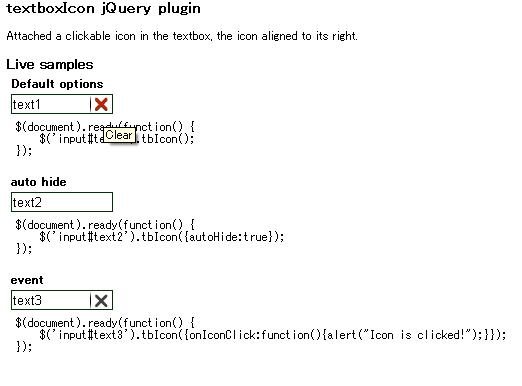
 

 插件代码

 1 $.fn.tbIcon = function(options) {

 2var defaults = {
 3         inactiveClass: 'tbIconinactive',
 4         activeClass: 'tbIconactive',
 5         autoHide: false,
 6         onIconClick: false,
 7         iconWidth:22,
 8         title:'Clear'
 9     };
10     var opts = $.extend(defaults, options);
11     return this.each(function() {
12         var txt = $(this);
13         if (!txt.is('input[type=text]')) {
14             return txt;
15         }
16         var zeroPoint = txt.offset().left;
17         var canClick = false;
18         var oraWidth = txt.width();
19         var hasTitle = txt.is('[title]');
20         var oldTitle = '';
21         if(hasTitle) {
22             oldTitle = txt.attr("title");
23         }
24         if(opts.autoHide) {
25             txt.mouseenter(function(e){
26                 txt.width(oraWidth - opts.iconWidth).css("padding-right",opts.iconWidth + "px").addClass(opts.inactiveClass);    
27             });
28         } else {
29                 txt.width(oraWidth - opts.iconWidth).css("padding-right",opts.iconWidth + "px").addClass(opts.inactiveClass);
30         }
31         txt.mousemove(function(e){    
32             if((txt.width() <= (e.pageX - zeroPoint))) {
33                 txt.css("cursor","pointer")
34                     .removeClass(opts.inactiveClass).addClass(opts.activeClass);
35                     txt.attr("title", opts.title);
36                 canClick = true;
37             } else {
38                 txt.css("cursor","")
39                     .removeClass(opts.activeClass).addClass(opts.inactiveClass);
40                 if(hasTitle) {
41                     txt.attr("title", oldTitle);
42                 } else {
43                     txt.removeAttr("title");
44                 }
45                 canClick = false;
46             }
47         }).mouseleave(function(){
48                 canClick = false;
49                 txt.css("cursor","").removeClass(opts.activeClass);
50                 if(hasTitle) {
51                     txt.attr("title", oldTitle);
52                 } else {
53                     txt.removeAttr("title");
54                 }
55                 
56                 if(opts.autoHide) {
57                     txt.width(oraWidth).css("padding-right", "").removeClass(opts.inactiveClass);
58                 } else {
59                     if(!txt.hasClass(opts.inactiveClass)) {
60                         txt.addClass(opts.inactiveClass);
61                     }
62                 }
63         }).click(function(event) {
64             event.stopPropagation();
65             if(canClick) {
66                 if ($.isFunction(defaults.onIconClick)) {
67                     defaults.onIconClick.call(event);
68                 } else {
69                     txt.val("");
70                 }
71             }
72         });
73         return txt;
74     });
75 };

 问题:

 IE下 padding-right 的设置不知为啥不好用啊,有知道的请指点一下。

下载