
惯性聚合 高效追踪和阅读你感兴趣的博客、新闻、科技资讯
阅读原文 在惯性聚合中打开

推荐订阅源

博客园 - 聂微东
Y
Y Combinator Blog
WordPress大学
WordPress大学
L
LangChain Blog
钛媒体:引领未来商业与生活新知
钛媒体:引领未来商业与生活新知
A
About on SuperTechFans
小众软件
小众软件
有赞技术团队
有赞技术团队
S
SegmentFault 最新的问题
宝玉的分享
宝玉的分享
Recent Announcements
GbyAI
GbyAI
I
InfoQ
The GitHub Blog
The GitHub Blog
让小产品的独立变现更简单 - ezindie.com
酷 壳 – CoolShell
酷 壳 – CoolShell
罗磊的独立博客
C
Check Point Blog
V
V2EX
Apple Machine Learning Research
月光博客
月光博客
量子位
雷峰网
雷峰网
Hugging Face - Blog
Hugging Face - Blog

Help Net Security

ChatGPT advanced account security adds passkeys and hardware keys Week in review: High-severity LPE vulnerability in the Linux kernel, cPanel 0-day exploited for months Automating Pentest Delivery: A Step-by-Step Guide - PlexTrac Open-source privacy proxy masks PII before prompts reach external AI services Shadow AI risks deepen as 31% of users get no employer training Identity is the control plane for distributed infrastructure AI traffic is getting bigger, louder, and less predictable New infosec products of the month: April 2026 cPanel zero-day exploited for months before patch release (CVE-2026-41940) Cisco releases open-source toolkit for verifying AI model lineage Met Police face criticism for using AI to spy on their own officers Nine-year-old Linux kernel flaw enables reliable local privilege escalation (CVE-2026-31431) Hacker with a special interest in breaching sports institutions ends behind bars - Help Net Security IP Fabric MCP server adds governance and control to enterprise AIOps workflows - Help Net Security Aqua Compass MCP server enables real-time investigation and containment of runtime threats - Help Net Security Google brings instant email verification to Android, no OTP needed - Help Net Security If cyber espionage via HDMI worries you, NCSC built a device to stop it - Help Net Security Apple fixes iPhone bug that let FBI retrieve deleted Signal messages(CVE-2026-28950) - Help Net Security GopherWhisper APT group hides command and control traffic in Slack and Discord - Help Net Security OpenAI tackles a bad habit people have when interacting with AI - Help Net Security A year in, Zoom's CISO reflects on balancing security and business - Help Net Security Scenario: Open-source framework for automated AI app red-teaming - Help Net Security GDPR works, but only where someone enforces it - Help Net Security Ransomware, fraud, and lawsuits drive cyber insurance claims to new peaks - Help Net Security Google’s Workspace Intelligence promises privacy while running on your data - Help Net Security Cyberattack on French government agency triggers phishing alert - Help Net Security Claude Mythos finds 271 Firefox flaws, Mozilla believes zero-days are numbered - Help Net Security Prove Identity Platform connects verification, authentication, and fraud prevention - Help Net Security New Mirai variants target routers and DVRs in parallel campaigns - Help Net Security Acronis GenAI Protection gives MSPs control over AI usage and data risks - Help Net Security
Phishing hides in routine Microsoft 365 workflows - Help ...
Sinisa Markovic · 2026-06-23 · via Help Net Security

Attackers are abusing Outlook Groups and Microsoft 365 collaboration features to make phishing campaigns appear routine, according to Fortra.

“The technique shifts malicious intent away from a single phishing email into a trusted productivity workflow. A user may see what looks like a normal group addition, internal update, shared resource, or calendar item before being pushed toward an action,” said Daud Jawad, Security Engineer on Fortra’s Intelligence & Threat Management team.

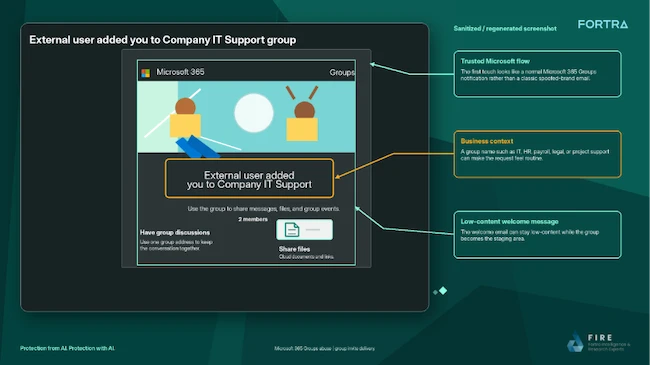
The attack begins when a target is added to or invited into an attacker-controlled Microsoft 365 Group. The group’s name, description, or welcome message is designed to create urgency, often using themes such as payroll updates, contract renewals, supplier requests, or mandatory training notices.
Microsoft 365 Outlook phishing

Attackers use Microsoft 365 Groups as an entry point for phishing campaigns (Source: Fortra)

Follow-up content is delivered through the group mailbox, shared files, or calendar invitations, often using one of four CalPhishing techniques. CalPhishing, short for Calendar Phishing, uses Outlook and Microsoft 365 calendar features to deliver phishing lures through meeting invitations and .ics files that can place events directly on a victim’s calendar.

Victims may be prompted to review a document, approve a request, sign in to an account, or download a file. The final action can lead to credential theft, token theft, malware delivery, data exposure, or further social engineering activity.

Fortra said the value of CalPhishing lies in repeated exposure. A user might ignore the initial email, then later notice the calendar event, open the invitation, read the description, click a link, or access a referenced file. Over time, the event can start to look like an unfinished work task, while calendar reminders keep bringing it back into view.

“Shared files create another path,” added Jawad.

“A clean group email can still lead to a document containing a fake support process, QR code, credential-harvesting page, macro lure, or remote-access instruction. Because the content is reached through a Microsoft collaboration surface, the user may treat it safer than a direct attachment.”

Fortra warned that these attacks can complicate investigations because the activity is spread between email, Microsoft 365 Groups, shared files, and calendar events.

“Unexpected groups, meetings, and shared files should be treated with the same caution as unexpected emails, especially when the theme is urgent, administrative, or account related,” concluded Jawad.