



惯性聚合 高效追踪和阅读你感兴趣的博客、新闻、科技资讯
阅读原文 在惯性聚合中打开

推荐订阅源

P
Privacy International News Feed
WordPress大学
WordPress大学
Security Latest
Security Latest
Cyberwarzone
Cyberwarzone
K
Kaspersky official blog
Cisco Talos Blog
Cisco Talos Blog
Microsoft Security Blog
G
GRAHAM CLULEY
N
News | PayPal Newsroom
Apple Machine Learning Research
freeCodeCamp Programming Tutorials: Python, JavaScript, Git & More
V
Visual Studio Blog
美团技术团队
J
Java Code Geeks
I
Intezer
The Cloudflare Blog
SecWiki News
SecWiki News
S
Secure Thoughts
Microsoft Azure Blog
V2EX - 技术
V2EX - 技术
C
Cyber Attacks, Cyber Crime and Cyber Security
奇客Solidot–传递最新科技情报
奇客Solidot–传递最新科技情报
Spread Privacy
Spread Privacy
D
DataBreaches.Net
S
Security Affairs
Help Net Security
Help Net Security
S
Securelist
F
Full Disclosure
C
Check Point Blog
F
Fortinet All Blogs
Know Your Adversary
Know Your Adversary
Exploit-DB.com RSS Feed
Y
Y Combinator Blog
云风的 BLOG
云风的 BLOG
阮一峰的网络日志
阮一峰的网络日志
The Register - Security
cs.CL updates on arXiv.org
人人都是产品经理
人人都是产品经理
博客园_首页
G
Google Developers Blog
Google Online Security Blog
Cyber Security Advisories - MS-ISAC
H
Help Net Security
酷 壳 – CoolShell
酷 壳 – CoolShell
I
InfoQ
Application and Cybersecurity Blog
H
Hacker News: Front Page
L
LINUX DO - 热门话题
Threat Intelligence Blog | Flashpoint
L
LangChain Blog

博客园 - forrestsun

问题整理 weedfs getsockopt: connection timed out CubieTruck上安装mjpg_streamer devexpress bandgridview使用总结(14.2) WeedFS0.6.8-引用库列表 NSQ的消息订阅发布测试 WeedFS问题收集 WeedFS依赖库 0.6.1 golang 前置补0 MongoDB-MMS使用总结 golang 格式化时间为字符串 格式化字符串为时间学习总结 mgo-后续测试(指定字段,获取id) mgo中DBRef-数据查询测试 mgo中DBRef-数据添加测试 weed-fs 基础测试 weed-fs 压力测试 weed-fs参数列表 mgo like的两种写法
利用cubieboard设置samba打印服务器
forrestsun · 2016-08-04 · via 博客园 - forrestsun
#注意安装下面软件前,先将cubieboard的动态地址改为静态地址!

apt-get install samba #安装samba vi /etc/samba/smb.conf //配置 workgroup = WORKGROUP security = user [printers] comment = All Printers browseable = yes * path = /var/spool/samba printable = yes guest ok = yes * read only = yes create mask = 0700 apt-get install cups #安装CUPS vi /etc/cups/cupsd.conf #Listen localhost:631 Port 631 Listen /var/run/cups/cups.sock <Location /> Order allow,deny Allow all </Location> # Restrict access to the admin pages... <Location /admin> Order allow,deny Allow all </Location>


登录:http://hostname:631 选择查找打印机
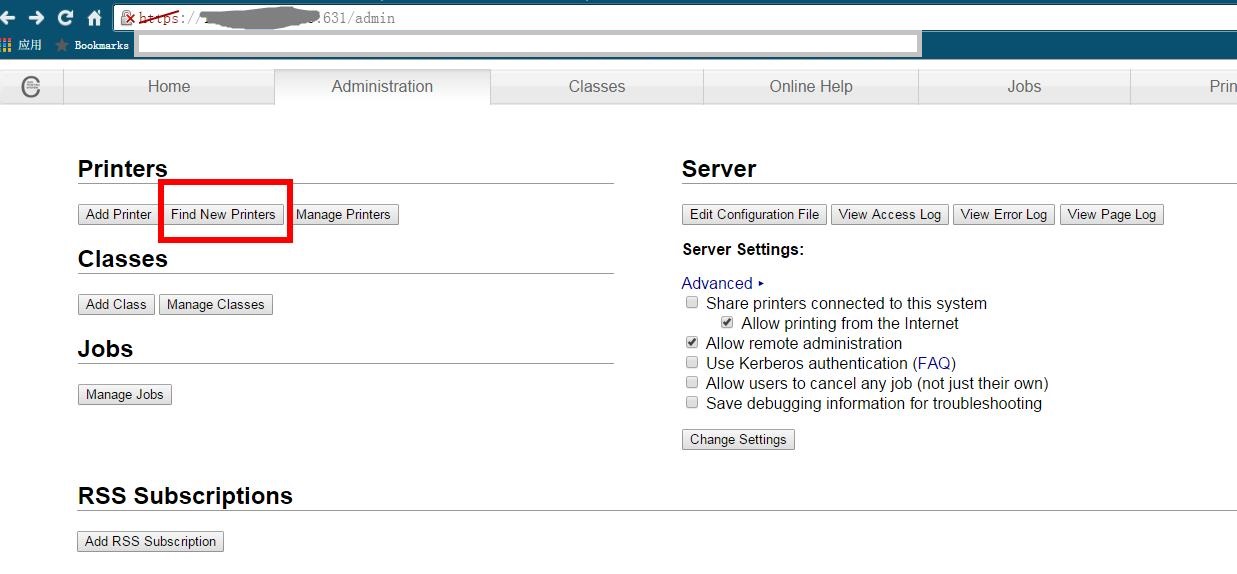
选择已经联机的打印机就可以了。由于我们的打印机是联想LJ2600D一开始费了不少劲配置,没想到在查找新打印机里能直接查到 :(

剩下的就是在windows下添加打印机,选择网络 然后输入你的机器地址就能找到了。

 关于安全,通过下面两种设置,可以避免未授权的用户访问管理页面:

<Location /admin>
      Order allow,deny
      Allow from 10.10.10.5
</Location>


<Location /admin>
      Order allow, deny
      Allow from 10.10.10.*
</Location>

参考:

CUPS Print Server (Ubuntu 14.04 LTS) : https://wiki.sebeka.k12.mn.us/ubuntu:cups_print_server

Printer Drivers : https://njh.eu/printer