






SPGridView提供数据分组显示功能, 但是只能将页面内数据分组. 只要设置 AllowGrouping(true), GroupField(某列名) 就能实现下面的效果.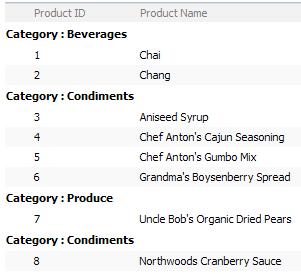
如果需要给分组的列加链接加菜单的话, 就得再设置GroupMenu. GroupMenu需要一个SPMenuField对象, 而SPMenuField又需要一个MenuTemplate.
所以我们先加入一个MenuTemplate.
<cc1:MenuTemplate ID="mtCategory" runat="server">
    <cc1:MenuItemTemplate ID="mitFilter" runat="server" Text="View Products" />
</cc1:MenuTemplate>
由于这个GroupMenu不在Columns里, 而SPMenuField又不能像MenuTemplate一样扔在SPGridView之外. 所以只好在代码里加了.
protected override void OnInit(EventArgs e)
{
    base.OnInit(e);
    this.SPGridView1.GroupMenu = new SPMenuField();
    this.SPGridView1.GroupMenu.MenuTemplateId = this.mtCategory.ID;
    this.SPGridView1.GroupMenu.HeaderText = "Category";
    this.SPGridView1.GroupMenu.TextFields = "CategoryName";
}
现在来看看效果吧.


完整代码:
<%@ Page Language="C#" MasterPageFile="~masterurl/Default.Master" %> <%@ Register Assembly="Microsoft.SharePoint, Version=12.0.0.0, Culture=neutral, PublicKeyToken=71e9bce111e9429c" Namespace="Microsoft.SharePoint.WebControls" TagPrefix="cc1" %> <script runat="server">1:2: protected override void OnInit(EventArgs e)3: {4: base.OnInit(e);5: this.SPGridView1.GroupMenu = new SPMenuField();6: this.SPGridView1.GroupMenu.MenuTemplateId = this.mtCategory.ID;7: this.SPGridView1.GroupMenu.HeaderText = "Category";8: this.SPGridView1.GroupMenu.TextFields = "CategoryName";9: }</script> <asp:Content ID="Content3" ContentPlaceHolderID="PlaceHolderAdditionalPageHead" runat="server"> </asp:Content> <asp:Content ID="Content1" ContentPlaceHolderID="PlaceHolderPageTitleInTitleArea" runat="server"> SPGridView Demo: Part 3 - Grouping </asp:Content> <asp:Content ID="Content2" ContentPlaceHolderID="PlaceHolderMain" runat="server"> <!--SPGridView--> <cc1:SPGridView ID="SPGridView1" runat="server" EnableViewState="false" AutoGenerateColumns="False" DataSourceID="ObjectDataSource1" AllowSorting="true" AllowGrouping="true" GroupField="CategoryName" AllowGroupCollapse="true"> <Columns> <cc1:SPBoundField DataField="ProductId" HeaderText="Product ID" SortExpression="ProductId"> </cc1:SPBoundField> <cc1:SPBoundField DataField="ProductName" HeaderText="Product Name" SortExpression="ProductName" /> <asp:BoundField DataField="UnitPrice" DataFormatString="${0:F2}" HeaderText="Unit Price" SortExpression="UnitPrice" /> <asp:TemplateField HeaderText="Orderable" SortExpression="Discontinued"> <itemtemplate> <asp:Label id="lblDiscontinued" runat="server" text='<%# Convert.ToBoolean(Eval("Discontinued")) ? "Yes" : "No" %>'></asp:Label> </itemtemplate> </asp:TemplateField> </Columns> </cc1:SPGridView> <!--SPGridView--> <!--MenuTemplate--> <cc1:MenuTemplate ID="mtCategory" runat="server"> <cc1:MenuItemTemplate ID="mitFilter" runat="server" Text="View Products" /> </cc1:MenuTemplate> <!--MenuTemplate--> <!--ObjectDataSource--> <asp:ObjectDataSource ID="ObjectDataSource1" runat="server" SelectMethod="GetProductList" TypeName="SPGridView_Demo.NorthwindData" SortParameterName="sortExpression"></asp:ObjectDataSource> <!--ObjectDataSource--> </asp:Content>
特别注意:
1.启用分组后, 如果不把EnableViewState设置为false, 排序功能就会出错. 寒~~
2.启用分组后, 过滤功能会失灵. 晕倒~~
3.如果使用了ObjectDataSource来分页数据, 那么分组只能分当前页的, 过滤功能也失灵. 汗~~
此内容由惯性聚合(RSS阅读器)自动聚合整理,仅供阅读参考。 原文来自 — 版权归原作者所有。