



惯性聚合 高效追踪和阅读你感兴趣的博客、新闻、科技资讯
阅读原文 在惯性聚合中打开

推荐订阅源

S
Schneier on Security
The Register - Security
月光博客
月光博客
freeCodeCamp Programming Tutorials: Python, JavaScript, Git & More
OSCHINA 社区最新新闻
OSCHINA 社区最新新闻
The GitHub Blog
The GitHub Blog
博客园 - 司徒正美
罗磊的独立博客
U
Unit 42
S
SegmentFault 最新的问题
Y
Y Combinator Blog
博客园_首页
Hugging Face - Blog
Hugging Face - Blog
J
Java Code Geeks
Schneier on Security
Know Your Adversary
Know Your Adversary
C
Check Point Blog
Cyber Security Advisories - MS-ISAC
Simon Willison's Weblog
V
Vulnerabilities – Threatpost
让小产品的独立变现更简单 - ezindie.com
阮一峰的网络日志
阮一峰的网络日志
The Hacker News
The Hacker News
博客园 - 叶小钗
C
Cybersecurity and Infrastructure Security Agency CISA
Spread Privacy
Spread Privacy
L
LINUX DO - 热门话题
T
The Exploit Database - CXSecurity.com
P
Palo Alto Networks Blog
cs.CL updates on arXiv.org
Latest news
Latest news
L
Lohrmann on Cybersecurity
A
About on SuperTechFans
L
LangChain Blog
Stack Overflow Blog
Stack Overflow Blog
S
Securelist
A
Arctic Wolf
D
Darknet – Hacking Tools, Hacker News & Cyber Security
T
Threatpost
Scott Helme
Scott Helme
博客园 - 聂微东
博客园 - 【当耐特】
T
Tenable Blog
I
Intezer
D
DataBreaches.Net
B
Blog RSS Feed
Security Latest
Security Latest
C
Cisco Blogs
T
Tor Project blog
N
Netflix TechBlog - Medium

博客园 - think8848

[原]使用BPI-R4开发板实现5G上网、Wi-Fi AP、文件共享和Docker服务 [原]挂载oVirt虚拟机磁盘 mongocxx-driver编译安装 Mapnik 3.0.20编译安装 [原]Webpack 3 + AngularJS1.* + Bootstrap 4 + Mapbox-gl Mapbox Studio Classic 闪退问题解决方案 EventEmitter事件处理器中的this问题 Rappid 消除试用版的弹出框 CentOS7.2 1511部署RabbitMQ shp2pgsql向postgresql导入shape数据 node.js的Promise库-bluebird示例 [原]Docker部署SuperMap8.1.1 Docker初步 node.js 调试问题 [原]OpenStreetMap数据瓦片服务性能篇 [原]CentOS7.2部署KVM虚拟机 [原]使用node-mapnik和openstreetmap数据初步搭建瓦片服务 [原]使用node-mapnik生成openstreetmap-carto风格的瓦片 [原]CentOS7.2部署node-mapnik
VSCode下调试mocha测试用例
think8848 · 2017-07-30 · via 博客园 - think8848

之前使用tape做Node.js的单元测试,最方便一条就是使用它就和自己写个控制台应用程序测试一样,控制起来比较灵活,直接用VSCode进行调试也比较方便。然而tape输出中文字符总是乱码,想了很多办法也没有解决。今天打算试试使用mochachai进行单元测试,简单试用后发现相当不错,测试结果的显示相当漂亮直观,然而如何才能在VSCode里面调试代码呢?经过一番折腾发现了一个可行的方法:

在 .vscode/laungch.js 中加入如下配置:

        {
            "name": "Run mocha",
            "type": "node",
            "request": "launch",
            "program": "${workspaceRoot}/node_modules/mocha/bin/_mocha",
            "stopOnEntry": false,
            "args": [
                "test/index.js",
                "--no-timeouts"
            ],
            "cwd": "${workspaceRoot}",
            "runtimeExecutable": null,
            "env": {
                "NODE_ENV": "testing"
            }
        }

 ./vscode/launch.js 内容如下:
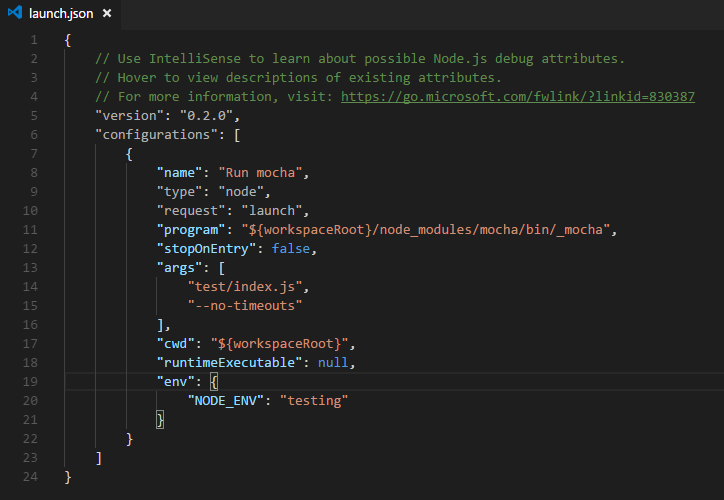
在 args 对象中加入启动文件,按 F5 启动调试即可。