



惯性聚合 高效追踪和阅读你感兴趣的博客、新闻、科技资讯
阅读原文 在惯性聚合中打开

推荐订阅源

GbyAI
GbyAI
T
Tenable Blog
Webroot Blog
Webroot Blog
L
Lohrmann on Cybersecurity
S
Securelist
S
Schneier on Security
NISL@THU
NISL@THU
Know Your Adversary
Know Your Adversary
C
Cybersecurity and Infrastructure Security Agency CISA
T
The Exploit Database - CXSecurity.com
L
LINUX DO - 热门话题
C
CXSECURITY Database RSS Feed - CXSecurity.com
O
OpenAI News
I
Intezer
Threat Intelligence Blog | Flashpoint
TaoSecurity Blog
TaoSecurity Blog
S
Secure Thoughts
Application and Cybersecurity Blog
P
Privacy International News Feed
H
Hacker News: Front Page
N
Netflix TechBlog - Medium
M
MIT News - Artificial intelligence
博客园 - Franky
PCI Perspectives
PCI Perspectives
OSCHINA 社区最新新闻
OSCHINA 社区最新新闻
Microsoft Azure Blog
MongoDB | Blog
MongoDB | Blog
L
LangChain Blog
P
Proofpoint News Feed
S
Security Affairs
WordPress大学
WordPress大学
The Last Watchdog
The Last Watchdog
S
SegmentFault 最新的问题
小众软件
小众软件
F
Full Disclosure
博客园 - 叶小钗
cs.AI updates on arXiv.org
T
The Blog of Author Tim Ferriss
Simon Willison's Weblog
P
Palo Alto Networks Blog
Security Latest
Security Latest
P
Proofpoint News Feed
月光博客
月光博客
T
Tailwind CSS Blog
Scott Helme
Scott Helme
Hacker News - Newest:
Hacker News - Newest: "LLM"
Google Online Security Blog
T
Threat Research - Cisco Blogs
Help Net Security
Help Net Security
Project Zero
Project Zero

博客园 - think8848

[原]使用BPI-R4开发板实现5G上网、Wi-Fi AP、文件共享和Docker服务 [原]挂载oVirt虚拟机磁盘 mongocxx-driver编译安装 Mapnik 3.0.20编译安装 [原]Webpack 3 + AngularJS1.* + Bootstrap 4 + Mapbox-gl VSCode下调试mocha测试用例 Mapbox Studio Classic 闪退问题解决方案 EventEmitter事件处理器中的this问题 Rappid 消除试用版的弹出框 CentOS7.2 1511部署RabbitMQ shp2pgsql向postgresql导入shape数据 node.js的Promise库-bluebird示例 [原]Docker部署SuperMap8.1.1 node.js 调试问题 [原]OpenStreetMap数据瓦片服务性能篇 [原]CentOS7.2部署KVM虚拟机 [原]使用node-mapnik和openstreetmap数据初步搭建瓦片服务 [原]使用node-mapnik生成openstreetmap-carto风格的瓦片 [原]CentOS7.2部署node-mapnik
Docker初步
think8848 · 2017-02-21 · via 博客园 - think8848

一、安装Docker

curl -sSL https://get.docker.com/ | sh

 启动及开机启动

systemctl start docker

systemctl enable docker

二、修改Images存放路径

systemctl stop docker

mv /var/lib/docker /home

ln -s /home/docker /var/lib/docker

ls -la /var/lib/docker

systemctl start docker

docker info

三、创建空的CentOS-7.2.1511镜像

1. 下载Dockerfile相关文件,解压,Dockerfile和centos-7.2.1511-docker.tar.xz放到同一个目录下。
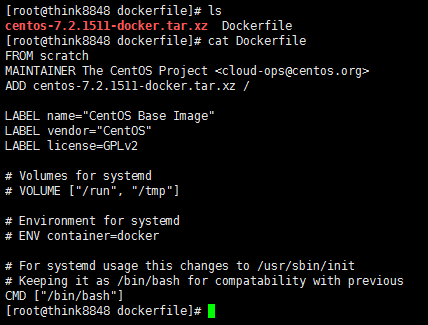
 

2. 创建镜像

#注意后面一个"."号
docker build -t centos-7.2.1511 .
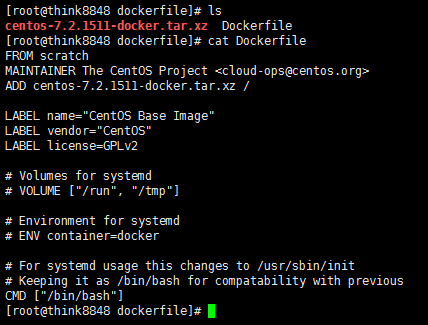
 

3.检查镜像 

4. hello world

5. 开启网络

docker run -it --net=host centos-7.2.1511 /bin/bash

四、复制及迁移 

#将Container复制为Image
docker commit [OPTIONS] CONTAINER [REPOSITORY[:TAG]]
#将Container存储为tar(用于迁移)
docker export [OPTIONS] CONTAINER
#将Export的文件恢复为Image
docker import [OPTIONS] file|URL|- [REPOSITORY[:TAG]]
#将Image存储为tar(用于迁移)[Export不保存镜像历史,而save保存历史]
docker save [OPTIONS] IMAGE [IMAGE...]
#加载save的tar文件
docker load [OPTIONS]

 五、常用命令

1. 重新开启已有的Container

#开启输入输出端
docker start -ia ContainerID

#先开启,再附加输入输出端
docker start ContainerID
docker attach ContainerID

2. 复制文件

docker cp [OPTIONS] CONTAINER:SRC_PATH DEST_PATH 
docker cp [OPTIONS] SRC_PATH|- CONTAINER:DEST_PATH