
惯性聚合 高效追踪和阅读你感兴趣的博客、新闻、科技资讯
阅读原文 在惯性聚合中打开

推荐订阅源

D
Docker
爱范儿
爱范儿
T
The Exploit Database - CXSecurity.com
量子位
T
Tailwind CSS Blog
T
Threatpost
The GitHub Blog
The GitHub Blog
AWS News Blog
AWS News Blog
云风的 BLOG
云风的 BLOG
K
Kaspersky official blog
P
Proofpoint News Feed
博客园 - 司徒正美
L
LangChain Blog
T
Threat Research - Cisco Blogs
C
CERT Recently Published Vulnerability Notes
罗磊的独立博客
酷 壳 – CoolShell
酷 壳 – CoolShell
博客园 - 叶小钗
S
Secure Thoughts
The Last Watchdog
The Last Watchdog
Spread Privacy
Spread Privacy
H
Hacker News: Front Page
T
Troy Hunt's Blog
Cyber Security Advisories - MS-ISAC
Google DeepMind News
W
WeLiveSecurity
A
Arctic Wolf
Apple Machine Learning Research
cs.AI updates on arXiv.org
P
Proofpoint News Feed
T
Tor Project blog
T
The Blog of Author Tim Ferriss
I
Intezer
P
Privacy & Cybersecurity Law Blog
美团技术团队
N
Netflix TechBlog - Medium
博客园_首页
OSCHINA 社区最新新闻
OSCHINA 社区最新新闻
V
Vulnerabilities – Threatpost
Application and Cybersecurity Blog
G
Google Developers Blog
Attack and Defense Labs
T
Tenable Blog
月光博客
月光博客
Stack Overflow Blog
Stack Overflow Blog
J
Java Code Geeks
腾讯CDC
Microsoft Security Blog
A
About on SuperTechFans
Last Week in AI
Last Week in AI

博客园 - 魔豆

oracle中使用unpivot实现列转行 推荐一个可以下载B站视频的工具 hadoop的eclipse插件 mysql5.5安装到最后一步卡死无响应的解决方法 Hbase各版本支持情况 Comparable接口的使用 css3实现动画效果 HTML5中使用EventSource实现服务器发送事件 HTML5中的Web Worker技术 css3中的盒子模型 使用visual studio code运行html 【转】解决chrome浏览器不支持audio和video标签的autoplay自动播放 spring mvc中添加对Thymeleaf的支持 Eclipse安装代码反编译插件Enhanced Class Decompiler 使用idea创建web项目 shell编程学习笔记(十二):Shell中的break/continue跳出循环 shell编程学习笔记(十一):Shell中的while/until循环 shell编程学习笔记(十):Shell中的for循环 shell编程学习笔记(九):Shell中的case条件判断
学习qt,做了一个小应用:随机点名提问系统
魔豆 · 2021-05-25 · via 博客园 - 魔豆

最近在研究学习qt,qt是一个跨平台的基于C++的应用程序开发框架。

感觉这个qt开发起来还是非常简单的,封装了很多功能,开发效率还是非常高的。然后迫不及待的做了一个小案例,就实现了很简单的一个功能:随机点名提问功能。

1、qt下载
qt下载地址:https://download.qt.io/new_archive/

我下载的是qt5.6.3版本的,qt-opensource-windows-x86-mingw492-5.6.3.exe
这个版本已经内置了qt creator开发工具,不用额外下载qt creator

2、随机点名提问系统

系统界面效果:
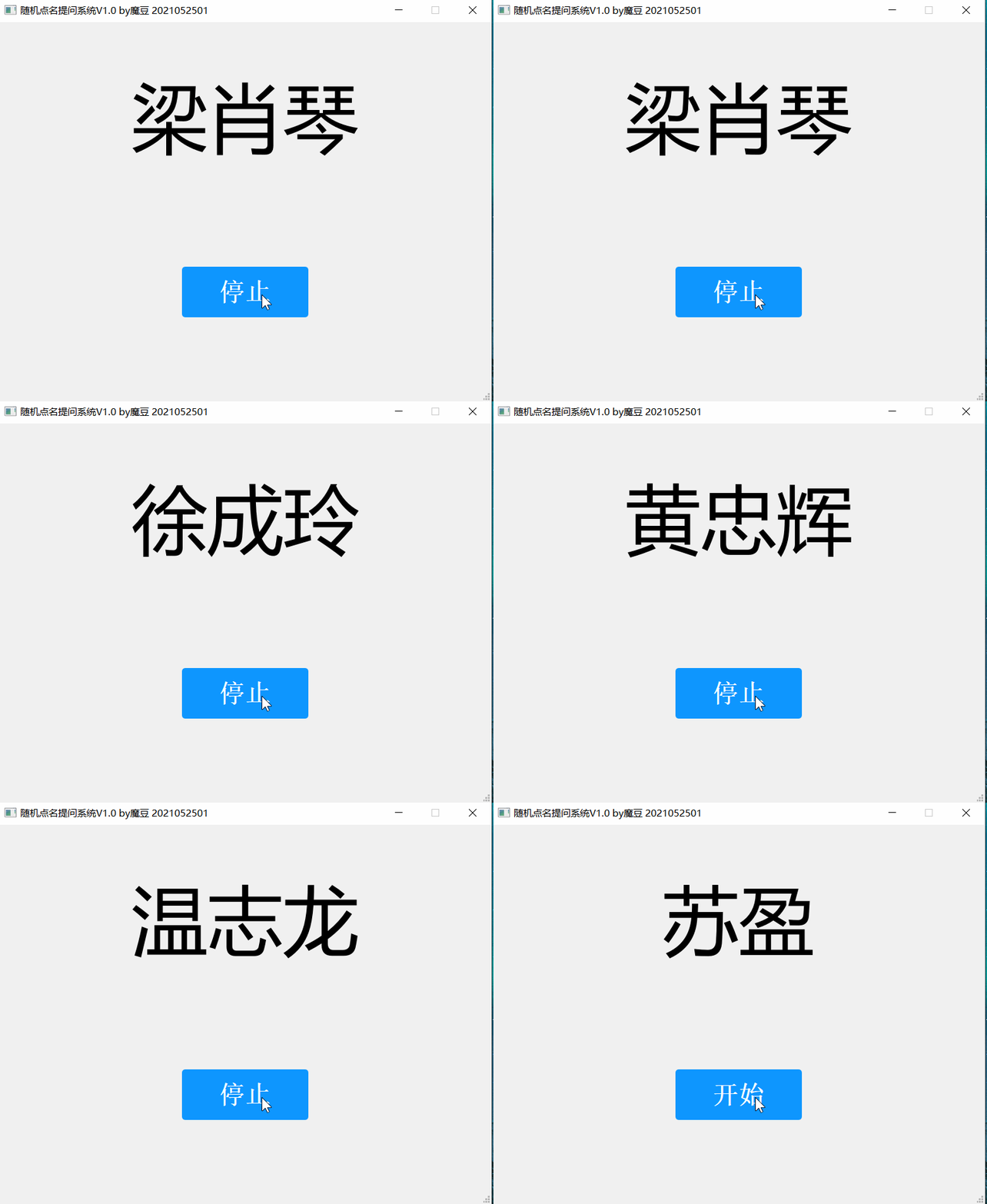
源码已经上传到:https://gitee.com/modoucn/dianming

想直接使用这个工具的话,可以到这里下载,我是封装成一个exe,直接运行即可:https://gitee.com/modoucn/dianming/blob/master/bin/dianmingV1.zip

应用使用方法:需要先准备人员名单数据文件,将data.txt人员名单数据文件放到程序同级目录下,文件格式为一行一个姓名

3、涉及到的技术

3.1  窗体禁用最大化按钮和禁止调节窗口大小

setWindowFlags(windowFlags()& ~Qt::WindowMaximizeButtonHint);
setFixedSize(this->width(), this->height());

3.2  消息对话框

#include <QMessageBox>

...

QMessageBox::critical(this,"出错了","读取文件出错!");

3.3 生成随机数

生成10以内的随机数,生成范围0-9

#include <QTime>

...

QTime time = QTime::currentTime();
qsrand(time.msec()+time.second()*1000);
int num = qrand() % 10;

3.4 读取文本文件

#include <QFile>
#include <QCoreApplication>
#include <QTextCodec>
#include <QMessageBox>

...

// 获取程序当前运行目录
QString filePath = QCoreApplication::applicationDirPath();
QFile file(filePath + "/data.txt");
if(!file.exists()) {
    QMessageBox::critical(this,"出错了","请将data.txt人员名单放到程序同级目录下\n文件格式:一行一个姓名,多个姓名用换行符分割");
       
} else if(!file.open(QIODevice::ReadOnly | QIODevice::Text))
{
    QMessageBox::critical(this,"出错了","读取文件出错!");    
} else {
    QByteArray bytes = file.readAll();
    // 防止中文乱码
    QTextCodec *codec = QTextCodec::codecForName("GBK");
    QString content = codec->toUnicode(bytes);
    // 获取人员列表
    QStringList list = content.split("\n");
}

3.5 定时器

主要使用到了QTimer,代码这里就不粘了