




Every security team knows the pain: a critical alert lands in someone’s inbox, buried under dozens of other emails, or filtered out by a spam rule. By the time anyone sees it, the incident is already in full swing—no ticket opened, no Slack message sent, no automated workflow triggered. The detection worked, but the notification system didn’t.
Email was always a compromise for security notifications. It’s universal, but that’s also its weakness:
The stakes are high. Imperva research found that 44% of security professionals spend more than 20 hours a week responding to alerts, and 27% of IT professionals receive more than a million security alerts a day. When a critical notification is lost in that flood, response slows down—exactly when speed matters most.
The result? An operational gap between detection and response. That gap closes today.
What are webhook notifications? Webhook notifications are automated, real-time messages that a system sends to a URL you choose the moment an event occurs. Instead of waiting for someone to open an email, the event data—usually structured as JSON—is pushed straight to your tools, where it can instantly trigger tickets, alerts, and automated workflows.
Imperva now supports webhook notifications: real-time, structured alerts delivered directly to your systems and tools. You define webhook connections in the Imperva Platform, assign them to notification policies, and from then on, your alerts go exactly where you need them—instantly, in a format your automation can use.
No more spam filters. No more manual ticket creation. No more copy-pasting data at midnight.
*Note: Some notification types and integrations (like Slack/Teams) are coming soon or in beta. See documentation for current coverage.
Webhook notifications are designed for enterprise reliability:
Webhook notifications aren’t just a new channel—they’re an automation unlock. Every alert becomes a programmable trigger: DDoS events, site configuration, bandwidth thresholds. Your automation stack gets a clean, reliable feed for every significant event, enabling faster, more consistent response. This is the foundation of SOC automation: every Imperva alert becomes a programmable trigger for faster, more consistent incident response.
When alerts arrive as structured events, action no longer depends on someone noticing an email. Notifications flow straight into tickets, incident channels, or automated workflows—so the right response happens immediately and consistently.
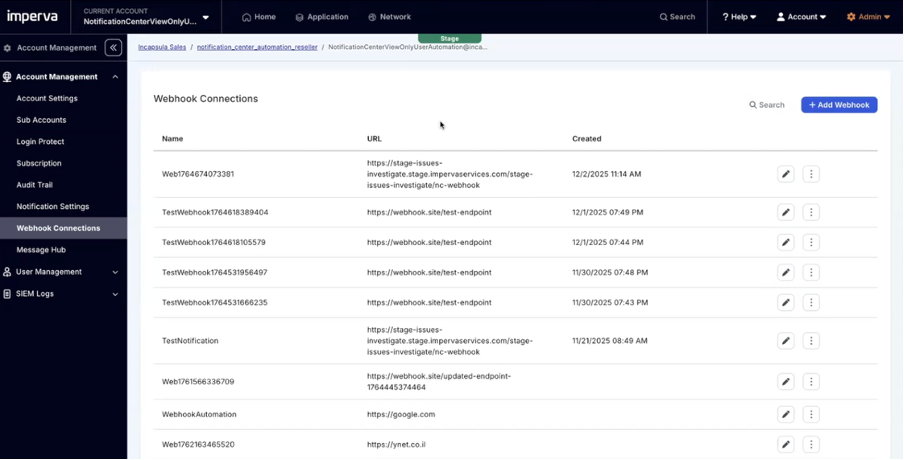
There’s nothing new to install. Webhook connections are configured directly in the Imperva platform under Accounts – Webhook Connection. You name the connection, define the endpoint URL, and assign it to the desired notification policy
Today, webhook notifications work alongside email—so you can run both channels in parallel and migrate at your own pace.
What are webhook notifications?
Webhook notifications are automated, real-time messages that Imperva sends to a URL you define the moment a security or operational event occurs. The event is delivered as structured data your tools can act on immediately—opening tickets, posting to chat channels, or triggering automated workflows—without anyone reading an email first.
How are webhook notifications more reliable than email security alerts?
Email alerts can be lost to spam filters or buried in crowded inboxes. Webhook notifications are delivered directly to your systems, with backoff logic that retries delivery if your endpoint is temporarily unreachable and optional authentication codes in the webhook header to verify each message. The result is fewer missed alerts and a structured payload your automation can parse reliably.
What security events can trigger an Imperva webhook?
Webhook notifications can fire on events such as a DDoS attack starting or stopping, an SSL certificate nearing expiration, a new site that needs DNS configuration, and bandwidth overage warnings. Each event is sent to the notification policy you assign it to. Some notification types and integrations are rolling out over time, so check the Imperva documentation for current coverage.
Can I use webhook and email notifications at the same time?
Yes. Webhook notifications run alongside email, so you can keep both channels active and migrate to webhooks at your own pace. Many teams keep email as a backup while webhooks become the primary channel for automated response.
How do I set up webhook notifications in Imperva?
There is nothing new to install. In the Imperva Platform, go to Accounts – Webhook Connection, name the connection, define the endpoint URL, and assign it to the notification policy you want. For step-by-step instructions and current event coverage, see the Imperva webhook documentation.
Webhook notifications mean fewer missed alerts, faster automation, and less manual work. Email becomes your backup, not your primary channel. At this stage access to webhook notifications is currently limited, get in touch to find out more.
Your security workflows just got an upgrade.
Contact your Imperva account team to find out more.
Protect your business for 30 days on Imperva.
此内容由惯性聚合(RSS阅读器)自动聚合整理,仅供阅读参考。 原文来自 — 版权归原作者所有。