惯性聚合 高效追踪和阅读你感兴趣的博客、新闻、科技资讯
阅读原文 在惯性聚合中打开

推荐订阅源

WordPress大学
WordPress大学
Microsoft Security Blog
Security Archives - TechRepublic
V
Visual Studio Blog
宝玉的分享
宝玉的分享
IT之家
IT之家
人人都是产品经理
人人都是产品经理
T
The Blog of Author Tim Ferriss
I
InfoQ
B
Blog RSS Feed
T
Threatpost
博客园_首页
M
MIT News - Artificial intelligence
Spread Privacy
Spread Privacy
cs.CL updates on arXiv.org
Know Your Adversary
Know Your Adversary
U
Unit 42
Engineering at Meta
Engineering at Meta
C
Cyber Attacks, Cyber Crime and Cyber Security
月光博客
月光博客
Scott Helme
Scott Helme
T
Tor Project blog
有赞技术团队
有赞技术团队
AWS News Blog
AWS News Blog
让小产品的独立变现更简单 - ezindie.com
Last Week in AI
Last Week in AI
S
Schneier on Security
Vercel News
Vercel News
博客园 - Franky
C
Cybersecurity and Infrastructure Security Agency CISA
L
LINUX DO - 热门话题
NISL@THU
NISL@THU
L
LangChain Blog
爱范儿
爱范儿
Google DeepMind News
The GitHub Blog
The GitHub Blog
雷峰网
雷峰网
Latest news
Latest news
C
CXSECURITY Database RSS Feed - CXSecurity.com
Hugging Face - Blog
Hugging Face - Blog
Exploit-DB.com RSS Feed
www.infosecurity-magazine.com
G
GRAHAM CLULEY
S
Security Affairs
A
About on SuperTechFans
K
KPMG report finds enterprise disconnect between AI and its ROI | CIO
大猫的无限游戏
大猫的无限游戏
W
WeLiveSecurity
Cisco Talos Blog
Cisco Talos Blog
罗磊的独立博客

博客园 - Advance

微软的操作系统已占据96.97%的市场份额(来自OneStat.com的权威调查) 软件测试常识(转载自51testing.com) 安装Rational Enterprise Suite(Robot...)时遇到的问题及解决办法! 如何解决:将字符串转换为 uniqueidentifier 时出现语法错误 这是春的气息? Microsoft系列 常见漏洞及解决方法 .NET(C#)连接各类数据库-集锦 让人深恶痛绝的编码问题?博客园也出现了乱码现象! 炎炎夏日,酷暑难耐! Mono使用日志(2) Mono使用日志(1) Visual Studio 2005 Beta2 简体中文版发布 C#-Imaging - Moire Fringe (摩尔纹) C#在OpenGL编程中的应用--关于摩尔纹的研究 VS.NET2005为何无法连接数据库? C#中对ActiveX控件的调用 在ASP.NET中指定出错页面,不让代码外泄! 有人尝试过用C#写一个操作系统吗? [发布]★以学校为背景做的CS游戏地图★
怎样获取本地机器的MAC地址
Advance · 2005-03-11 · via 博客园 - Advance

程序代码如下:

using System;
using System.Management;

public class MAC
{
    
public static void Main()
    
{
        ManagementClass mc 
= new ManagementClass("Win32_NetworkAdapterConfiguration");  
        ManagementObjectCollection moc 
= mc.GetInstances();  
        
foreach(ManagementObject mo in moc)  


if((bool)mo["IPEnabled"== true)  
                Console.WriteLine(
"MAC address\t{0}", mo["MacAddress"].ToString());  
        }
  
        ManagementObject disk 
= new ManagementObject("win32_logicaldisk.deviceid=\"c:\"");  
        disk.Get();  
        Console.WriteLine(
"Volume Serial Number: " + disk.GetPropertyValue("VolumeSerialNumber").ToString()); 
    }

}

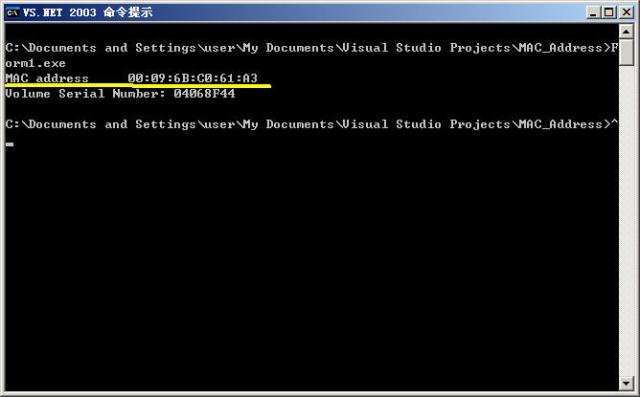
输出如图:

通过上面的程序获取MAC物理地址和卷轴序列号!

posted on 2005-03-11 15:20  Advance  阅读(2746)  评论(0)    收藏  举报