









Follow ZDNET: Add us as a preferred source on Google.
Running a Google search typically shows me the AI overview with an AI-generated summary of the information I want. Since AI isn't always accurate, I make sure to click on some of the links to the third-party sources to investigate them directly. But in the past, this was a clumsy process as each link would open in a separate tab, forcing me to juggle multiple tabs. Now, a new change to AI Mode cuts down on that type of tab clutter.
Also: Chrome's new 'Skills' update lets you save AI prompts now - for one-click reuse
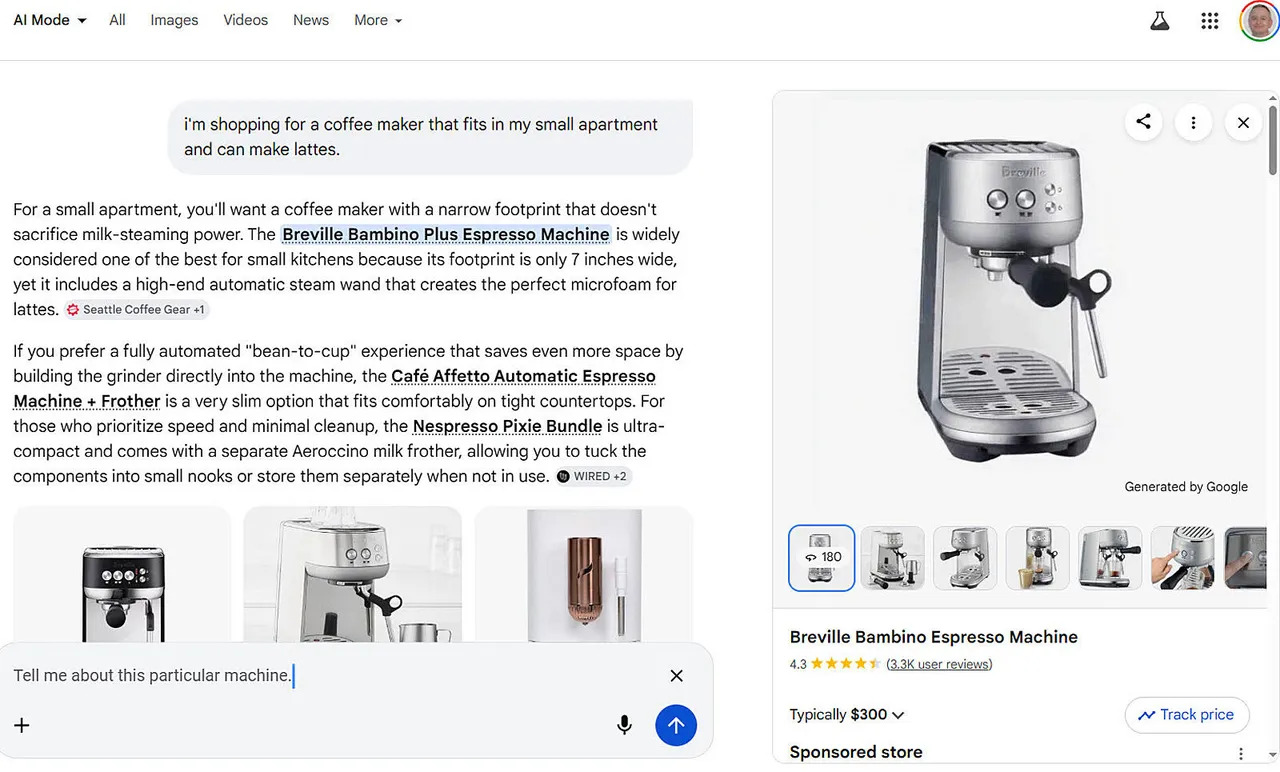
Rolling out to Google Chrome on Thursday is an upgrade to AI Mode that lets you focus on each search result you visit without losing your train of thought. With the new search mode, any website you visit by clicking its link opens side-by-side with your AI Mode screen. This means you can view your search window and the site you visit together on one page. You can then ask Google follow-up questions while still viewing the third-party site.
"Now, when you're using AI Mode on Chrome desktop, clicking a link opens the web page side-by-side with AI Mode," Google said in a new blog post. "This makes it much easier to visit relevant websites, compare details, and ask follow-up questions while still maintaining the context of your search."
As one example offered by Google, let's say you're shopping for a coffee maker that fits in your apartment and can make lattes. Using AI Mode in Google Search in Chrome, describe what you want, and you'll see not only the AI summary but links to websites for different retailers. Click the link for a specific retailer, and the resulting website opens next to your AI Mode window. You can then ask Google questions about a coffee maker, and AI Mode will provide more details.
Also: Google Chrome's vertical tabs are here: How to opt in and use the new Reading Mode
Here's another example. Maybe you're searching Google for information on a technology product. Among the linked results used for the AI overview is one for a ZDNET story. Clicking the link takes you to the story, which displays side-by-side with AI Mode. You can then ask Google further questions about the product while still viewing the story.
"Our early testers loved that they didn't have to constantly switch tabs to get help with a comprehensive article or a long video," Google said. "And they found that having both Search and the web side-by-side helped them stay focused on their tasks while exploring useful web pages."
And there's one more item on the list.
Using Chrome on the desktop or mobile, you're now able to search across your recent tabs. To do this, select the new Plus menu in the box on the New Tab page (or the existing Plus menu within AI Mode). Select any of your recent tabs and add them to your search. You can now ask any questions related to the pages in all those tabs.
As one example from Google, maybe you're studying for a test or other type of assignment. Your open tabs are filled with class notes, lecture slides, and academic papers, but you need more. Based on the content in those tabs, ask Google to suggest more sites for you to visit.
Also: I let Chrome's AI agent shop, research, and email for me - here's how it went
The new updates are currently rolling out in the US, starting with US English, and should reach all users by the end of the day. Google promises that it'll soon expand to other regions.
To get these new features, you need Chrome version 146.0.7680.174 or higher. In Chrome, click the ellipsis icon at the top, go to Help, and then select About Google Chrome. You can then check and update your current version if needed. Then just restart the browser to see if the AI Mode changes have reached you.
For now, the AI Mode updates are accessible only in Chrome on the desktop, even if you use the standard Google search engine via a different browser. But according to a Google spokesperson, the goal is to bring these capabilities to as many people as possible across the web.
此内容由惯性聚合(RSS阅读器)自动聚合整理,仅供阅读参考。 原文来自 — 版权归原作者所有。