







1.下载 Microsoft JDBC Driver for SQL Server。
(1)Microsoft JDBC Driver 4.0 for SQL Server 下载地址:http://www.microsoft.com/zh-cn/download/details.aspx?id=11774
网站提供了两种格式文件供下载,一种是自解压的EXE格式文件,还有一种是tar.gz格式的压缩文件。两种格式选其一下载即可,经过解压缩,可以得到两个JAR格式文件:sqljdbc.jar与sqljdbc4.jar。
(2)由于本人使用的是SQL Server 2012,因此需将“sqljdbc4.jar”拷贝至“%TOMCAT_HOME%\webapps\cas\WEB-INF\lib”文件夹。
(3)在本系列第二部分曾经提及从CAS网站下载“cas-server-3.5.1-release.zip”并解压缩。在解压缩的文件下中找到“modules\cas-server-support-jdbc-3.5.1.jar”,将其一并拷贝至“%TOMCAT_HOME%\webapps\cas\WEB-INF\lib”文件夹。
2.创建用于身份验证的数据库
(1)启动SQL Server Management Studio,新建一数据库“UsersDB”,并在其中建立表“Users”,字段如下:
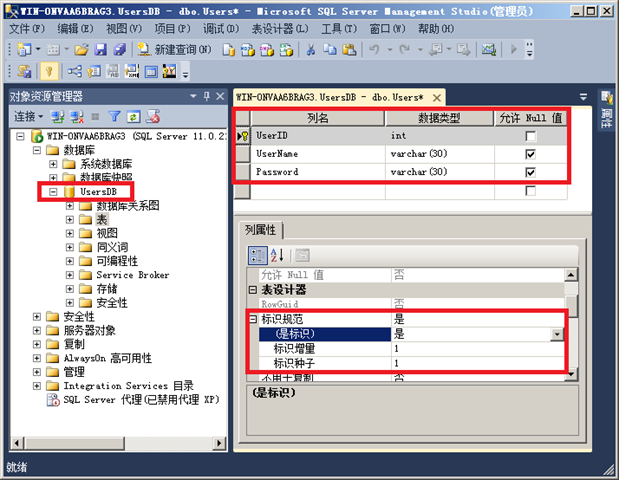
(2)在表中输入若干测试数据:

3.配置CAS实现基于数据库的身份验证
(1)以管理员身份启动文本编辑工具,打开“%TOMCAT_HOME%\webapps\cas\WEB-INF\deployerConfigContext.xml”。找到下面的代码
<bean id="authenticationManager"
    class="org.jasig.cas.authentication.AuthenticationManagerImpl">
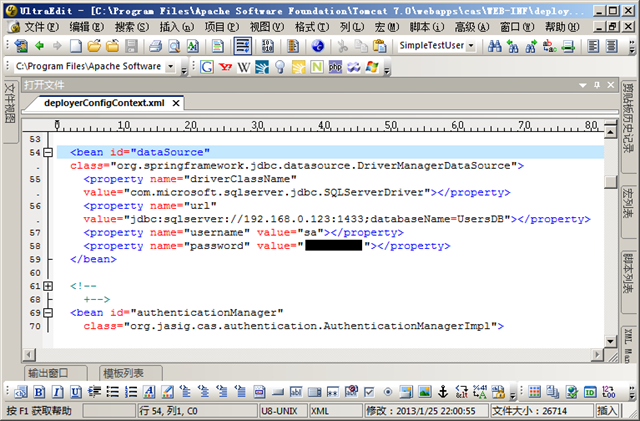
(2)在该段代码前面插入 SQL Server JDBC 数据源配置信息:
<bean id="dataSource" class="org.springframework.jdbc.datasource.DriverManagerDataSource">
    <property name="driverClassName" value="com.microsoft.sqlserver.jdbc.SQLServerDriver"></property>
    <property name="url" value="jdbc:sqlserver://192.168.0.123:1433;databaseName=UsersDB"></property>
    <property name="username" value="sa"></property>
    <property name="password" value="YourPassword"></property>
</bean>
如下图所示:
(3)找到如下配置信息:
<bean class="org.jasig.cas.authentication.handler.support.SimpleTestUsernamePasswordAuthenticationHandler" />
该配置信息使用SimpleTestUsernamePasswordAuthenticationHandler验证用户,即默认用户名和密码相同则验证通过,用户名密码不同则登录失败。我们需要将其替换成基于数据库验证的配置信息。
首先将上面的配置信息注释掉,并在其下面插入如下配置信息:
<bean class="org.jasig.cas.adaptors.jdbc.QueryDatabaseAuthenticationHandler">
    <property name="sql" value="select Password from users where username=?" />
    <property name="dataSource" ref="dataSource" />
</bean>
如图所示:

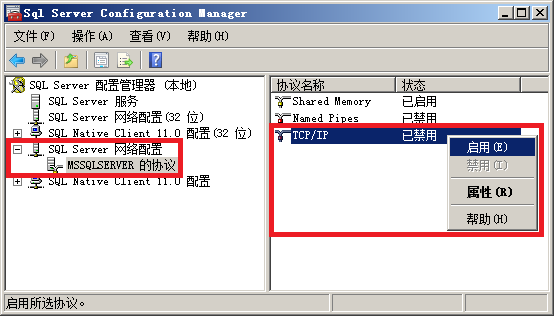
说明:如果你安装的是SQL Server 2012,那么默认TCP/IP访问协议不会打开,因此无法通过IP地址的方式访问SQL Server数据,解决办法就是启动SQL Server配置管理器,并在里面启用TCP/IP,启用后记得重新启动SQL Server服务以使设置生效。如图所示:
(4)保存对“%TOMCAT_HOME%\webapps\cas\WEB-INF\deployerConfigContext.xml”所做的修改。
(5)重新启动 Tomcat 服务。
4.测试基于数据库的身份验证
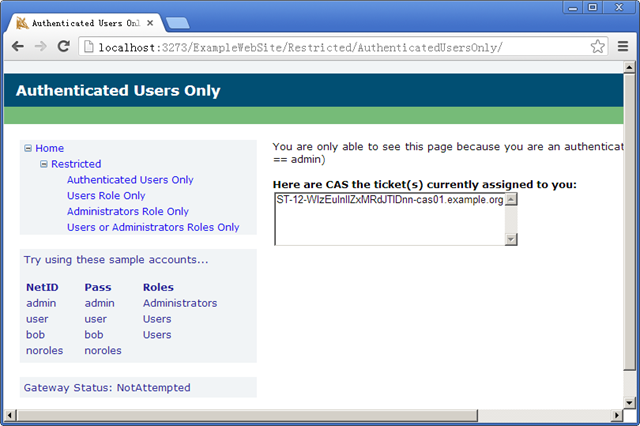
从客户端运行前面调试好的WebForm程序(请参考:Yale CAS + .net Client 实现 SSO(3)),输入用户名“admin”、密码“123”,测试是否登录成功。如果一切配置正常,可以看到程序登录后的界面如下图:
5.进一步改善登录体验
在实际使用过程中,用户可能希望通过多种方式登录:用户名、密码;邮箱、密码;手机号、密码,如何解决多种方式登录的问题呢?在随后的部分我们将深入讨论如何解决此类问题。
待续...
此内容由惯性聚合(RSS阅读器)自动聚合整理,仅供阅读参考。 原文来自 — 版权归原作者所有。