


0.代码下载
1.简要说明
证书注册API(Certificate Enrollment API)的功能是用于在客户端程序请求一个证书,请求批准后得到一个证书,然后安装证书。从vista开始使用的市CertEnroll.dll,之前使用的都是Xenroll.dll
我门的CA是Widows Certificate Services
CA即证书管理机构,受委托发放数字证书的第三方组织或公司。数字证书是用来建立数字签名和公-私(public-private)密钥对的。CA在这个过程中所起的作用就是保证获得这一独特证书的人就是被授权者本人。在数据安全和电子商务中,CA是一个非常重要的组成部分,因为它们确保信息交换各方的身份。
2.添加引用
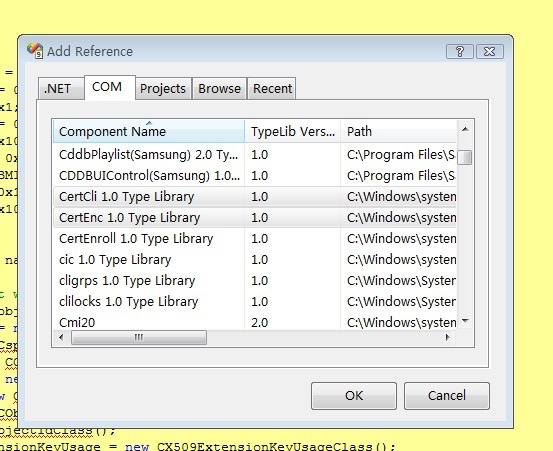
using CERTENROLLLib;
using CERTCLIENTLib;
私有变量定义
private const int CC_DEFAULTCONFIG = 0;
private const int CC_UIPICKCONFIG = 0x1;
private const int CR_IN_BASE64 = 0x1;
private const int CR_IN_FORMATANY = 0;
private const int CR_IN_PKCS10 = 0x100;
private const int CR_DISP_ISSUED = 0x3;
private const int CR_DISP_UNDER_SUBMISSION = 0x5;
private const int CR_OUT_BASE64 = 0x1;
private const int CR_OUT_CHAIN = 0x100;
private string sOK = "";
3.创建证书请求
public string createRequest(string name, ref string strRequest)
{
// Create all the objects that will be required
CX509CertificateRequestPkcs10 objPkcs10 = new CX509CertificateRequestPkcs10Class();
CX509PrivateKey objPrivateKey = new CX509PrivateKeyClass();
CCspInformation objCSP = new CCspInformationClass();
CCspInformations objCSPs = new CCspInformationsClass();
CX500DistinguishedName objDN = new CX500DistinguishedNameClass();
CX509Enrollment objEnroll = new CX509EnrollmentClass();
CObjectIds objObjectIds = new CObjectIdsClass();
CObjectId objObjectId = new CObjectIdClass();
CX509ExtensionKeyUsage objExtensionKeyUsage = new CX509ExtensionKeyUsageClass();
CX509ExtensionEnhancedKeyUsage objX509ExtensionEnhancedKeyUsage = new CX509ExtensionEnhancedKeyUsageClass();try
{// Initialize the csp object using the desired Cryptograhic Service Provider (CSP)
objCSP.InitializeFromName(
"Microsoft Enhanced Cryptographic Provider v1.0"
);// Add this CSP object to the CSP collection object
objCSPs.Add(
objCSP
);// Provide key container name, key length and key spec to the private key object
//objPrivateKey.ContainerName = "AlejaCMa";
objPrivateKey.Length = 1024;
objPrivateKey.KeySpec = X509KeySpec.XCN_AT_SIGNATURE;
objPrivateKey.KeyUsage = X509PrivateKeyUsageFlags.XCN_NCRYPT_ALLOW_ALL_USAGES;
objPrivateKey.MachineContext = false;// Provide the CSP collection object (in this case containing only 1 CSP object)
// to the private key object
objPrivateKey.CspInformations = objCSPs;// Create the actual key pair
objPrivateKey.Create();// Initialize the PKCS#10 certificate request object based on the private key.
// Using the context, indicate that this is a user certificate request and don't
// provide a template name
objPkcs10.InitializeFromPrivateKey(
X509CertificateEnrollmentContext.ContextUser,
objPrivateKey,
""
);// Key Usage Extension
objExtensionKeyUsage.InitializeEncode(
X509KeyUsageFlags.XCN_CERT_DIGITAL_SIGNATURE_KEY_USAGE |
X509KeyUsageFlags.XCN_CERT_NON_REPUDIATION_KEY_USAGE |
X509KeyUsageFlags.XCN_CERT_KEY_ENCIPHERMENT_KEY_USAGE |
X509KeyUsageFlags.XCN_CERT_DATA_ENCIPHERMENT_KEY_USAGE
);
objPkcs10.X509Extensions.Add((CX509Extension)objExtensionKeyUsage);// Enhanced Key Usage Extension
objObjectId.InitializeFromValue("1.3.6.1.5.5.7.3.2"); // OID for Client Authentication usage
objObjectIds.Add(objObjectId);
objX509ExtensionEnhancedKeyUsage.InitializeEncode(objObjectIds);
objPkcs10.X509Extensions.Add((CX509Extension)objX509ExtensionEnhancedKeyUsage);
objDN.Encode(
name,
X500NameFlags.XCN_CERT_NAME_STR_NONE
);
}
catch (Exception ex)4.发送证书请求到CA,证书请求批准后的到一个证书
public string sendRequest(string strRequest, ref string strCert)
{
// Create all the objects that will be required
CCertConfig objCertConfig = new CCertConfigClass();
CCertRequest objCertRequest = new CCertRequestClass();
string strCAConfig;int iDisposition;
string strDisposition;try
{
// Get CA config from UI
//strCAConfig = objCertConfig.GetConfig(CC_DEFAULTCONFIG);
strCAConfig = objCertConfig.GetConfig(CC_UIPICKCONFIG);// Submit the request
iDisposition = objCertRequest.Submit(
CR_IN_BASE64 | CR_IN_FORMATANY,
strRequest,
null,
strCAConfig
);// Check the submission status
if (CR_DISP_ISSUED != iDisposition) // Not enrolled
{
strDisposition = objCertRequest.GetDispositionMessage();if (CR_DISP_UNDER_SUBMISSION == iDisposition) // Pending
{return "The submission is pending: " + strDisposition;
}
else // Failed
{
string sError;
sError = "The submission failed: " + strDisposition;
sError += "Last status: " + objCertRequest.GetLastStatus().ToString();
return sError;
}
}// Get the certificate
strCert = objCertRequest.GetCertificate(
CR_OUT_BASE64 | CR_OUT_CHAIN
);
return sOK;
}
catch (Exception ex)5.在客户端机器上安装证书
public string acceptPKCS7(string strCert)
{
// Create all the objects that will be required
CX509Enrollment objEnroll = new CX509EnrollmentClass();try
{// Install the certificate
objEnroll.Initialize(X509CertificateEnrollmentContext.ContextUser);
objEnroll.InstallResponse(
InstallResponseRestrictionFlags.AllowUntrustedRoot,
strCert,
EncodingType.XCN_CRYPT_STRING_BASE64,
null
);return sOK;
}
catch (Exception ex)
{
return ex.Message;
}
}
6.参考
此内容由惯性聚合(RSS阅读器)自动聚合整理,仅供阅读参考。 原文来自 — 版权归原作者所有。
