
惯性聚合 高效追踪和阅读你感兴趣的博客、新闻、科技资讯
阅读原文 在惯性聚合中打开

推荐订阅源

酷 壳 – CoolShell
酷 壳 – CoolShell
T
Threatpost
Latest news
Latest news
N
News | PayPal Newsroom
Threat Intelligence Blog | Flashpoint
Help Net Security
Help Net Security
D
Darknet – Hacking Tools, Hacker News & Cyber Security
AI
AI
Simon Willison's Weblog
TaoSecurity Blog
TaoSecurity Blog
The Last Watchdog
The Last Watchdog
L
LINUX DO - 热门话题
Google DeepMind News
T
Threat Research - Cisco Blogs
O
OpenAI News
钛媒体:引领未来商业与生活新知
钛媒体:引领未来商业与生活新知
T
The Exploit Database - CXSecurity.com
NISL@THU
NISL@THU
Application and Cybersecurity Blog
S
Securelist
小众软件
小众软件
cs.CL updates on arXiv.org
Martin Fowler
Martin Fowler
S
SegmentFault 最新的问题
Cisco Talos Blog
Cisco Talos Blog
云风的 BLOG
云风的 BLOG
AWS News Blog
AWS News Blog
GbyAI
GbyAI
N
News and Events Feed by Topic
cs.CV updates on arXiv.org
美团技术团队
Engineering at Meta
Engineering at Meta
A
About on SuperTechFans
博客园 - 三生石上(FineUI控件)
S
Schneier on Security
博客园 - 聂微东
V2EX - 技术
V2EX - 技术
T
Troy Hunt's Blog
SecWiki News
SecWiki News
S
Secure Thoughts
B
Blog RSS Feed
Hugging Face - Blog
Hugging Face - Blog
WordPress大学
WordPress大学
腾讯CDC
H
Heimdal Security Blog
Exploit-DB.com RSS Feed
Apple Machine Learning Research
月光博客
月光博客
www.infosecurity-magazine.com
P
Privacy International News Feed

博客园 - zhumk

Kindle DX/2最低程度中文化 ABAP:更新供应商Email地址 How to search for BAdIs IP41 - 维护计划中的日期和周期 如何升级Mac Mini(二代)内存 Kindle Collection编辑器 Kindle 汉化终结版 ABAP:密码输入框 SAP相关下载链接 ABAP:在Dynpro屏幕中使用Selection Screen BAPI:KBPP_EXTERN_UPDATE_CO, TCODE:CJ30/CJ40 第四部分 ABAP: 如何让ALV Tree的注册事件在屏幕PAI之后触发 ABAP: Search Help for Date ABAP:运行中修改Table Control控件状态 BAPI:KBPP_EXTERN_UPDATE_CO, TCODE:CJ30/CJ40 第三部分 BAPI:KBPP_EXTERN_UPDATE_CO, TCODE:CJ30/CJ40 第二部分 BAPI:KBPP_EXTERN_UPDATE_CO, TCODE:CJ30/CJ40 第一部分 ABAP:WBS Element下层预算向上层汇总 DynDNS免费动态域名解析
ALV popup based on classic style REUSE_ALV_POPUP_TO_SELECT function module
zhumk · 2011-03-04 · via 博客园 - zhumk

http://www.kerum.pl/infodepot/00004

This is sample ALV popup based on REUSE_ALV_POPUP_TO_SELECT function module (classic style). It includes only buttons for ENTER and CANCEL to make this dialog simple for a user. Other buttons related to ALV standard functions are excluded.

Here the sample popup:
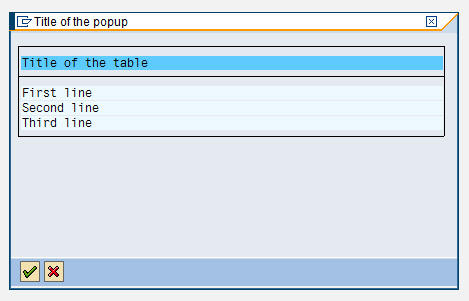
screenshot

and the related coding:

REPORT zkm_test.

TYPE-POOLS:
  slis.

PERFORM display_popup.

FORM display_popup.

  DATA:
    BEGIN OF ls_popup,
      text(60) TYPE c,
    END OF ls_popup,
    lt_popup   LIKE TABLE OF ls_popup,
    lt_fcat    TYPE slis_t_fieldcat_alv,
    ls_fcat    TYPE slis_fieldcat_alv,
    lt_excl    TYPE slis_t_extab,
    ls_excl    TYPE slis_extab,
    lv_exit    TYPE c.

  ls_popup-text = 'First line'.  APPEND ls_popup TO lt_popup.
  ls_popup-text = 'Second line'. APPEND ls_popup TO lt_popup.
  ls_popup-text = 'Third line'.  APPEND ls_popup TO lt_popup.

  ls_fcat-col_pos = 1.
  ls_fcat-fieldname = 'TEXT'.
  ls_fcat-outputlen = 60.
  ls_fcat-seltext_m = 'Title of the table'.
  APPEND ls_fcat TO lt_fcat.

  ls_excl-fcode = '&ETA'. APPEND ls_excl TO lt_excl.
  ls_excl-fcode = '%SC'.  APPEND ls_excl TO lt_excl.
  ls_excl-fcode = '%SC+'. APPEND ls_excl TO lt_excl.
  ls_excl-fcode = '&OUP'. APPEND ls_excl TO lt_excl.
  ls_excl-fcode = '&ODN'. APPEND ls_excl TO lt_excl.
  ls_excl-fcode = '&ILT'. APPEND ls_excl TO lt_excl.
  ls_excl-fcode = '&OL0'. APPEND ls_excl TO lt_excl.
  ls_excl-fcode = '&CRB'. APPEND ls_excl TO lt_excl.
  ls_excl-fcode = '&CRL'. APPEND ls_excl TO lt_excl.
  ls_excl-fcode = '&CRR'. APPEND ls_excl TO lt_excl.
  ls_excl-fcode = '&CRE'. APPEND ls_excl TO lt_excl.

  ls_excl-fcode = '&ALL'. APPEND ls_excl TO lt_excl.
  ls_excl-fcode = '&SAL'. APPEND ls_excl TO lt_excl.

  CALL FUNCTION 'REUSE_ALV_POPUP_TO_SELECT'
    EXPORTING
      i_title               = 'Title of the popup'
      i_selection           = ''
      i_screen_start_column = 1
      i_screen_start_line   = 1
      i_screen_end_column   = 62
      i_screen_end_line     = 10
      i_tabname             = 'LT_POPUP'
      it_fieldcat           = lt_fcat
      it_excluding          = lt_excl
    IMPORTING
      e_exit                = lv_exit
    TABLES
      t_outtab              = lt_popup.

  IF lv_exit = 'X'.

  ELSE.

  ENDIF.

ENDFORM.