









Follow ZDNET: Add us as a preferred source on Google.
If you want to cut the cord and enhance your streaming TV experience, you may wonder which device is best suited for you. The Amazon Fire TV Stick and the Roku Streaming Stick are two of the most popular options on the market -- and Amazon just announced a new Fire TV Stick HD, coming on April 29.
Also: Own a Roku TV? My 20+ best shortcuts to get the most out of the system
However, there are some key differences to consider before pulling the plug. I'll delve into the major differences between Fire TV and the Roku streaming platform to help you determine which one best suits your needs and preferences, using the comparable Roku Streaming Stick Plus and Fire TV Stick 4K Plus as examples.
| Features | Fire TV Stick 4K Plus | Roku Streaming Stick Plus |
| Normal Retail Price | $50 | $40 |
| Picture quality | 4K resolution, Dolby Vision, HDR10, HDR10+ | 4K resolution, HDR10, HDR10+ |
| Frame rate | 60 FPS | 60 FPS |
| Wi-Fi | Wi-Fi 6 Dual-band | Wi-Fi 5 Dual-band |
| Ports | HDMI 2.1 output with ARC support, Micro-USB for power | HDMI 2.0b |
| Remote batteries | Two AAA batteries | Two AAA batteries |
When you compare the tech specifications of a Fire TV Stick 4K Plus against the Roku Streaming Stick Plus, you'll find that both devices are very similar. Amazon typically offers bigger discounts more often on its Fire TV Stick than Roku does, although not currently. The Fire TV may be a better deal if you value Dolby Vision and seamless Alexa integrations, which brings me to my next point.
Alexa, Amazon's voice assistant, has become a must on almost every Amazon device, and the Fire TV Stick 4K Plus is no exception. The new Fire TV Stick HD will also feature Alexa+ built in from the get-go, making Alexa+ now available on all Fire TV Stick devices.
Also: I changed 10 settings on my Fire TV to significantly improve the performance
The Alexa-enabled remote included with this streaming device has a button that can be pressed and held to ask Alexa questions. Though the Roku also comes with a voice remote for navigating the Roku platform, the Alexa remote can do more than just search for your favorite TV show.
If you have Alexa-enabled devices in your smart home, you can use your Fire TV Stick remote to tell Alexa to turn on a smart light or adjust the room temperature on your smart thermostat. You can even ask the voice assistant to show you compatible security cameras on your TV.
Roku offers a line of smart home products that can integrate its camera feeds with Roku TVs or streaming devices; however, the feature is currently limited to Roku Home devices. Roku is rolling out an updated Roku Voice feature with a similar virtual assistant to Alexa, but that update hasn't been released yet.
Unsurprisingly, the Fire TV platform is more focused on Prime Video. The streaming service comes preinstalled on the device, offering access to great exclusive programming. These include, but are not limited to, hit shows like Fallout, The Boys, and the upcoming Steal. Of course, not everything is geared toward adults, as there are plenty of kid-friendly shows, such as Tumble Leaf and the newer BatFam, which my kids love.
Also: 12+ powerful Alexa commands you should start using at home (no subscriptions required)
As the Fire TV is an Amazon product, it's not surprising that you'll find many ads while navigating the system. I personally don't mind the ads so much; I ignore most of them. However, if you're an avid Prime Video viewer, you'll find ads tailored to users like you.
Roku devices offer access to Prime Video, but the service is not preinstalled. You'll need to visit the Roku Channel Store, download the Prime Video app, register the app, record a six-digit code, and enter that code into Amazon's MyTV webpage. The process is straightforward, but it can take some time to complete. Meanwhile, on the Fire TV Stick, simply log in to your account to start watching.
The Fire TV menu is visually appealing, but it's not as straightforward or user-friendly as Roku's. You often have to take extra steps to accomplish something that can be done in a single step on a Roku.
Also: Try this 30-second refresh on your Roku TV before replacing it for good
The Roku operating system is not only easier to navigate for everyday users but also for guests who aren't familiar with it, including children and older people. The system uses tiles that make it more intuitive to find what you need, and it doesn't autoplay ads while you're on the home screen, while you're deciding what to watch.
Admittedly, Fire TV remotes have come a long way in becoming more user-friendly and, in the process, more like the Roku remote. However, I still find the Roku remote easier to use than its competitor.
Also: I watched Roku's free live TV channels, and it felt like the cable I grew up with
It's the buttons for me; give me good old arrows, and I know where to go. I don't want to sound like a dinosaur here, but I'd choose the Roku remote if I had to choose between it, my Fire TV, Google TV Streamer, and Apple TV 4K remotes.
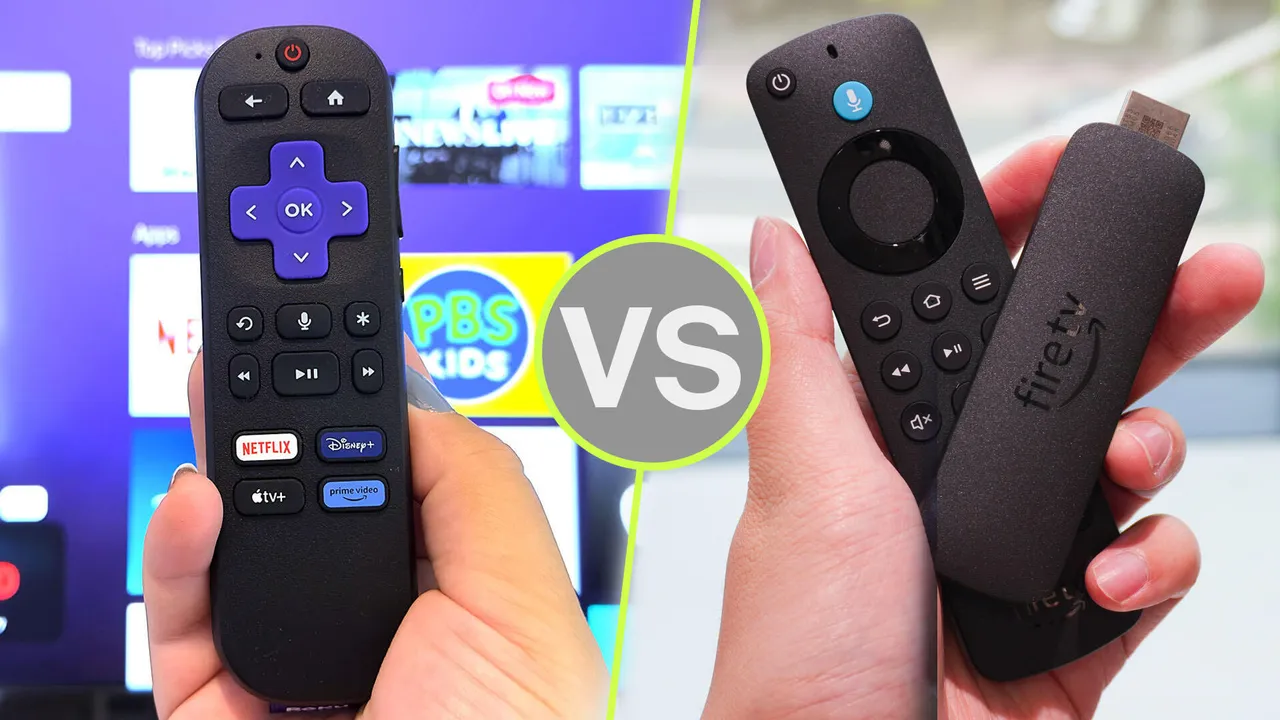
My Roku remote (left) doesn't get lost in my couch cushions nearly as often as the Fire TV Stick remote (right).
The Roku remote is rounder and thicker than the Fire TV remote, which is thinner and more prone to getting lost between the couch cushions. The Roku remote also has old-school arrows and an "OK" button, whereas the Fire TV remote has a circle with a round "OK" button in the middle and, you guessed it, no letters or arrows in this navigation wheel, which makes it a little less intuitive for someone getting familiar with it.
Also: How to reset your Roku: 4 easy ways
Aside from this, both remotes are quite similar: they both have mute and volume buttons to control compatible televisions, standard navigation buttons, and four-channel shortcut buttons that are not reprogrammable on either remote. Additionally, both devices feature a mobile app that lets your phone serve as a remote control if you lose your physical remote.
The newest Roku Streaming Stick HD and Plus models feature a convenient benefit that makes them the most travel-friendly streaming devices: they're powered by your TV's HDMI port. Aside from the Stick itself and the remote, there are no extra cables or add-ons to the Roku Stick Plus.
This not only makes installation easier than ever, but also makes it easy to carry if you want to take it on a trip. Taking your Roku lets you use your own streaming device and subscriptions at a hotel or short-term rental without having to log in to them or, worse, forgetting to log out before leaving.
A streaming stick may not be the perfect solution for every application, but it's a small, portable, and inexpensive way to turn a standard TV into a smart one.
There's also the option of a more expensive alternative, such as buying a smart TV that's already Wi-Fi-integrated and equipped with the most popular streaming apps. However, the investment is far more than the cost of a $50 TV stick.
All the Fire Sticks support the following apps: Netflix, HBO Max, Prime Video, Youtube Kids, Apple TV, Sling TV, Disney+, Peacock, Starz, Showtime, Paramount+, YouTube TV, IMDb TV, Tubi, Pluto TV, Amazon Music, Spotify, Pandora, iHeartRadio, and many more.
Similarly, all of Roku's offerings support the following apps: Netflix, HBO Max, Prime Video, Apple TV, Sling TV, Disney+, Peacock, Starz, Showtime, Paramount+, YouTube TV, IMDb TV, Tubi, Pluto TV, Amazon Music, Spotify, Pandora, iHeartRadio, and more.
Neither stick charges you to stream your favorite apps. You could save money by only watching the free TV and movie channels such as Vudu, Roku TV, Peacock, or Tubi TV. And if you have an Amazon Prime account, Amazon Video is included. While more recent movies and shows may come with a fee, Amazon Video has plenty of free programming available through your Roku or Amazon Fire player.
Streaming players broadcast what's available from the apps. While many streaming apps offer free content, some of the most popular such as HBO Max, Disney Plus, ESPN+, and Netflix come with a monthly subscription fee. If you'd like to access Netflix from your Roku Streaming Stick, for example, you would need to pay for a monthly Netflix subscription and log in to your account through Roku's interface.
此内容由惯性聚合(RSS阅读器)自动聚合整理,仅供阅读参考。 原文来自 — 版权归原作者所有。