



开发环境:Windows server 2008 Enterprise,Microsoft Visual Studio 2008 SP1,.NET Framework 3.5 SP1,Microsoft SQL Server 2008
开发架构: ASP.NET AJAX,WCF,ADO.NET Entity Framework
开发步骤:
1、创建一个空白解决方案:JXCSln;
2、添加一个类库项目,名称为:Jxc.DAL,删除生成的Class1.cs,接着引用一下:System.Data.Entity,否则在创建数据库连接时会出现错误,无法连接到数据库。然后添加新项:ADO.NET Entity Date Model。名称为:NorthwindDbModel.edmx;在弹出的实体模型向导的第一个窗口中,选择“从数据库生成”,然后下一步,数据库连接设置如下图:

设置好后,单击下一步,出现如下图所示窗口,这时,我们只选择表:

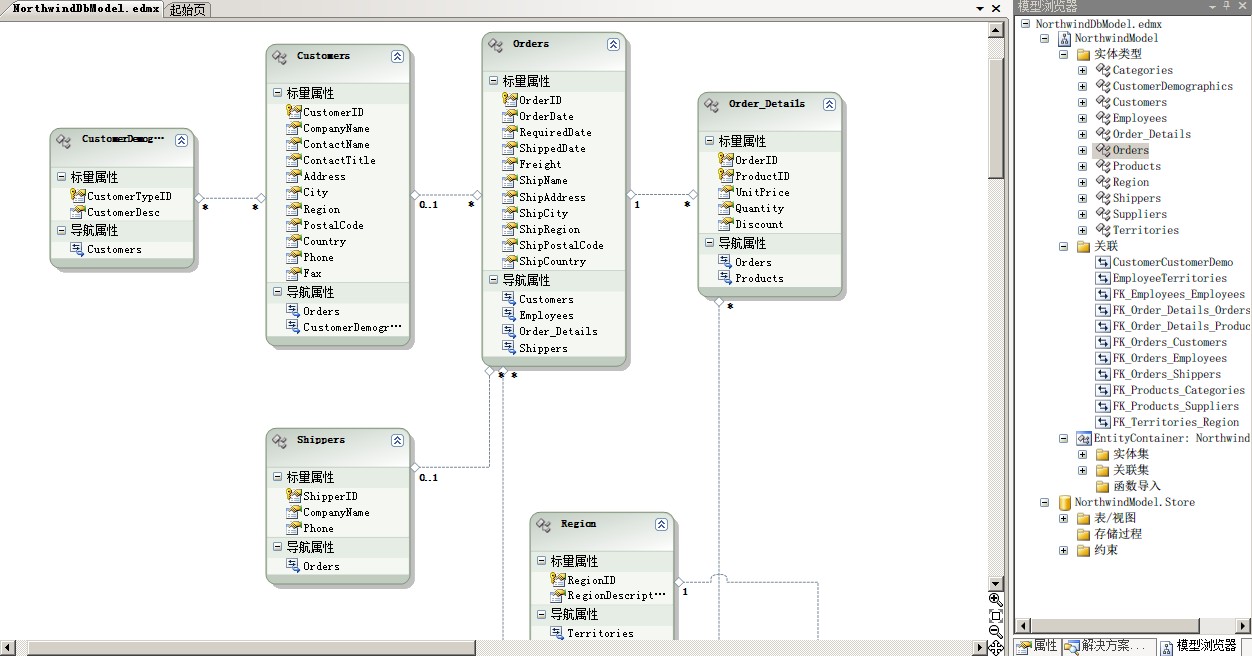
最后单击无成,生成的实体模型图如下:
三、选择Jxc.DAL类库,生成一下。
四、添加一个新项目(类库项目),名称为:Jxc.BLL,删除生成的Class1.cs文件。添加引用,选择项目,引用Jxc.DAL,引用System.Data.Entity。
五、添加一个新类,名称:EmployeesInfo。
六、打开EmployeesInfo.cs文件,输入如下代码:
(需要 using Jxc.DAL;)
NorthwindEntities EmployeesContent = new NorthwindEntities();
public string GetEmployeeNameByID(int EmployeeID)
{
var query = EmployeesContent.Employees.First(p => p.EmployeeID == EmployeeID);
return query.LastName + query.FirstName;
}
public Employees[] GetAllEmployees()
{
var query = from emp in EmployeesContent.Employees select emp;
return query.ToArray();
}
(时间关系,待续...)
接着上面的
七、添加一个新项目:ASP.NET Web 应用程序,并命名为:Jxc.Web。
八、添加引用——>项目:Jxc.BLL,Jxc.DAL,System.Data.Entity。
九、添加新项,WCF服务,名称:EmployeeService.svc; 删除文件IEmployeeService.cs,并将以下代码粘贴到EmployeeService.svc.cs文件中:
using System;
using System.Collections.Generic;
using System.Linq;
using System.Runtime.Serialization;
using System.ServiceModel;
using System.Text;
using Jxc.DAL;
using Jxc.BLL; //记得引用
namespace Jxc.Web
{
[ServiceContract(Namespace = "WcfService")]
public class EmployeeService
{
EmployeesInfo employeefobl = new EmployeesInfo();
int recordCount = 0;
[OperationContract]
public string GetEmployeeNameByID(int empid)
{
return employeefobl.GetEmployeeNameByID(empid);
}
[OperationContract]
public Employees[] GetAllEmployees()
{
return employeefobl.GetAllEmployees();
}
}
}
十、接着删除Web.Config文件中生气的代码:
<system.serviceModel>
<behaviors>
<serviceBehaviors>
<behavior name="Jxc.Web.EmployeeServiceBehavior">
<serviceMetadata httpGetEnabled="true" />
<serviceDebug includeExceptionDetailInFaults="false" />
</behavior>
</serviceBehaviors>
</behaviors>
<services>
<service behaviorConfiguration="Jxc.Web.EmployeeServiceBehavior"
name="Jxc.Web.EmployeeService">
<endpoint address="" binding="wsHttpBinding" contract="Jxc.Web.IEmployeeService">
<identity>
<dns value="localhost" />
</identity>
</endpoint>
<endpoint address="mex" binding="mexHttpBinding" contract="IMetadataExchange" />
</service>
</services>
</system.serviceModel>
十一、选择文件EmployeeService.svc,右键——>查看标记:
将代码::<%@ ServiceHost Language="C#" Debug="true" Service="Jxc.Web.EmployeeService" CodeBehind="EmployeeService.svc.cs" %>
改成如下代码:<%@ ServiceHost Language="C#" Debug="true" Service="Jxc.Web.EmployeeService" CodeBehind="EmployeeService.svc.cs" Factory="System.ServiceModel.Activation.WebScriptServiceHostFactory" %>
十二、打开Default.aspx窗口,加入Asp.net Ajax功能:ScriptManager代码如下:
<body>
<form id="form1" runat="server">
<asp:ScriptManager ID="ScriptManager1" runat="server">
<Services>
<asp:ServiceReference Path="~/EmployeeService.svc" />
</Services>
</asp:ScriptManager>
<br />
<h2>
ASP.NET AJAX+WCF+ADO.NET Entity 架构实例</h2>
<p>
输入一个员工ID调用WCF并返回对应的名字!</p>
请输入部门ID:<input id="txtdeptID" name="txtdeptID" type="text" />
<input id="btnTransfer" onclick="ClientGetEmployeeID()" type="button"
value="调用" /> <span id="Results"></span>
</form>
</body>
十三、编写javascript代码,如下:
<script type="text/javascript">
function ClientGetEmployeeID() {
var txtdeptID = document.getElementById("txtdeptID");
if (isNaN(txtdeptID.value)) {
alert('部门ID必须是数字!')
txtdeptID.focus();
return;
}
var proxy = new WcfService.EmployeeService();
proxy.GetEmployeeNameByID(txtdeptID.value, OnSucceeded, OnFailed, "");
}
function OnSucceeded(result) {
var RsltElem = document.getElementById("Results");
RsltElem.innerHTML = result;
}
function OnFailed(error) {
var RsltElem = document.getElementById("Results");
RsltElem.innerHTML = "调用失败!";
}
</script>
十四、在Default.aspx.cs文件using一下引用项目:
using Jxc.BLL;
using Jxc.DAL;
十五、程序运行如下:

至此,已经可以正常运行,测试通过。
请路过的朋友发表高见,当然也为像我一样想学这些技术的朋友指引一下,不过,还得大家多发表意见,谢谢
此内容由惯性聚合(RSS阅读器)自动聚合整理,仅供阅读参考。 原文来自 — 版权归原作者所有。