

惯性聚合 高效追踪和阅读你感兴趣的博客、新闻、科技资讯
阅读原文 在惯性聚合中打开

推荐订阅源

P
Privacy & Cybersecurity Law Blog
V
V2EX
月光博客
月光博客
奇客Solidot–传递最新科技情报
奇客Solidot–传递最新科技情报
The Register - Security
MongoDB | Blog
MongoDB | Blog
P
Privacy International News Feed
The Last Watchdog
The Last Watchdog
Security Archives - TechRepublic
美团技术团队
Stack Overflow Blog
Stack Overflow Blog
博客园 - 司徒正美
博客园 - 三生石上(FineUI控件)
V
Visual Studio Blog
cs.CV updates on arXiv.org
K
Kaspersky official blog
S
Secure Thoughts
T
Tenable Blog
Security Latest
Security Latest
The Cloudflare Blog
S
Security @ Cisco Blogs
H
Heimdal Security Blog
aimingoo的专栏
aimingoo的专栏
TaoSecurity Blog
TaoSecurity Blog
Blog — PlanetScale
Blog — PlanetScale
Microsoft Security Blog
Schneier on Security
Webroot Blog
Webroot Blog
G
Google Developers Blog
www.infosecurity-magazine.com
Scott Helme
Scott Helme
IT之家
IT之家
Latest news
Latest news
The Hacker News
The Hacker News
C
Check Point Blog
T
The Exploit Database - CXSecurity.com
H
Hackread – Cybersecurity News, Data Breaches, AI and More
腾讯CDC
C
CERT Recently Published Vulnerability Notes
NISL@THU
NISL@THU
N
News | PayPal Newsroom
Forbes - Security
Forbes - Security
P
Palo Alto Networks Blog
S
Security Affairs
S
Securelist
Google Online Security Blog
WordPress大学
WordPress大学
Last Week in AI
Last Week in AI
C
Cybersecurity and Infrastructure Security Agency CISA
A
About on SuperTechFans

博客园 - 蔡秋心

Windows Azure VM的两种shut down 方式 转贴: A Simple c# Wrapper for ffMpeg PowerShell: 找到一个目录下最新的文件 PowerShell: 如何解决File **.ps1 cannot be loaded because the execution of scripts is disabled on this system. Please see "get- help about_sig" for more de 在localhost上使用fiddler 在SQL Server Business Intelligence Development Studio中编辑Dynamcis CRM中的Report Report Design: Best Practices and Guidelines Visual Studio使用小技巧5 – 区块选择(box selection)的拷贝(copy)和粘贴(paste) Visual Studio使用小技巧4 – Where am I(在Solution Explorer中显示当前文档) Visual Studio使用小技巧3 – 标签分组(Tab Group)和分割窗口(Split window) Visual Studio使用小技巧2 – 使用任务列表(task list) - 补充 Visual Studio使用小技巧2 – 使用任务列表(task list) Visual Studio使用小技巧1 – HTML编辑器中的格式化 部署Dotnetnuke Site到虚拟目录和端口不为80的网站 asp.net使用COM组件需要的权限设置 前台线程(Foreground Threads)和后台线程(Background Threads) 在Dynamics CRM 的 Entity Form中显示记录的ID的方法 如何使用VS2005创建web安装包 使用Visual Studio中的Item Template
Visual Studio使用小技巧6 – 为代码加上Using(Resolve using)和管理Using(Organize using)
蔡秋心 · 2011-04-04 · via 博客园 - 蔡秋心

* 为代码加上Using(Resolve Using)

是否你遇到过这种情况? 在internet上或者msdn上找到段代码,拷贝到Visual Studio中进行编译;或者是将书上的代码敲入Visual Studio中,进行编译。得到这样的错误:

The type or namespace name '****' could not be found (are you missing a using directive or an assembly reference?)   

这次错误由两个可能的原因引起的。

1。没有添加引用

2。没有using类所在的命名空间(namespace).

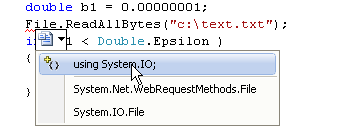
前者没有更方便的办法,只能找到类所在的Assembly,并添加对它的引用。后者有很方便的方法: 将光标置于出错的代码上,敲击Control+’.’ .
image

就会弹出像上图的菜单。菜单中的第一项就是添加using System.IO; 后面两个就是用类的全称(命名空间.类)来替换生成错误的类,这样就不需要using了。

错误的类上的鼠标的右键菜单上已有同样的命令:

image

* 管理Using(Organize Using)

在代码窗口上的空白的任何地方,或者是using namespace上,点击鼠标右键,弹出的快捷菜单中,有Organize Using的弹出菜单。下面有几个命令,可能帮助我们管理using

Remove Unused Using: 删除没有使用的Using

Sort Usings: 给Using 排序

Remove and Using: 删除没有使用的Using,然后排序。

 image
这个功能在复制整个类,再进行修改的场合下很有用。