
惯性聚合 高效追踪和阅读你感兴趣的博客、新闻、科技资讯
阅读原文 在惯性聚合中打开

推荐订阅源

酷 壳 – CoolShell
酷 壳 – CoolShell
H
Hacker News: Front Page
P
Palo Alto Networks Blog
T
ThreatConnect
Apple Machine Learning Research
博客园_首页
T
True Tiger Recordings
P
Privacy & Cybersecurity Law Blog
B
Blog
IT之家
IT之家
Last Week in AI
Last Week in AI
F
Full Disclosure
Hacker News: Ask HN
Hacker News: Ask HN
C
Comments on: Blog
Microsoft Azure Blog
C
Cybersecurity and Infrastructure Security Agency CISA
Microsoft Security Blog
博客园 - 【当耐特】
N
News and Events Feed by Topic
NISL@THU
NISL@THU
腾讯CDC
雷峰网
雷峰网
Security Latest
Security Latest
李成银的技术随笔
M
Microsoft Research Blog - Microsoft Research
L
LangChain Blog
L
Lohrmann on Cybersecurity
cs.CL updates on arXiv.org
C
Check Point Blog
Y
Y Combinator Blog
Recent Announcements
博客园 - Franky
N
News | PayPal Newsroom
V
V2EX
A
About on SuperTechFans
The Register - Security
月光博客
月光博客
奇客Solidot–传递最新科技情报
奇客Solidot–传递最新科技情报
Google Online Security Blog
MyScale Blog
MyScale Blog
Cisco Talos Blog
Cisco Talos Blog
Vercel News
Vercel News
WordPress大学
WordPress大学
C
Cyber Attacks, Cyber Crime and Cyber Security
The Hacker News
The Hacker News
IntelliJ IDEA : IntelliJ IDEA – the Leading IDE for Professional Development in Java and Kotlin | The JetBrains Blog
爱范儿
爱范儿
A
Arctic Wolf
L
LINUX DO - 最新话题
freeCodeCamp Programming Tutorials: Python, JavaScript, Git & More

博客园 - 蔡秋心

Windows Azure VM的两种shut down 方式 转贴: A Simple c# Wrapper for ffMpeg PowerShell: 找到一个目录下最新的文件 PowerShell: 如何解决File **.ps1 cannot be loaded because the execution of scripts is disabled on this system. Please see "get- help about_sig" for more de 在localhost上使用fiddler 在SQL Server Business Intelligence Development Studio中编辑Dynamcis CRM中的Report Report Design: Best Practices and Guidelines Visual Studio使用小技巧6 – 为代码加上Using(Resolve using)和管理Using(Organize using) Visual Studio使用小技巧5 – 区块选择(box selection)的拷贝(copy)和粘贴(paste) Visual Studio使用小技巧4 – Where am I(在Solution Explorer中显示当前文档) Visual Studio使用小技巧3 – 标签分组(Tab Group)和分割窗口(Split window) Visual Studio使用小技巧2 – 使用任务列表(task list) - 补充 Visual Studio使用小技巧2 – 使用任务列表(task list) Visual Studio使用小技巧1 – HTML编辑器中的格式化 部署Dotnetnuke Site到虚拟目录和端口不为80的网站 asp.net使用COM组件需要的权限设置 前台线程(Foreground Threads)和后台线程(Background Threads) 如何使用VS2005创建web安装包 使用Visual Studio中的Item Template
在Dynamics CRM 的 Entity Form中显示记录的ID的方法
蔡秋心 · 2010-06-29 · via 博客园 - 蔡秋心

目前碰到一个需求,需要在entity Form上显示记录的ID。

而且我们有些Webserivce的输入参数是ID。在Form上显示ID也会有助于更快的进行测试。

Dynamics CRM4.0不支持在Form上放置ID. 因此我们需要 增加一个属性放到Form上作为占位符(placeholder), 然后再在javascript中对其赋值。

步骤:

1. 增加placeholder属性。
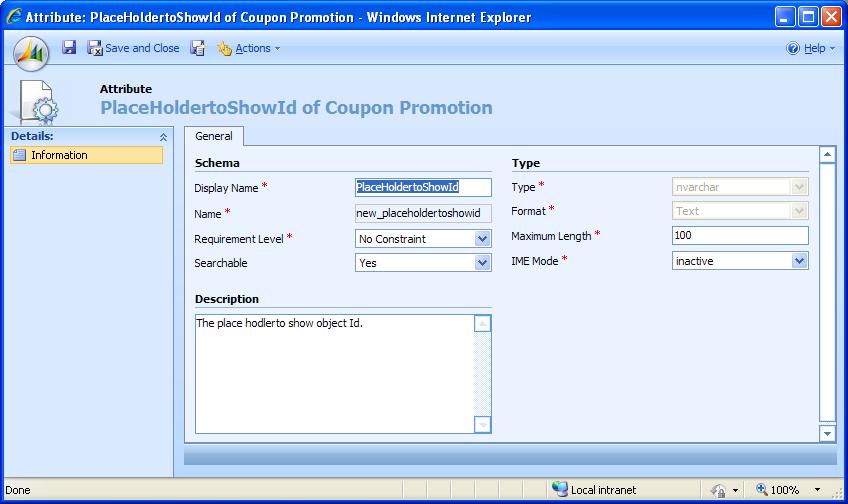
    增加占位符属性

2. 将占位符属性放到Form上,并设置为只读

3. 在Form的OnLoad事件中加入下列代码

//show id in placeholder
if (crmForm.FormType == 2)  //2=Existing; 1=New
{
    crmForm.all.new_placeholdertoshowid.DataValue = crmForm.ObjectId;
}

这样,打开记录的form是,Id就会显示在Placeholder中。

效果: