


惯性聚合 高效追踪和阅读你感兴趣的博客、新闻、科技资讯
阅读原文 在惯性聚合中打开

推荐订阅源

D
Docker
爱范儿
爱范儿
T
The Exploit Database - CXSecurity.com
量子位
T
Tailwind CSS Blog
T
Threatpost
The GitHub Blog
The GitHub Blog
AWS News Blog
AWS News Blog
云风的 BLOG
云风的 BLOG
K
Kaspersky official blog
P
Proofpoint News Feed
博客园 - 司徒正美
L
LangChain Blog
T
Threat Research - Cisco Blogs
C
CERT Recently Published Vulnerability Notes
罗磊的独立博客
酷 壳 – CoolShell
酷 壳 – CoolShell
博客园 - 叶小钗
S
Secure Thoughts
The Last Watchdog
The Last Watchdog
Spread Privacy
Spread Privacy
H
Hacker News: Front Page
T
Troy Hunt's Blog
Cyber Security Advisories - MS-ISAC
Google DeepMind News
W
WeLiveSecurity
A
Arctic Wolf
Apple Machine Learning Research
cs.AI updates on arXiv.org
P
Proofpoint News Feed
T
Tor Project blog
T
The Blog of Author Tim Ferriss
I
Intezer
P
Privacy & Cybersecurity Law Blog
美团技术团队
N
Netflix TechBlog - Medium
博客园_首页
OSCHINA 社区最新新闻
OSCHINA 社区最新新闻
V
Vulnerabilities – Threatpost
Application and Cybersecurity Blog
G
Google Developers Blog
Attack and Defense Labs
T
Tenable Blog
月光博客
月光博客
Stack Overflow Blog
Stack Overflow Blog
J
Java Code Geeks
腾讯CDC
Microsoft Security Blog
A
About on SuperTechFans
Last Week in AI
Last Week in AI

博客园 - 蔡秋心

Windows Azure VM的两种shut down 方式 转贴: A Simple c# Wrapper for ffMpeg PowerShell: 找到一个目录下最新的文件 PowerShell: 如何解决File **.ps1 cannot be loaded because the execution of scripts is disabled on this system. Please see "get- help about_sig" for more de 在localhost上使用fiddler 在SQL Server Business Intelligence Development Studio中编辑Dynamcis CRM中的Report Report Design: Best Practices and Guidelines Visual Studio使用小技巧6 – 为代码加上Using(Resolve using)和管理Using(Organize using) Visual Studio使用小技巧5 – 区块选择(box selection)的拷贝(copy)和粘贴(paste) Visual Studio使用小技巧4 – Where am I(在Solution Explorer中显示当前文档) Visual Studio使用小技巧3 – 标签分组(Tab Group)和分割窗口(Split window) Visual Studio使用小技巧2 – 使用任务列表(task list) - 补充 Visual Studio使用小技巧2 – 使用任务列表(task list) 部署Dotnetnuke Site到虚拟目录和端口不为80的网站 asp.net使用COM组件需要的权限设置 前台线程(Foreground Threads)和后台线程(Background Threads) 在Dynamics CRM 的 Entity Form中显示记录的ID的方法 如何使用VS2005创建web安装包 使用Visual Studio中的Item Template
Visual Studio使用小技巧1 – HTML编辑器中的格式化
蔡秋心 · 2011-03-25 · via 博客园 - 蔡秋心

当我们在aspx中手动写html的时候,经常会造成html 混乱,像太长的行,缩进格式不对等等。

这个时候我们可以选中要格式化的html代码,执行右键菜单中的Format Selection。Visual Studio 将会自动为我们完成格式化。

问题又来了,Visual Studio以什么样的标准来决定该格式化成什么样子呢?这个标准时可以定义的。

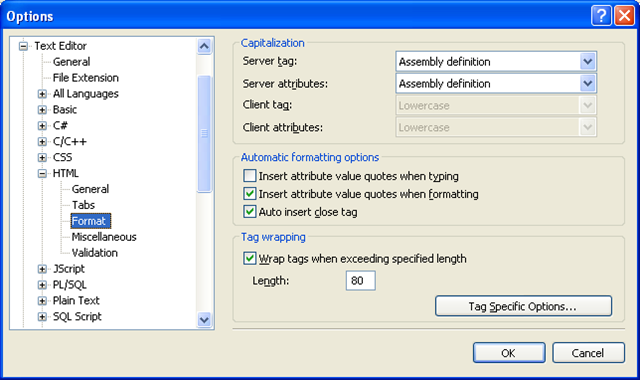
Tools –> Options 打开Options对话框。

找到Text Editor –>HTML –> Format
image

你可以定义Html 标签是否首字母大写,每行的最长多少字符。

如果你愿意,你还可以通过Tag Specific Options…为每个标签定义不同的属性(例如,标签后是否折行,颜色的)。不过这些定义太细节了,我个人觉得默认的就已经很好了。

除了format设置,对于HTML. Option对话框还包含其它几项设置

General:设置语句自动完成,自动折行,显示行号等。

Tabs: 选择按Tab键生成的空格数。

Miscellaneous: 粘贴时是否自动格式化,是否为Element自动生成Unique的ID

Validation: 设置目标HTML标准的类型,例如HTML4.01还是XHTML1.1. Visual Studioj会根据选中的标准对HTML进行校验。