


惯性聚合 高效追踪和阅读你感兴趣的博客、新闻、科技资讯
阅读原文 在惯性聚合中打开

推荐订阅源

GbyAI
GbyAI
B
Blog
Stack Overflow Blog
Stack Overflow Blog
量子位
freeCodeCamp Programming Tutorials: Python, JavaScript, Git & More
T
Tailwind CSS Blog
MongoDB | Blog
MongoDB | Blog
小众软件
小众软件
博客园 - 三生石上(FineUI控件)
Recent Announcements
U
Unit 42
奇客Solidot–传递最新科技情报
奇客Solidot–传递最新科技情报
腾讯CDC
D
DataBreaches.Net
Microsoft Azure Blog
G
Google Developers Blog
M
MIT News - Artificial intelligence
P
Proofpoint News Feed
罗磊的独立博客
L
LangChain Blog
V
Visual Studio Blog
雷峰网
雷峰网
aimingoo的专栏
aimingoo的专栏
宝玉的分享
宝玉的分享

Latest news

LG G6 vs. LG G5: I compared the latest OLED TV models, and it's a surprisingly tough choice I saw the 'MacBook Pro for Linux users' for the first time, and it's a legit Windows threat I'm putting Motorola above Samsung when it comes to flip phones - and won't think twice I tested Surfshark's new Dausos VPN protocol - here's how it compares to WireGuard How to easily encrypt your files on an Android phone - for free I'm not giving up on DJI cameras yet - not when they can upset my GoPro like this The best website builders for small businesses in 2026: Expert tested and reviewed Why I'm recommending last year's phones over 2026 models - with one exception This powerful Gemini setting made my AI results way more personal and accurate After testing this HP laptop, I get why its 'boring' design is adored by business users The best TV antenna of 2026: Expert tested Your old iPad or Android tablet can be your new smart home panel - here's how Apple's original AirTag still tracks effectively, and you can get a 4-pack for its best price ever T-Mobile will give you an iPad for $99 when you sign up for a new line - here's how How to qualify for Apple's education discount - and get a $499 MacBook Neo for school T-Mobile will give you a Samsung Galaxy Watch 8 for free - how to get yours Prolonged AI use can be hazardous to your health and work: 4 ways to stay safe Verizon will give you a free iPad or Apple Watch with your next iPhone - how the deal works The best laptops of 2026: Expert tested and reviewed I hid 4 Bluetooth trackers (including AirTags) to test their reliability - here's how Android rivals compared I stopped using my iPhone's hotspot after testing this 5G router - and that won't change The best Kindles in 2026: Expert recommended Does Best Buy price match? Everything to know about matching prices online and in-store The best WordPress hosting services of 2026: Expert tested and reviewed The best Apple Watch of 2026: Expert tested and reviewed The best TV screen cleaners of 2026: Expert recommended The best 50-inch TVs of 2026: Expert tested I traded my Sonos Era 300 for Denon's new home speaker - and see no reason to go back AI-powered website builders have come a long way - here's your best option in 2026 Amazon just slashed $250 off the Google Pixel 10 - and a Prime subscription isn't required
Microsoft's latest Windows update now confirms if your PC...
2026-04-16 · via Latest news
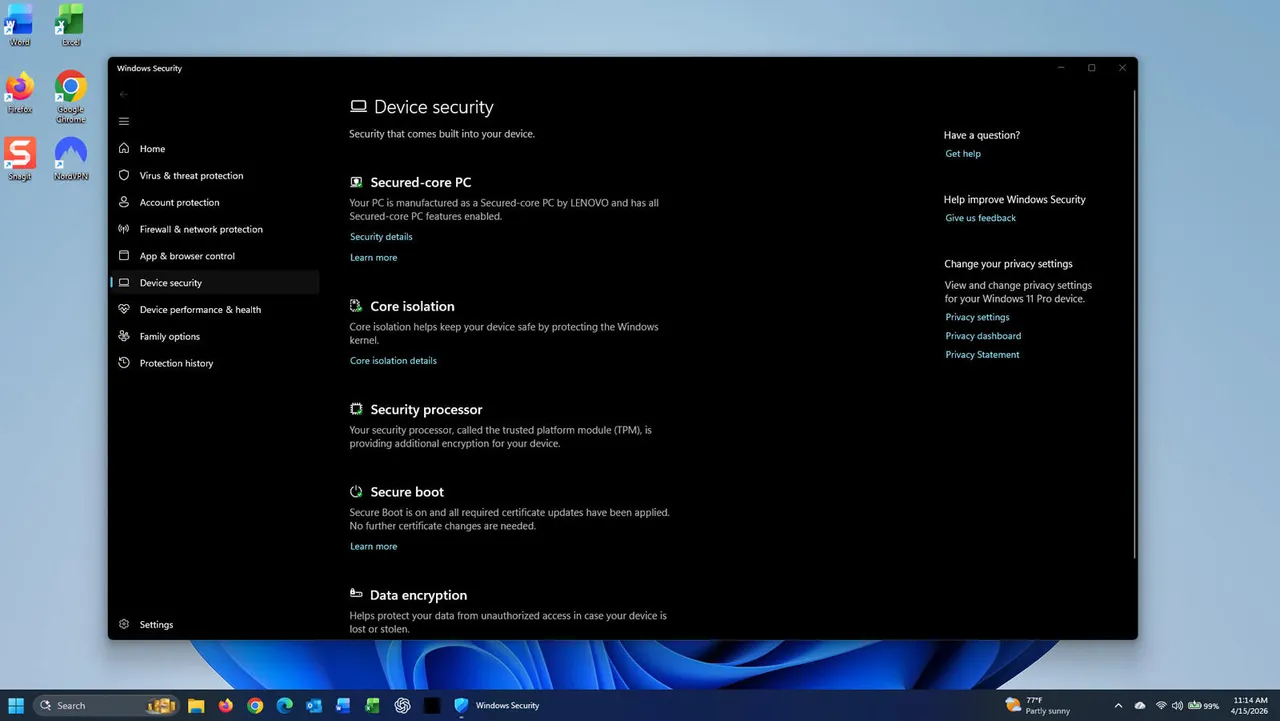
Windows Secure Boot status
Lance Whitney/ZDNET

Follow ZDNET: Add us as a preferred source on Google.


ZDNET's key takeaways

  • Windows will now tell you if Secure Boot is working properly.
  • The new status indicates whether you have the latest Secure Boot updates.
  • The April Windows update also patches a whopping 164 security flaws.

Microsoft's Secure Boot defends your Windows PC against dangerous bootkit malware. To keep your PC protected, the company has been racing to replace older Secure Boot certificates before they expire in June. But how do you know if your PC has received the newer certificates? Windows itself will now tell you.

Arriving this week with the April Patch Tuesday updates for Windows 11 and Windows 10 is a new visual clue and description to indicate the status of Secure Boot on your computer. The new information will tell you whether you're protected with the latest certificates or still at risk. Here's how this works.

Also: Why the Microsoft Surface I bought 4 months ago is 69% more expensive now

In Windows 11, go to Settings, select Privacy & security, choose Windows Security, and then click Device security. Scroll down to the Secure Boot setting. In Windows 10, head to Settings, select Update & security, choose Windows Security, and then click Device Security. Scroll down to the Secure Boot setting.

Secure Boot icon appears in one of three colors  

Depending on your status, the Secure Boot icon will appear in one of three colors -- green, yellow, or red. A green icon means that your device is protected with no recommended actions. A yellow icon indicates a safety recommendation is awaiting you. A red icon indicates that something needs your immediate attention.

However, even a green icon doesn't necessarily mean you're in the clear. The message that accompanies the icon provides further details.

On a spare Windows PC that I haven't updated in quite a while, the green icon appeared. However, the message told me: "Secure Boot is on, but your device is using an older boot trust configuration that should be updated." On my main PC, where Secure Boot is enabled and up to date, the message said: "Secure Boot is on, and all required certificate updates have been applied."

To get the new Secure Boot certificates, just make sure you've applied the latest Windows updates. In Windows 10 Settings, head to Update & Security, select Windows Update, and then click the button to check for updates. In Windows 11 Settings, just go to Windows Update and click the button to check for updates. Allow the latest updates to download and install, and then check the Secure Boot status again.

Secure Boot is an important security feature as it thwarts bootkit malware as soon as you turn on your PC, something that Windows-based security software can't handle. That's why you should make sure you're using the latest Secure Boot certificates. Come June, the older ones will expire, which means Secure Boot will no longer be able to properly protect you.

Zero-days and multiple critical issues, too

Outside of the Secure Boot status, the April Windows updates are loaded with security fixes. In fact, this month's update addresses a whopping 164 vulnerabilities, well above the usual number. Eight of the security bugs are rated critical, while two are deemed zero-day flaws. For that reason alone, make sure you're running the latest update in Windows 11 or 10.

"The elevated number of patches, combined with the presence of zero-days and multiple critical issues, makes this a release that should be prioritized for immediate attention," patch management provider Action1 said in an advisory."