
惯性聚合 高效追踪和阅读你感兴趣的博客、新闻、科技资讯
阅读原文 在惯性聚合中打开

推荐订阅源

GbyAI
GbyAI
Martin Fowler
Martin Fowler
I
InfoQ
腾讯CDC
钛媒体:引领未来商业与生活新知
钛媒体:引领未来商业与生活新知
爱范儿
爱范儿
Microsoft Security Blog
Google DeepMind News
D
DataBreaches.Net
云风的 BLOG
云风的 BLOG
F
Fortinet All Blogs
N
Netflix TechBlog - Medium
博客园 - 聂微东
Microsoft Azure Blog
D
Docker
博客园 - 三生石上(FineUI控件)
Y
Y Combinator Blog
博客园 - Franky
Engineering at Meta
Engineering at Meta
B
Blog
罗磊的独立博客
Apple Machine Learning Research
Jina AI
Jina AI
V
Visual Studio Blog

Latest news

Why I'm recommending last year's phones over 2026 models - with one exception This powerful Gemini setting made my AI results way more personal and accurate After testing this HP laptop, I get why its 'boring' design is adored by business users How to qualify for Apple's education discount - and get a $499 MacBook Neo for school T-Mobile will give you a Samsung Galaxy Watch 8 for free - how to get yours Prolonged AI use can be hazardous to your health and work: 4 ways to stay safe Verizon will give you a free iPad or Apple Watch with your next iPhone - how the deal works The best laptops of 2026: Expert tested and reviewed I hid 4 Bluetooth trackers (including AirTags) to test their reliability - here's how Android rivals compared I stopped using my iPhone's hotspot after testing this 5G router - and that won't change The best Kindles in 2026: Expert recommended Does Best Buy price match? Everything to know about matching prices online and in-store The best WordPress hosting services of 2026: Expert tested and reviewed The best Apple Watch of 2026: Expert tested and reviewed The best TV screen cleaners of 2026: Expert recommended The best 50-inch TVs of 2026: Expert tested I traded my Sonos Era 300 for Denon's new home speaker - and see no reason to go back AI-powered website builders have come a long way - here's your best option in 2026 Amazon just slashed $250 off the Google Pixel 10 - and a Prime subscription isn't required I found the apps slowing down my PC - how to kill the biggest memory hogs These companies are actually upskilling their workers for AI - here's how they do it Verizon will give you Meta Ray-Bans for free with this Fios Internet deal - how to get yours I tried the new Gemini app for Mac - it has one major advantage over the web version How Google's updated AI Mode will ease your tab clutter when you search Why this MagSafe battery pack is our readers' favorite model right now - especially at its price T-Mobile will give you a Google Pixel 10a for free - plus an extra gift OpenAI's Codex Desktop can run your computer now - and has its own browser Want to build a startup that gets acquired? This founder shares 5 proven tips Google to pay $135M settlement to Android phone users - how to claim your share if you qualify Want to stand out on LinkedIn? Try this career strategist's top 3 tips for strengthening your profile
How to use Google Messages' new Trash feature to recover ...
2026-04-15 · via Latest news
google-messages
Elyse Betters Picaro/ZDNET

Follow ZDNET: Add us as a preferred source on Google.


ZDNET's key takeaways

  • Android Messages finally has a Trash option.
  • When you delete a message, it now goes to Trash.
  • This feature is available in the latest update.

Admit it. You've accidentally deleted an important text message and were desperate to get it back. You might then have had to reach out to the sender to say, "Can you send that text again?" Or, worse, the sender isn't in your contact list, so you don't even know who sent the message.

It's happened to me… several times. 

So, what do you do?

Also: How to turn your Pixel phone into a PC - with the new Android Desktop Mode

Well, if you have an updated version of Android, you're in luck because Google finally added a feature to its messaging app that solves this problem.

The solution comes in the form of Trash. That's right, Google added a Trash option for its messaging app. Now, when you delete an SMS message, it no longer vanishes into the ether. Instead, those deleted texts go to the new Trash folder, where they'll be automatically deleted after 30 days. Or, you can opt to restore those deleted chats.

The feature is easy to use and doesn't have to be enabled. 

Also: How to share audio from your Android phone to multiple earbuds (and why it's genius)

SMS Trash (which sounds like it should be the name of a renegade "Star Trek" vessel) was added via the latest update (April 5, 2026), so make sure your phone is up to date; otherwise, you cannot beam those unwanted messages into space.

I'm done with the Trek metaphors.

Maybe.

How the new Trash feature works

Getting rid of those "red shirt" messages (sorry, I couldn't help myself) is simple. When you find an SMS message you want to delete, simply do so in the usual fashion. I use the swiping method (swipe left) to send them to the new Trash location.

Also: How to turn your old Android phone or iPhone into a security camera - in 4 easy steps

A pop-up appears, asking if you want to move the message to the Trash or cancel the action. Tap "Move to trash," and you're done.

Android Messages.

No more accidentally deleting SMS messages on Android.

Jack Wallen/ZDNET

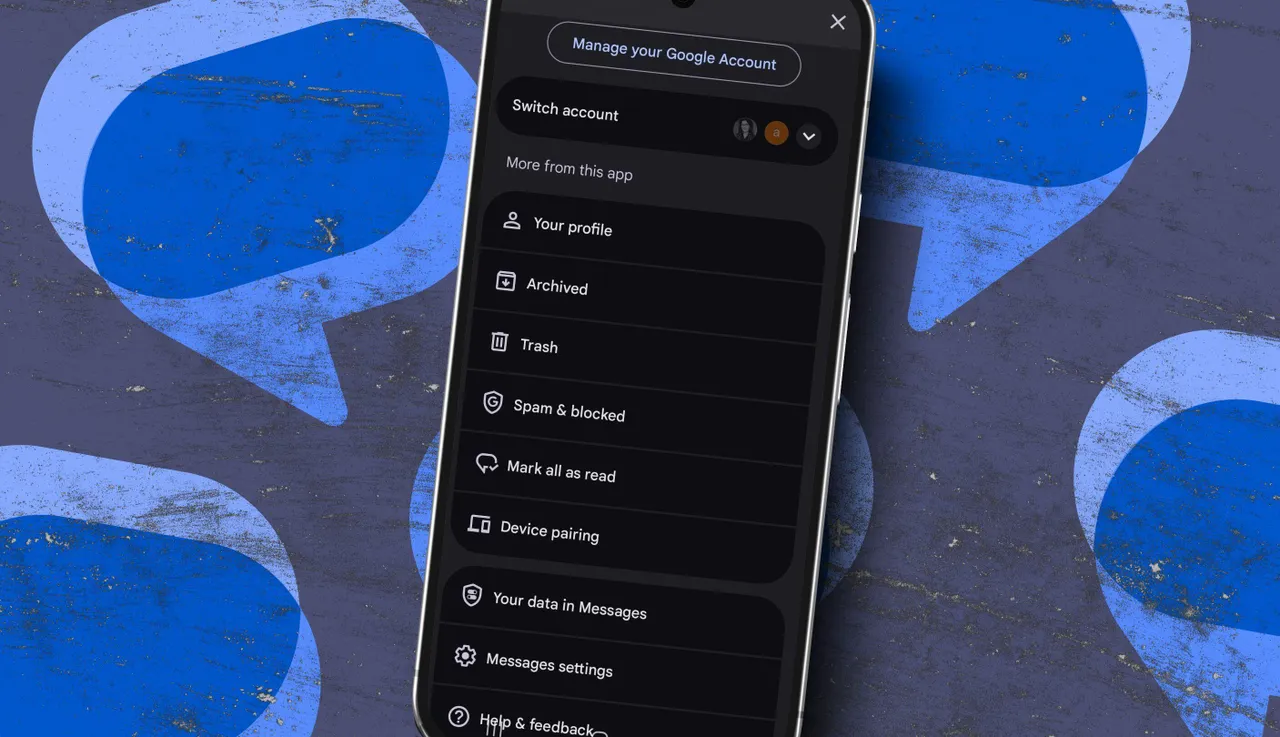
If you then tap your profile picture (in the upper right-hand corner of the messaging app), you'll now see the Trash option. Tap that entry, and you'll find yourself in the Trash (metaphorically speaking), where the deleted message awaits. 

Here's one thing to consider: you cannot read those messages from within Trash. You can either leave them there (to be auto-deleted after 30 days) or restore them. 

To restore a message, tap to select it, and then tap the clock icon directly to the left of the Trash icon near the top right of the window.

Android Messages.

After 30 days, those messages will be auto-deleted.

Jack Wallen/ZDNET

You can also select a message and manually delete it by tapping the Trash icon.

Also: How to turn your old Android phone into a Wi-Fi extender - and fix dead spots at home

This feature is long overdue, and I'm thankful that it's finally arrived. Now, I don't have to worry about accidentally deleting a message and never seeing it again.