



惯性聚合 高效追踪和阅读你感兴趣的博客、新闻、科技资讯
阅读原文 在惯性聚合中打开

推荐订阅源

Martin Fowler
Martin Fowler
爱范儿
爱范儿
博客园_首页
OSCHINA 社区最新新闻
OSCHINA 社区最新新闻
大猫的无限游戏
大猫的无限游戏
月光博客
月光博客
IT之家
IT之家
WordPress大学
WordPress大学
N
Netflix TechBlog - Medium
Microsoft Azure Blog
The GitHub Blog
The GitHub Blog
C
Check Point Blog
Apple Machine Learning Research
博客园 - Franky
G
Google Developers Blog
V
V2EX
雷峰网
雷峰网
美团技术团队
博客园 - 【当耐特】
人人都是产品经理
人人都是产品经理
有赞技术团队
有赞技术团队
MongoDB | Blog
MongoDB | Blog
V
Visual Studio Blog
J
Java Code Geeks

Latest news

Why I'm recommending last year's phones over 2026 models - with one exception This powerful Gemini setting made my AI results way more personal and accurate After testing this HP laptop, I get why its 'boring' design is adored by business users How to qualify for Apple's education discount - and get a $499 MacBook Neo for school T-Mobile will give you a Samsung Galaxy Watch 8 for free - how to get yours Prolonged AI use can be hazardous to your health and work: 4 ways to stay safe Verizon will give you a free iPad or Apple Watch with your next iPhone - how the deal works The best laptops of 2026: Expert tested and reviewed I hid 4 Bluetooth trackers (including AirTags) to test their reliability - here's how Android rivals compared I stopped using my iPhone's hotspot after testing this 5G router - and that won't change The best Kindles in 2026: Expert recommended Does Best Buy price match? Everything to know about matching prices online and in-store The best WordPress hosting services of 2026: Expert tested and reviewed The best Apple Watch of 2026: Expert tested and reviewed The best TV screen cleaners of 2026: Expert recommended The best 50-inch TVs of 2026: Expert tested I traded my Sonos Era 300 for Denon's new home speaker - and see no reason to go back AI-powered website builders have come a long way - here's your best option in 2026 Amazon just slashed $250 off the Google Pixel 10 - and a Prime subscription isn't required I found the apps slowing down my PC - how to kill the biggest memory hogs These companies are actually upskilling their workers for AI - here's how they do it Verizon will give you Meta Ray-Bans for free with this Fios Internet deal - how to get yours I tried the new Gemini app for Mac - it has one major advantage over the web version How Google's updated AI Mode will ease your tab clutter when you search Why this MagSafe battery pack is our readers' favorite model right now - especially at its price T-Mobile will give you a Google Pixel 10a for free - plus an extra gift OpenAI's Codex Desktop can run your computer now - and has its own browser Want to build a startup that gets acquired? This founder shares 5 proven tips Google to pay $135M settlement to Android phone users - how to claim your share if you qualify Want to stand out on LinkedIn? Try this career strategist's top 3 tips for strengthening your profile
Chrome's new 'Skills' update lets you save AI prompts now...
2026-04-15 · via Latest news
Chrome now lets you save and reuse your most helpful AI prompts – here's how
Lance Whitney / Elyse Betters Picaro / ZDNET

Follow ZDNET: Add us as a preferred source on Google.


ZDNET's key takeaways

  • Chrome now lets you save and reuse your AI prompts.
  • The feature works with your Gemini chats in Chrome.
  • You can also customize any saved AI prompts.

As I use Google Gemini and other AIs, I often find myself writing the same prompts for different questions or requests. Sometimes, I remember writing an ideal prompt in the past but can't quite recall how I phrased it. If only I could easily reuse past prompts. 

Now I can, at least with Gemini and Chrome. Rolling out Tuesday is a new feature in Chrome for the desktop called Skills. 

Skills in Chrome

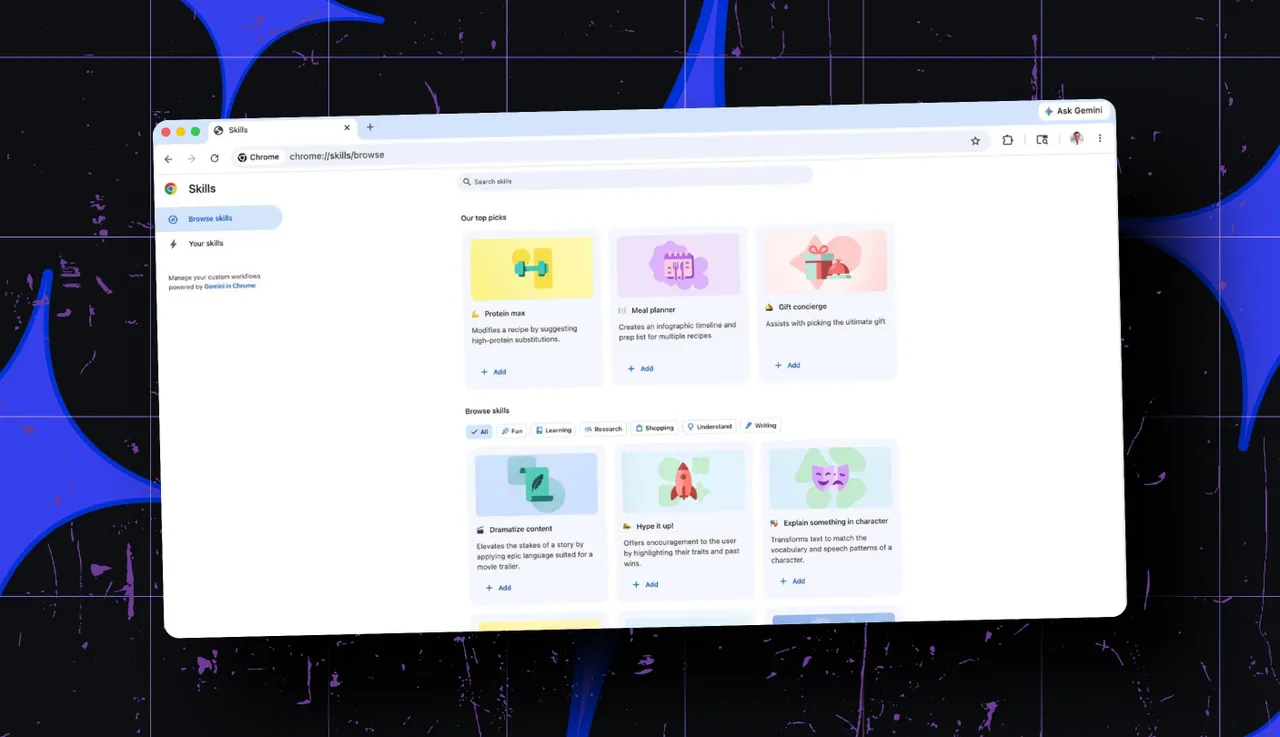
With Skills, you can save an AI prompt and then reuse it in the future just by selecting it from a list. To reuse a saved prompt in your chat window, just type the forward slash or click the plus button and select the Skill from the menu. That Skill then runs in your new chat. You can also edit your saved prompts and create new ones.

Also: I tested ChatGPT Plus vs. Gemini Pro to see which is better - and if it's worth switching

Skills are designed to work with the Ask Gemini feature in Chrome. When you want help with a particular web page, you're able to chat with Gemini in a sidebar. Here, you can ask the AI questions about the content and even reference pages across multiple tabs.

In a new blog post, Google highlighted a few sample Skills cooked up by early testers of the feature. 

In one instance, a saved prompt quickly calculates protein macros for any recipe you find on the web. In another, the Skill shows you side-by-side comparisons of different products displayed in multiple tabs. In one more, the saved prompt scans a long document on a web page to surface important details.

Library of Skills

To kick off the new feature, Google has also created a library of Skills for common tasks and topics. 

One such Skill finds the right gift by comparing your budget with the interests of the recipient. Another Skill checks the ingredients of a food product you're viewing online. If you like one of Google's pre-built Skills, you can save it to your own list, where you're able to tweak it or simply reuse it down the road.

Also: How to switch from ChatGPT to Gemini - without starting from scratch

As a safeguard, certain Skills will ask for your permission before they run, especially if they're performing specific actions such as sending an email or adding an event to your calendar. Your Skills are also protected by Chrome's own security defenses.

Availability

For now, Skills are rolling out to all Chrome desktop users with their language set to US English. As they are just in the process of launching, you may have to wait a bit before they reach you. Once they arrive, you'll be able to access them by typing the forward slash while using Gemini in Chrome and then clicking the compass icon.

Editorial standards