





After installing the ActiveX update patch, some webpages which contain some ActiveX controls (such as media player) will require users to manually activate such controls by clicking on it or using the TAB key and ENTER key, this is by design for security reason.
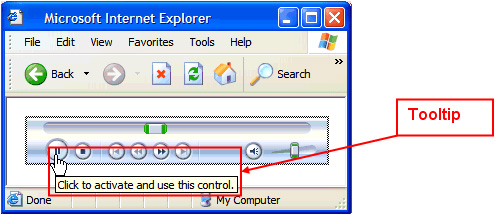
But Microsoft has a workaround as well, the key point is load ActiveX controls from external script files. By using document.write, document.createElement or innerHTML, we can bypass this kind of limitation easily.
 <!-- HTML File --><html> <body leftmargin=0 topmargin=0 scroll=no> <script src="ActiveXCtl.js"></script> </body></html>
//ActiveXCtl.jsdocument.write('<object classid="clsid:6BF52A52-394A-11d3-B153-00C04F79FAA6">');document.write('<param name="URL" value="example.wmv">');document.write('<param name="autoStart" value="-1"></object>');
Refer to this MSDN article for detail.
此内容由惯性聚合(RSS阅读器)自动聚合整理,仅供阅读参考。 原文来自 — 版权归原作者所有。