


惯性聚合 高效追踪和阅读你感兴趣的博客、新闻、科技资讯
阅读原文 在惯性聚合中打开

推荐订阅源

G
Google Developers Blog
小众软件
小众软件
The Cloudflare Blog
S
SegmentFault 最新的问题
美团技术团队
freeCodeCamp Programming Tutorials: Python, JavaScript, Git & More
让小产品的独立变现更简单 - ezindie.com
阮一峰的网络日志
阮一峰的网络日志
博客园 - 聂微东
V
Visual Studio Blog
奇客Solidot–传递最新科技情报
奇客Solidot–传递最新科技情报
雷峰网
雷峰网
WordPress大学
WordPress大学
T
Tailwind CSS Blog
腾讯CDC
人人都是产品经理
人人都是产品经理
月光博客
月光博客
Microsoft Azure Blog
M
MIT News - Artificial intelligence
D
DataBreaches.Net
Apple Machine Learning Research
P
Proofpoint News Feed
J
Java Code Geeks
宝玉的分享
宝玉的分享

博客园 - fengzhimei

The template you have chosen is invalid or cannot be found. CSS trick : text-transform Site Definition KickStart Project Transform between Hex and Dec in Javascript - fengzhimei Visual Studio 2005 Web Application Projects Template Overcome limitation of activate ActiveX control in IE Extend toolbar of HtmlEditor in SharePoint 2007 Expand querystring in URL with JavaScript Create a AJAX enabled WebPart for SharePoint2007 by using ASP.NET 2.0 client callback feature Code view is missing in SharePoint Designer Beta 2 when you try to edit a WSS v3 site. MOSS2007(Beta) SDK is online. .Net Framework v2.0 built-in tools StringBuilder in Javascript Remove duplicate rows from a table Remove duplicate items from collection Programatically download file from document library. Reset VSS Admin Password Html entity encoder/decoder A nice piece of javascript to simulate Adodb Recordset.
"Suggested Web Parts" in SharePoint 2007 Web Part picker ...
fengzhimei · 2006-07-05 · via 博客园 - fengzhimei

When we click the "Add a Web Part" button in page design mode, it will open a Web Part picker page. By default, this page will display as two groups, one is "Lists and Libraries" group, and the other is "All Web Parts" group.

In fact, there is still a "always on top" group called "Suggested Web Parts", according to my understanding, "Suggested Web Parts" means those Web Parts which will be frequently used.
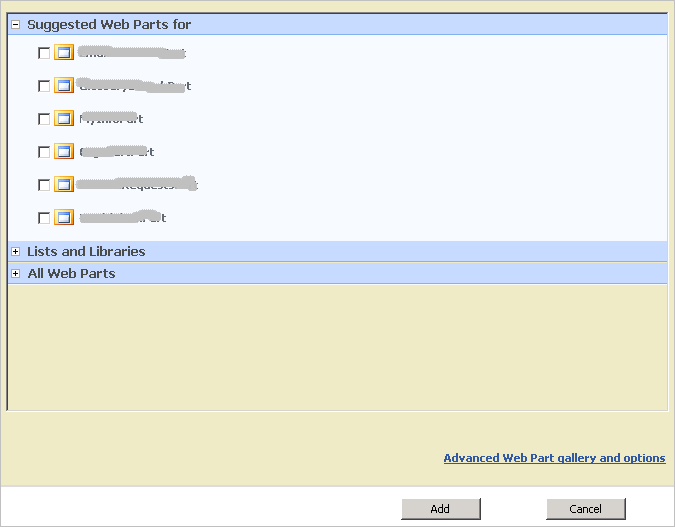
But how can we put some Web Parts into this group when picker window opened? Actually, Microsoft.SharePoint.WebPartPages.WebPartZone has a "QuickAdd-GroupNames" property, And every Web Part in the Web Part Gallery page has a "Quick Add Groups" field, if these two properties totally match up, then those Web Parts will be added to the "Suggested Web Parts" group.
