







https://confluence.atlassian.com/adminjiraserver/performance-and-scale-testing-965568707.html
我看了一下, 我好流口水:
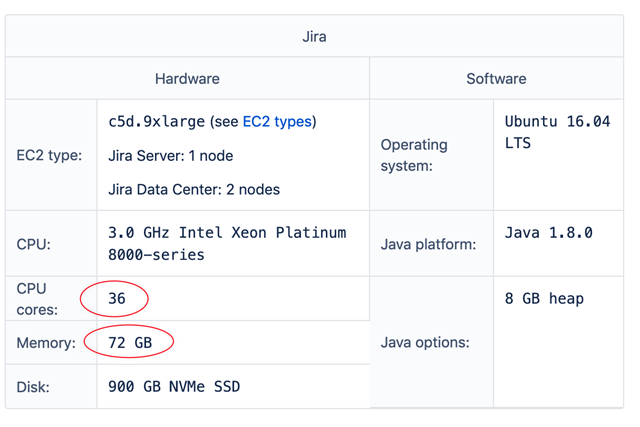
我一台1.4万的Dell R730XD 二手,留了8G内存给jira,又不是SSD硬盘。咋办呢,不是土豪还想用土豪的速度。
调优呗,上手段,别问,问了就是。。。。
setenv.sh 改动: 增加内存,增加性能监视代理

## The following 2 settings control the minimum and maximum given to the JIRA Java virtual machine.??In larger JIRA instances, the maximum amount will need to be increased. # #JVM_MINIMUM_MEMORY="384m" #JVM_MAXIMUM_MEMORY=“2048m"
?#modified by Rock on 2020.03.09?
JVM_MINIMUM_MEMORY="768m" JVM_MAXIMUM_MEMORY=“3072m”

## The following setting configures the size of JVM code cache.??A high value of reserved size allows Jira to work with more installed apps. #?
#JVM_CODE_CACHE_ARGS='-XX:InitialCodeCacheSize=32m -XX:ReservedCodeCacheSize=512m’?
#modified by Rock on 2020.03.09?
JVM_CODE_CACHE_ARGS='-XX:InitialCodeCacheSize=96m -XX:ReservedCodeCacheSize=1280m'


#-----------------------------------------
# Prevents the JVM from suppressing stack traces if a given type of exception # occurs frequently, which could make it harder for support to diagnose a problem.?
#-----------------------------------------?
JVM_EXTRA_ARGS="-XX:-OmitStackTraceInFastThrow -Djava.locale.providers=COMPAT -javaagent:/root/tingyun/tingyun/tingyun-agent-java.jar”
用了听云的APM
接着升级java 8 到java 11
安装openjdk 11

yum search openjdk
yum install java-11-openjdk.x86_64

查找jdk路径
[root@CEN07_JIRA bin]# echo $JAVA_HOME
/usr/lib/jvm/java-1.8.0-openjdk-1.8.0.232.b09-0.el7_7.x86_64


[root@CEN07_JIRA jvm]# ll
total 0
lrwxrwxrwx. 1 root root 26 Jan 23 00:22 java -> /etc/alternatives/java_sdk
drwxr-xr-x. 6 root root 68 Mar??9 18:11 java-11-openjdk-11.0.6.10-1.el7_7.x86_64
lrwxrwxrwx. 1 root root 32 Jan 23 00:22 java-1.8.0 -> /etc/alternatives/java_sdk_1.8.0
lrwxrwxrwx. 1 root root 40 Jan 23 00:22 java-1.8.0-openjdk -> /etc/alternatives/java_sdk_1.8.0_openjdk
drwxr-xr-x. 7 root root 68 Jan 23 00:22 java-1.8.0-openjdk-1.8.0.232.b09-0.el7_7.x86_64
lrwxrwxrwx. 1 root root 34 Jan 23 00:22 java-openjdk -> /etc/alternatives/java_sdk_openjdk
lrwxrwxrwx. 1 root root 21 Mar??9 18:11 jre -> /etc/alternatives/jre
lrwxrwxrwx. 1 root root 24 Mar??9 18:11 jre-11 -> /etc/alternatives/jre_11
lrwxrwxrwx. 1 root root 32 Mar??9 18:11 jre-11-openjdk -> /etc/alternatives/jre_11_openjdk
lrwxrwxrwx. 1 root root 40 Mar??9 18:11 jre-11-openjdk-11.0.6.10-1.el7_7.x86_64 -> java-11-openjdk-11.0.6.10-1.el7_7.x86_64
lrwxrwxrwx. 1 root root 27 Jan 23 00:22 jre-1.8.0 -> /etc/alternatives/jre_1.8.0
lrwxrwxrwx. 1 root root 35 Jan 23 00:22 jre-1.8.0-openjdk -> /etc/alternatives/jre_1.8.0_openjdk
lrwxrwxrwx. 1 root root 51 Jan 23 00:22 jre-1.8.0-openjdk-1.8.0.232.b09-0.el7_7.x86_64 -> java-1.8.0-openjdk-1.8.0.232.b09-0.el7_7.x86_64/jre
lrwxrwxrwx. 1 root root 29 Mar??9 18:11 jre-openjdk -> /etc/alternatives/jre_openjdk

替换jre-8 成为jre-11
setenv.sh

# DO NOT remove the following line
#JAVA_HOME="/opt/atlassian/jira/jre/"; export JAVA_HOME
#Modified by Rock on 2020.03.09 - change jre to jre 11 :)
JAVA_HOME="/usr/lib/jvm/jre-11"; export JAVA_HOME
重启,试试。
对了忘记说了结果如何?
结果是感人的,其实,我发现了如果把虚拟机的CPU调到8

你会发现jira飞起来了,

太晚了,就做对比了。
总结一个就苟了,

更新一下: 2020.05.02, 貌似升级jdk11反而影响性能,我重新退回到jdk8,速度提升很多。
此内容由惯性聚合(RSS阅读器)自动聚合整理,仅供阅读参考。 原文来自 — 版权归原作者所有。