





构建 Maven 项目
通过官方的 Spring Initializr 工具来产生基础项目,访问 http://start.spring.io/ ,如下图所示,该页面提供了以Maven构建Spring Boot 项目的功能。

工程结构解析
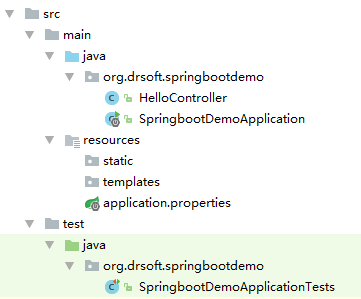
如上图所示,Spring Boot 的基础结构有三大块(具体路径根据用户生成项目时填写的Group和Artifact有所差异)
Maven配置分析
打开当前工程下的 pom.xml 文件,可以看到如下关键配置:
<parent>
<groupId>org.springframework.boot</groupId>
<artifactId>spring-boot-starter-parent</artifactId>
<version>1.5.4.RELEASE</version>
<relativePath/> <!-- lookup parent from repository -->
</parent>
<properties>
<project.build.sourceEncoding>UTF-8</project.build.sourceEncoding>
<project.reporting.outputEncoding>UTF-8</project.reporting.outputEncoding>
<java.version>1.8</java.version>
</properties>
<dependencies>
<dependency>
<groupId>org.springframework.boot</groupId>
<artifactId>spring-boot-starter-web</artifactId>
</dependency>
<dependency>
<groupId>org.springframework.boot</groupId>
<artifactId>spring-boot-starter-test</artifactId>
<scope>test</scope>
</dependency>
</dependencies>
实现 RESTful API
在Spring Boot 中创建一个RESTFul API 的实现代码同 Spring MVC一样,只是不需要Spring MVC那样先做很多配置,步骤如下:
新建 HelloController 类,代码如下:
@RestController
public class HelloController {
@RequestMapping ("/hello")
public String index() {
return "Hello World";
}
}
启动 Spring Boot 应用
启动 Spring Boot 应用的方式很多种:
编写单元测试
在Spring Boot 中实现单元测试很方便,我们打开 src/test 下的单元测试入口 SpringbootDemoApplicationTests 类,编写一个简单的单元测试来模拟 HTTP 请求,测试代码如下:
import org.junit.Before;
import org.junit.Test;
import org.junit.runner.RunWith;
import org.springframework.boot.test.context.SpringBootTest;
import org.springframework.http.MediaType;
import org.springframework.test.context.junit4.SpringRunner;
import org.springframework.test.web.servlet.MockMvc;
import org.springframework.test.web.servlet.request.MockMvcRequestBuilders;
import org.springframework.test.web.servlet.setup.MockMvcBuilders;
import static org.springframework.test.web.servlet.result.MockMvcResultMatchers.content;
import static org.springframework.test.web.servlet.result.MockMvcResultMatchers.status;
@RunWith (SpringRunner.class)
@SpringBootTest
public class SpringbootDemoApplicationTests {
private MockMvc mvc;
@Before
public void setUp() {
mvc = MockMvcBuilders.standaloneSetup(new HelloController()).build();
}
@Test
public void helloTest() throws Exception {
mvc.perform(MockMvcRequestBuilders.get("/hello").accept(MediaType.APPLICATION_JSON_UTF8))
.andExpect(status().isOk())
.andExpect(content().string("Hello World"));
}
}
代码解析如下:
本文版权归作者 李雪(博客地址:https://www.cnblogs.wiki)所有,欢迎转载和商用,请在文章页面明显位置给出原文链接并保留此段声明,否则保留追究法律责任的权利,其他事项,可留言咨询。
此内容由惯性聚合(RSS阅读器)自动聚合整理,仅供阅读参考。 原文来自 — 版权归原作者所有。