


惯性聚合 高效追踪和阅读你感兴趣的博客、新闻、科技资讯
阅读原文 在惯性聚合中打开

推荐订阅源

T
Threat Research - Cisco Blogs
freeCodeCamp Programming Tutorials: Python, JavaScript, Git & More
cs.AI updates on arXiv.org
V
Vulnerabilities – Threatpost
GbyAI
GbyAI
P
Proofpoint News Feed
L
LINUX DO - 热门话题
P
Palo Alto Networks Blog
A
About on SuperTechFans
T
Tenable Blog
M
MIT News - Artificial intelligence
IT之家
IT之家
I
Intezer
D
DataBreaches.Net
爱范儿
爱范儿
T
Threatpost
C
CERT Recently Published Vulnerability Notes
云风的 BLOG
云风的 BLOG
博客园 - 三生石上(FineUI控件)
WordPress大学
WordPress大学
K
Kaspersky official blog
大猫的无限游戏
大猫的无限游戏
A
Arctic Wolf
Y
Y Combinator Blog
Cyberwarzone
Cyberwarzone
酷 壳 – CoolShell
酷 壳 – CoolShell
D
Darknet – Hacking Tools, Hacker News & Cyber Security
H
Help Net Security
Microsoft Security Blog
Spread Privacy
Spread Privacy
奇客Solidot–传递最新科技情报
奇客Solidot–传递最新科技情报
AWS News Blog
AWS News Blog
博客园 - 聂微东
C
Check Point Blog
S
Securelist
有赞技术团队
有赞技术团队
雷峰网
雷峰网
aimingoo的专栏
aimingoo的专栏
Last Week in AI
Last Week in AI
Stack Overflow Blog
Stack Overflow Blog
MongoDB | Blog
MongoDB | Blog
D
Docker
G
GRAHAM CLULEY
T
The Exploit Database - CXSecurity.com
C
Cybersecurity and Infrastructure Security Agency CISA
T
Tailwind CSS Blog
L
Lohrmann on Cybersecurity
G
Google Developers Blog
C
Cyber Attacks, Cyber Crime and Cyber Security
L
LangChain Blog

博客园 - 立3807

ROS 系统架构及概念 ROS 在 Ubuntu 18.04 安装 利用 Skywalking 搭建 APM(应用性能管理)— 安装与配置 elasticsearch 集群搭建及启动常见错误 Git 基本操作 Git 环境配置 Git 基础和原理 Spring Cloud(Dalston.SR5)--Config 集群配置中心-加解密 Spring Cloud(Dalston.SR5)--Config 集群配置中心-刷新配置 Java NIO 概述 Spring Boot - AOP(面向切面)-切入点表达式 Spring Boot - AMQP 消息中间件 Spring Boot - AOP(面向切面) Spring Boot - 基础 POM 文件 Spring Boot - 配置介绍 Spring Boot - 项目构建与解析 Mycat 镜像-创建 Docker 镜像 Spring Cloud(Dalston.SR5)--Config 集群配置中心 Spring Cloud(Dalston.SR5)--Zuul 网关-Hystrix 回退 Spring Cloud(Dalston.SR5)--Zuul 网关-过滤器
Git 安装
立3807 · 2018-09-18 · via 博客园 - 立3807

安装 Git

是时候动手尝试下 Git 了,不过得先安装好它。有许多种安装方式,主要分为两种,一种是通过编译源代码来安装;另一种是使用为特定平台预编译好的安装包。

从源代码安装

若是条件允许,从源代码安装有很多好处,至少可以安装最新的版本。Git 的每个版本都在不断尝试改进用户体验,所以能通过源代码自己编译安装最新版本就再好不过了。有些 Linux 版本自带的安装包更新起来并不及时,所以除非你在用最新的 distro 或者 backports,那么从源代码安装其实该算是最佳选择。

Git 的工作需要调用 curlzlibopensslexpatlibiconv 等库的代码,所以需要先安装这些依赖工具。在有 yum 的系统上(比如 Fedora)或者有 apt-get 的系统上(比如 Debian 体系),可以用下面的命令安装:

$ yum install curl-devel expat-devel gettext-devel \
openssl-devel zlib-devel

$ apt-get install libcurl4-gnutls-dev libexpat1-dev gettext \
libz-dev libssl-dev

之后,从下面的 Git 官方站点下载最新版本源代码:

http://git-scm.com/download

然后编译并安装:

$ tar -zxf git-1.7.2.2.tar.gz
$ cd git-1.7.2.2
$ make prefix=/usr/local all
$ sudo make prefix=/usr/local install

现在已经可以用 git 命令了,用 git Git 项目仓库克隆到本地,以便日后随时更新:

$ git clone git://git.kernel.org/pub/scm/git/git.git

Linux 上安装

如果要在 Linux 上安装预编译好的 Git 二进制安装包,可以直接用系统提供的包管理工具。在 Fedora 上用 yum 安装:

$ yum install git-core

Ubuntu 这类 Debian 体系的系统上,可以用 apt-get 安装:

$ apt-get install git

Mac 上安装

Mac 上安装 Git 有两种方式。最容易的当属使用图形化的 Git 安装工具,界面如图 1-7,下载地址在:

http://sourceforge.net/projects/git-osx-installer/
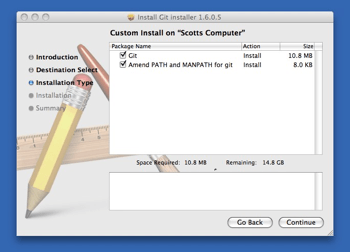
1-7. Git OS X 安装工具

另一种是通过 MacPorts (http://www.macports.org) 安装。如果已经装好了 MacPorts,用下面的命令安装 Git

$ sudo port install git-core +svn +doc +bash_completion +gitweb

这种方式就不需要再自己安装依赖库了,Macports 会帮你搞定这些麻烦事。

Windows 上安装

Windows 上安装 Git 同样轻松,有个叫做 msysGit 的项目提供了安装包,可以到 GitHub 的页面上下载 exe 安装文件并运行,下载链接 https://github.com/git-for-windows/git/releases/
完成安装之后,就可以使用命令行的 git 工具(已经自带了 ssh 客户端)了,另外还有一个图形界面的 Git 项目管理工具。

Windows 用户的敬告:你应该在 msysGit 提供的 Unix 风格的 shell 来运行 Git。在 Unix 风格的 shell 中,可以使用本书中提及的复杂多行的命令。对于那些需要在 Windows 命令行中使用 Git 的用户,必须注意:在参数中间有空格的时候,必须使用双引号将参数括起来(在 Linux 中是单引号);另外,如果扬抑符(^)作为参数的结尾,并且作为这一行的最后一个字符,则这个参数也需要用双引号括起来。因为扬抑符(^)在 Windows 命令行中表示续行(译注:即下一行为这一行命令的继续)。

本文版权归作者 李雪(博客地址:https://www.cnblogs.wiki)所有,欢迎转载和商用,请在文章页面明显位置给出原文链接并保留此段声明,否则保留追究法律责任的权利,其他事项,可留言咨询。