


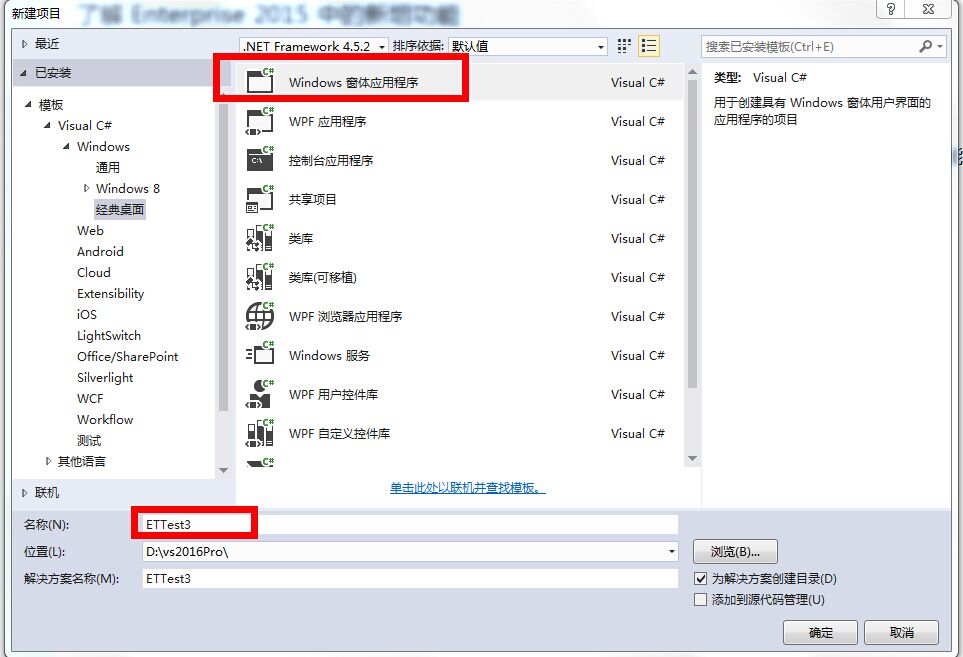
1.新建工程
2.建立类的文件夹DAL
3.建立相关类
【Student类】
using System;
using System.Collections.Generic;
using System.Linq;
using System.Text;
using System.Threading.Tasks;
namespace ETTest3
{
public class Student
{
public int Id { get; set; }
public string LastName { get; set; }
}
}
【School类】
using System;
using System.Collections.Generic;
using System.Data.Entity.ModelConfiguration.Conventions;
using System.Data.Entity;
using System.Linq;
using System.Text;
using System.Threading.Tasks;
namespace ETTest3
{
public class SchoolContext : DbContext
{
public SchoolContext() : base("MyContext") { }
public DbSet<Student> Students { get; set; }
protected override void OnModelCreating(DbModelBuilder modelBuilder)
{
base.OnModelCreating(modelBuilder);
}
}
}
4. 引用EF6.0 Mysql.Entity
5.调整配置文件 app.config
<connectionStrings>
<add name="MyContext" connectionString="Data Source=localhost;port=3306;Initial Catalog=test;user id=root;password=123456;" providerName="MySql.Data.MySqlClient" />
</connectionStrings>
<entityFramework>
<defaultConnectionFactory type="System.Data.Entity.Infrastructure.SqlConnectionFactory, EntityFramework" />
<providers>
<provider invariantName="System.Data.SqlClient" type="System.Data.Entity.SqlServer.SqlProviderServices, EntityFramework.SqlServer" />
<provider invariantName="MySql.Data.MySqlClient" type="MySql.Data.MySqlClient.MySqlProviderServices, MySql.Data.Entity.EF6, Version=6.9.8.0, Culture=neutral, PublicKeyToken=c5687fc88969c44d">
</provider></providers>
</entityFramework>
6 测试建立数据库
try
{
SchoolContext ctx = new SchoolContext();
ctx.Database.Initialize(true);
var o = new Student();
o.Id = 1;
o.LastName = "aa";
ctx.Students.Add(o);
ctx.SaveChanges();
}
catch (Exception ex)
{
Console.Write(ex.Message);
}
7.测试成功,打开数据库,可以见到mysql里增加一个库test ,里面有一张表student
8 数据表中的字段发生变化情况处理
如果变动比较小,比如新增或删除一两个字段
先备份好数据库以后 直接进行数据表操作,将你的数据模型和数据库表做上对应就好了,
需要注意的是,项目上线一般需要将DataContext设置一下
Database.SetInitializer<DataContext>(null);
而不能设置
Database.SetInitializer<DataContext>(new DropCreateDatabaseIfModelChanges<DataContext>());或者
Database.SetInitializer<DataContext>(new DropCreateDatabaseAlways<DataContext>());等等其他方式,
以防意外导致数据库被删除,重新生成(因为自己添加字段可能与你的模型映射不一致)
如果改动非常大,那么可能就要换另外一种方案了,数据迁移,或者自己导入数据。
此内容由惯性聚合(RSS阅读器)自动聚合整理,仅供阅读参考。 原文来自 — 版权归原作者所有。