
惯性聚合 高效追踪和阅读你感兴趣的博客、新闻、科技资讯
阅读原文 在惯性聚合中打开

推荐订阅源

宝玉的分享
宝玉的分享
NISL@THU
NISL@THU
E
Exploit-DB.com RSS Feed
L
LINUX DO - 热门话题
L
Lohrmann on Cybersecurity
K
Kaspersky official blog
Project Zero
Project Zero
Cisco Talos Blog
Cisco Talos Blog
T
The Exploit Database - CXSecurity.com
P
Palo Alto Networks Blog
C
CXSECURITY Database RSS Feed - CXSecurity.com
T
Threatpost
S
Schneier on Security
G
GRAHAM CLULEY
The Hacker News
The Hacker News
T
Threat Research - Cisco Blogs
Scott Helme
Scott Helme
Threat Intelligence Blog | Flashpoint
P
Privacy & Cybersecurity Law Blog
C
Cyber Attacks, Cyber Crime and Cyber Security
Cyberwarzone
Cyberwarzone
C
CERT Recently Published Vulnerability Notes
T
Tor Project blog
AWS News Blog
AWS News Blog
Simon Willison's Weblog
cs.CL updates on arXiv.org
爱范儿
爱范儿
P
Privacy International News Feed
云风的 BLOG
云风的 BLOG
P
Proofpoint News Feed
S
Securelist
G
Google Developers Blog
The Last Watchdog
The Last Watchdog
Google Online Security Blog
美团技术团队
F
Fortinet All Blogs
小众软件
小众软件
Recorded Future
Recorded Future
V
Visual Studio Blog
B
Blog RSS Feed
H
Help Net Security
CTFtime.org: upcoming CTF events
Google DeepMind News
Blog — PlanetScale
Blog — PlanetScale
博客园 - 聂微东
Stack Overflow Blog
Stack Overflow Blog
Martin Fowler
Martin Fowler
Latest news
Latest news
Spread Privacy
Spread Privacy
H
Heimdal Security Blog

博客园 - 勤劳の洗碗机

pyinstaller打包exe故障解析 curl 访问k8s api k8s 之HPA应用 statefulset 及storageclass hadoop 伪分布式 完全分布式 及HA部署 LDAP部署及实践 docker 制作自己的mysql镜像 k8s 压测工具之perf-test shell执行mysql脚本 分布式minio image-syncer 误删libc.so.6文件补救 docker 使用bind 动态扩容pvc k8s备份工具之velero jmeter使用 docker 制作ssh镜像 docker 制作自定义的nginx镜像 docker部署sharding-proxy
mysql相关(三)、主从复制
勤劳の洗碗机 · 2020-12-01 · via 博客园 - 勤劳の洗碗机

配置:

编辑master  my.cnf添加

[mysqld]
server-id=1     #各个mysql实例  id不能重复
log-bin=mysql-bin #这个一定得设置,否则没有日志的话,从数据库上会报错
binlog-ignore-db=mysql,test #表示不同步mysql test库
binlog_format=MIXED
expire_logs_days =30                        //binlog过期清理时间
max_binlog_size=100m                       //binlog每个日志文件大小
binlog_cache_size=4m                        //binlog缓存大小
max_binlog_cache_size=512m                     //最大binlog缓存大小

编辑slave my.cnf

[mysqld]
server-id=2     #各个mysql实例  id不能重复
log-bin=mysql-bin #这个一定得设置,否则没有日志的话,从数据库上会报错
relay-log=relay-log  #定义relay_log的位置和名称
relay-log-index=relay-log.index #同relay_log,定义relay_log的位置和名称
skip_name_resolve=ON
binlog-ignore-db=mysql
binlog_format=MIXED
slave_skip_errors=1062
## relay_log配置中继日志
log_slave_updates=1
read_only=1 #将slave从库设置为只读状态

登录master数据库

1、设置主从复制的账号

grant replication CLIENT, REPLICATION SLAVE on *.* to 'backup'@'%' identified by '123';
flush privileges;

2、查看当前日志位置

登录slave数据库

1、设置同步参数

change master to
master_host='192.168.7,2',
master_port=3306,
master_user='backup',
master_password='123',
master_log_file='replicas-mysql-bin.000003',  #master 查询的日志
master_log_pos=154;                                   #master 查询的位置

2、启动同步

3、查看状态

如下俩个yes 说明配置成功了
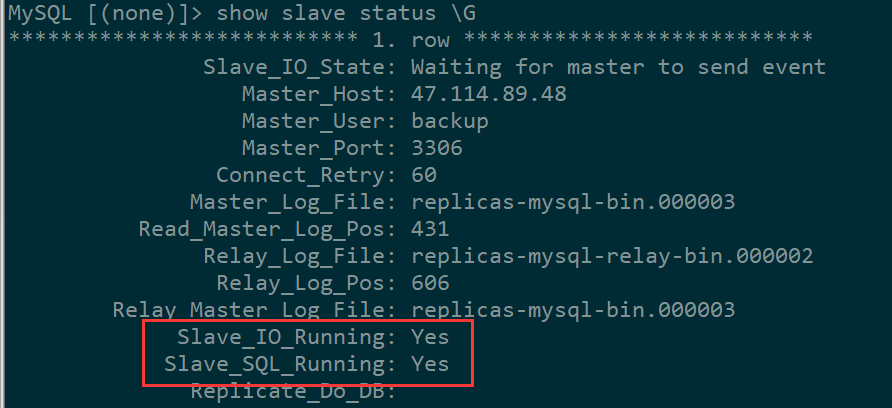
另一个重要参数Seconds_Behind_Master:0  这个是和主库比同步延迟秒数

如果出错了,可以先停止同步,重新配置再开启同步

stop slave;
set GLOBAL SQL_SLAVE_SKIP_COUNTER=1;