惯性聚合 高效追踪和阅读你感兴趣的博客、新闻、科技资讯
阅读原文 在惯性聚合中打开

推荐订阅源

S
Secure Thoughts
P
Proofpoint News Feed
D
Darknet – Hacking Tools, Hacker News & Cyber Security
Project Zero
Project Zero
Cyberwarzone
Cyberwarzone
K
Kaspersky official blog
AWS News Blog
AWS News Blog
cs.AI updates on arXiv.org
N
News | PayPal Newsroom
S
Schneier on Security
O
OpenAI News
S
Security @ Cisco Blogs
K
KPMG report finds enterprise disconnect between AI and its ROI | CIO
月光博客
月光博客
GbyAI
GbyAI
T
Tenable Blog
B
Blog
人人都是产品经理
人人都是产品经理
Engineering at Meta
Engineering at Meta
T
Troy Hunt's Blog
量子位
S
Security Affairs
Security Archives - TechRepublic
The Cloudflare Blog
W
WeLiveSecurity
U
Unit 42
Application and Cybersecurity Blog
cs.CL updates on arXiv.org
The GitHub Blog
The GitHub Blog
Cloudbric
Cloudbric
A
About on SuperTechFans
Hacker News - Newest:
Hacker News - Newest: "LLM"
Exploit-DB.com RSS Feed
Google DeepMind News
博客园_首页
I
Intezer
P
Proofpoint News Feed
N
News and Events Feed by Topic
SecWiki News
SecWiki News
Microsoft Security Blog
TaoSecurity Blog
TaoSecurity Blog
博客园 - 三生石上(FineUI控件)
NISL@THU
NISL@THU
Latest news
Latest news
H
Help Net Security
G
Google Developers Blog
博客园 - Franky
T
The Exploit Database - CXSecurity.com
Cisco Talos Blog
Cisco Talos Blog
Know Your Adversary
Know Your Adversary

博客园 - 唯知为之

Antigravity Skills 全局安装与配置指南 前端设计资源汇总 VitePress 添加友链界面 如何快速无缝的从 vscode 转向AI编辑器 cursor、kiro、trae 等 VitePress 集成 Twikoo 评论 Vitepress 建站资源汇总 Vue3.5常用特性整理 巧用mask属性创建一个纯CSS图标库 给网站设置三级域名 JS脚本批量处理TS数据类型 常用TS总结 定制你的清爽Mac版Edge浏览器 uni-app+vue3会遇到哪些问题 你想要的龙年特效来了 uni-app+vue3+ts项目搭建完整流程 vue3+ts打开echarts的正确方式 Vite4+Typescript+Vue3+Pinia 从零搭建(7) - request封装 Github项目徽标 Vite4+Typescript+Vue3+Pinia 从零搭建(6) - 状态管理pina
vue3项目部署到Github
唯知为之 · 2024-09-12 · via 博客园 - 唯知为之

此教程适应于以webpack,vue-cli,vite等脚手架构建的vue项目。当然,vue2和vue3都是可以滴。

1. 前提:你的代码库已经提交到Github上

如果没有的话,请到GitHub上新建仓库,并把你本地的项目提交到GitHub上新建的仓库里。
具体方法,可以参考我的博客 Git使用记录 - 持续更新 - 将本地项目关联到远程仓库
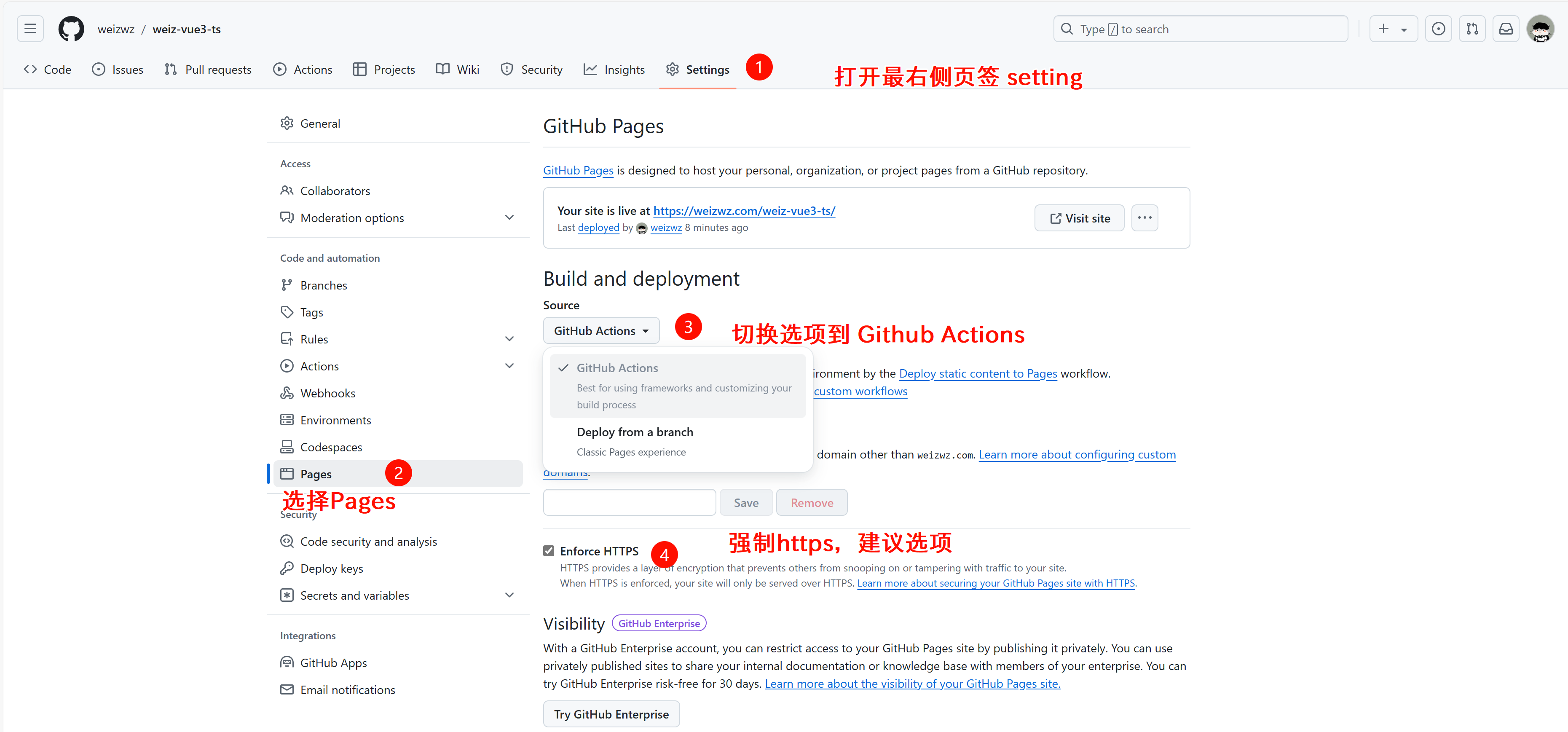
2. 在GitHub上设置部署配置

image

3. 到你的项目根目录创建工作流文件

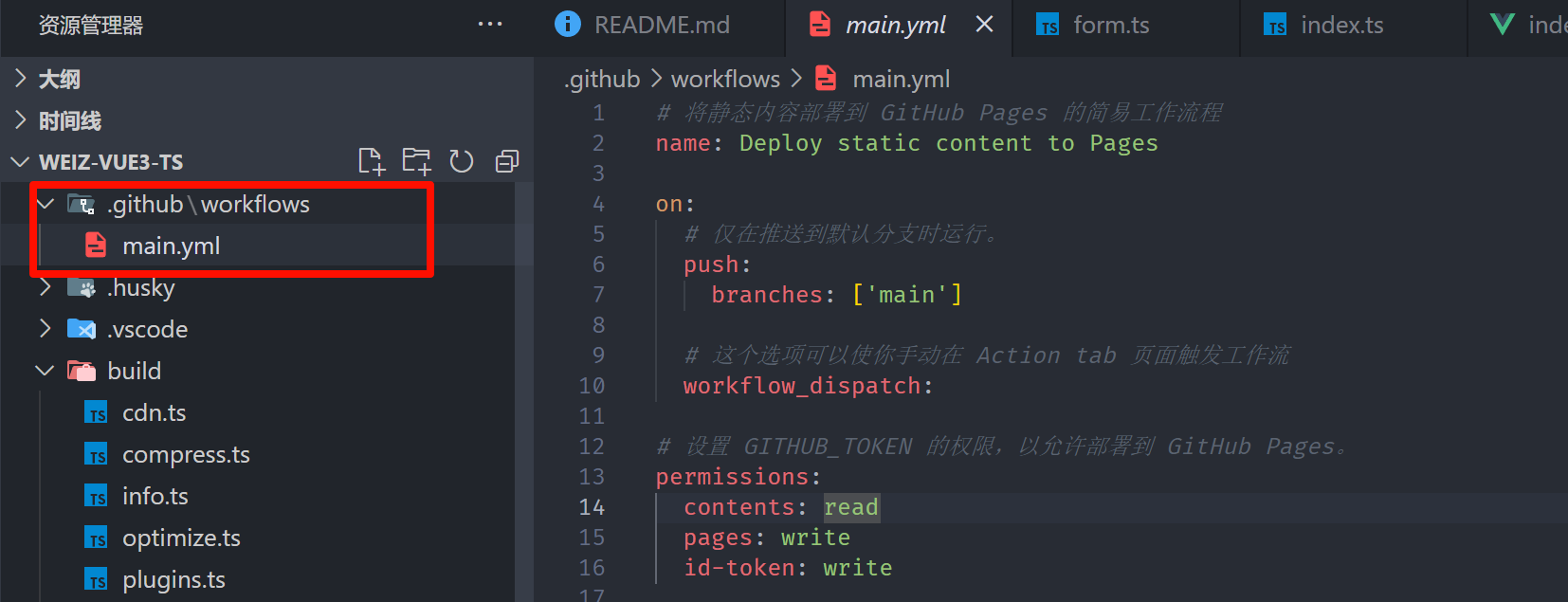
根目录下新建 .github 文件夹,然后在其目录下新建 workflows 文件夹,在里面新建 main.yml
image

main.yml 里的内容如下:

# 将静态内容部署到 GitHub Pages 的简易工作流程
name: Deploy static content to Pages

on:
  # 仅在推送到默认分支时运行。
  push:
    branches: ['main']

  # 这个选项可以使你手动在 Action tab 页面触发工作流
  workflow_dispatch:      

# 设置 GITHUB_TOKEN 的权限,以允许部署到 GitHub Pages。
permissions:
  contents: read
  pages: write
  id-token: write

# 允许一个并发的部署
concurrency:
  group: 'pages'
  cancel-in-progress: true

jobs:
  # 单次部署的工作描述
  deploy:
    environment:
      name: github-pages
      url: ${{ steps.deployment.outputs.page_url }}
    runs-on: ubuntu-latest
    steps:
      - name: Checkout
        uses: actions/checkout@v3
      - name: Set up Node
        uses: actions/setup-node@v3
        with:
          node-version: 20
          cache: 'npm'
      - name: Install dependencies
        run: npm install
      - name: Build
        run: npm run build
      - name: Setup Pages
        uses: actions/configure-pages@v3
      - name: Upload artifact
        uses: actions/upload-pages-artifact@v1
        with:
          # Upload dist repository
          path: './dist'
      - name: Deploy to GitHub Pages
        id: deployment
        uses: actions/deploy-pages@v1

其中我们需要修改的内容:

  1. node版本,根据你的项目实际使用版本设置
  2. 打包目录,一般都是 dist,如果不是的话请修改
  3. 项目脚本,此项目是使用npm构建,如果你使用的是pnpm,或者ymal等,需要手动修改。下面给出pnpm的设置:
steps:
  - name: Checkout
	uses: actions/checkout@v4
  - name: Set up pnpm
	uses: pnpm/action-setup@v4
	with:
	  version: 9
  - name: Set up Node
	uses: actions/setup-node@v3
	with:
	  node-version: 20
	  cache: 'pnpm'
  - name: Install dependencies
	run: pnpm install
  - name: Build
	run: pnpm run build

pnpm的版本也根据你的实际使用而定,后面的内容都一样。其他的请自行查找。

4. 修改你的项目部署根目录

正常情况下一般都在 vite.config.tsvue.config.jswebpack.config.js 里,取决于你使用了哪种脚手架。
vite.config.ts 为例,存在 base 字段中。参考代码 vite-vue3-charts
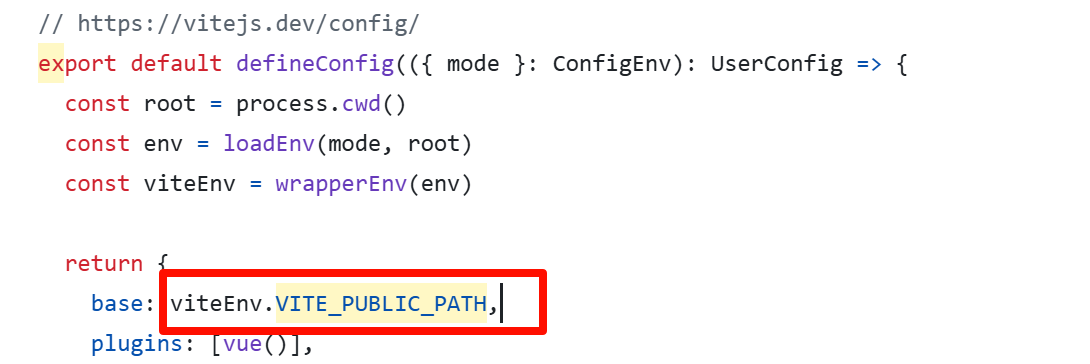
image

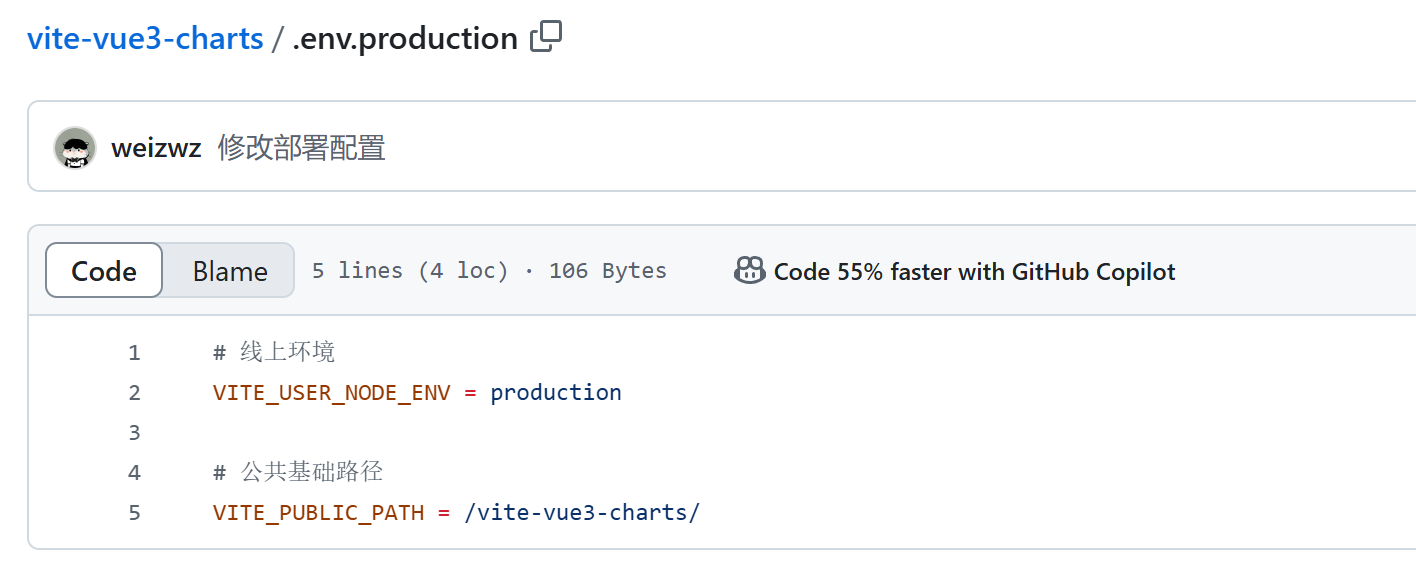
如果你有封装的话,如上图,可能是一个变量,一般都在根目录的 .env.production 文件中,修改此变量的值即可。如下图:
image

5. 提交代码,你的项目即可自动部署

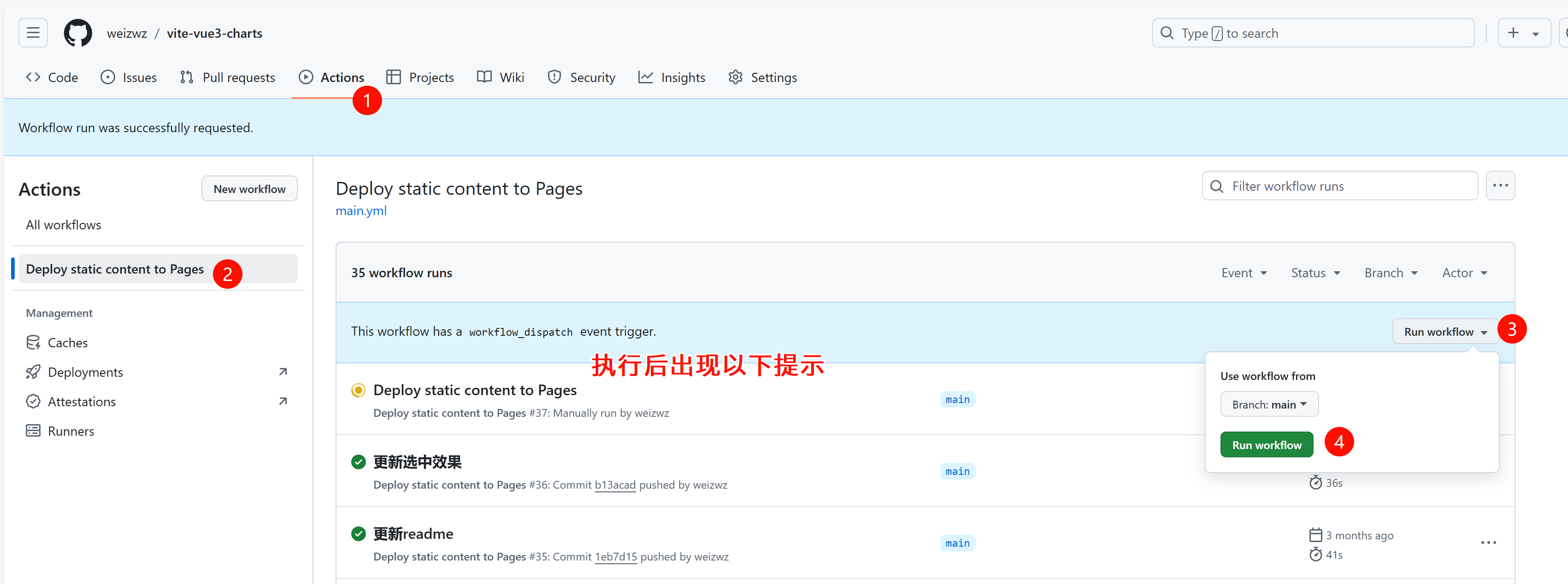
或者到GitHub网站仓库目录,在 Actions 页签中,手动部署
image

6. 访问路径

访问路径:[github账号名称].github.io/[仓库名称]
例如:https://weizwz.github.io/vite-vue3-charts

实例项目代码参考 weiz-vue3-charts