惯性聚合 高效追踪和阅读你感兴趣的博客、新闻、科技资讯
阅读原文 在惯性聚合中打开

推荐订阅源

D
DataBreaches.Net
V
Vulnerabilities – Threatpost
C
CERT Recently Published Vulnerability Notes
Google DeepMind News
GbyAI
GbyAI
Y
Y Combinator Blog
T
Threatpost
Threat Intelligence Blog | Flashpoint
Project Zero
Project Zero
Engineering at Meta
Engineering at Meta
MongoDB | Blog
MongoDB | Blog
MyScale Blog
MyScale Blog
Security Latest
Security Latest
T
Threat Research - Cisco Blogs
量子位
I
Intezer
Simon Willison's Weblog
C
Cybersecurity and Infrastructure Security Agency CISA
L
Lohrmann on Cybersecurity
L
LINUX DO - 最新话题
The Register - Security
T
Tailwind CSS Blog
爱范儿
爱范儿
Google DeepMind News
T
Troy Hunt's Blog
Stack Overflow Blog
Stack Overflow Blog
Cloudbric
Cloudbric
S
Secure Thoughts
The GitHub Blog
The GitHub Blog
T
The Blog of Author Tim Ferriss
L
LangChain Blog
Recorded Future
Recorded Future
小众软件
小众软件
www.infosecurity-magazine.com
T
Tor Project blog
人人都是产品经理
人人都是产品经理
F
Full Disclosure
O
OpenAI News
Webroot Blog
Webroot Blog
A
Arctic Wolf
TaoSecurity Blog
TaoSecurity Blog
P
Privacy & Cybersecurity Law Blog
Jina AI
Jina AI
Cyber Security Advisories - MS-ISAC
Exploit-DB.com RSS Feed
雷峰网
雷峰网
Microsoft Security Blog
H
Heimdal Security Blog
B
Blog RSS Feed
Vercel News
Vercel News

博客园 - Liaofy

前端新范式:用 AI 提效开发,用 E2E 保证迭代质量 把SPA的加载速度提升一倍,有没有搞头? 使用mumu模拟器抓包 andriod app 如何在本地给 vue-router4 扩展功能? Vue3 路由优化,使页面初次渲染效率翻倍 【eslint 插件开发】禁用 location 跳转外部链接 vue 项目使用 charles 代理线上页面到本地后显示404 避免使用单个数字作为对象的key 高扩展弹出层组件设计实现(H5&小程序) 轻松搞懂POST与PUT的区别 vite(or rollup) 实现 webpackChunkName webapp项目架构畅想(vue3).md vite试玩:老项目启动从6分钟到秒开 修剪AST树减少webapck打包尺寸 【uniapp】改善中大型uniapp小程序项目开发体验 5分钟,搞清 Unicode 与 UTF-8 的区别 deAsync.js 真正让异步变同步 盘的转——使用缓动函数完成动画 多个请求间断失败,如何优雅处理?
vscode 调试 webpack 打包
Liaofy · 2021-11-15 · via 博客园 - Liaofy

webpack 打包底层是调用 node 的各种接口/能力,所以调试 webpack 其实和调试一个node应用没什么差别。

恰好最近在改造一个uniapp项目的编译流程,需要使用一些webapck文档上没有的数据。通过debug的方式,我们得以一窥究竟。本文仅记录如何进入开启 vscode 调试模式,一来方便以后查找,二来希望能帮到有需要的人。

调试方法不限项目,但文本以uniapp项目为例

vscode Node Debugging

照例先上官网链接,详细参数可前往查看。本文重点关注Attaching to Node.js这个部分。

package.json 改动

package.json 文件的 scripts 中新增 debug 模式:

...
scripts: {
  ...
  "build:mp-weixin": "cross-env NODE_ENV=production UNI_PLATFORM=mp-weixin vue-cli-service uni-build",
  // 新增debug模式
  "debug": "cross-env NODE_ENV=production UNI_PLATFORM=mp-weixin node --inspect-brk=5858 ./node_modules/@vue/cli-service/bin/vue-cli-service uni-build",
}
...

观察上面两行,他们的区别仅是把vue-cli-service改成了node --inspect-brk=5858 ./node_modules/@vue/cli-service/bin/vue-cli-service

新建 launch.json

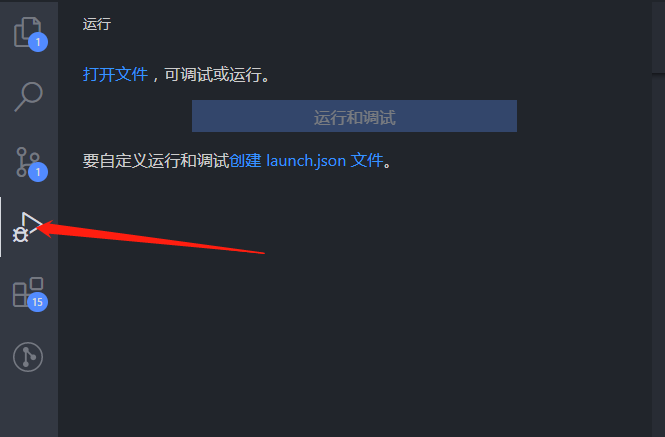
同时按下Ctrl+Shift+D,或者鼠标点击 vscode 编辑器左侧运行按钮(上图),可创建 launch.json 文件,添加如下内容并保存。

{
  // 使用 IntelliSense 了解相关属性。 
  // 悬停以查看现有属性的描述。
  // 欲了解更多信息,请访问: https://go.microsoft.com/fwlink/?linkid=830387
  "version": "0.2.0",
  "configurations": [
    {
      "type": "node",
      "request": "launch",
      "name": "启动程序",
      "runtimeExecutable": "npm",
      "runtimeArgs": ["run", "debug"],
      "port": 5858
    }
  ]
}

注意:参数要和添加到scripts中的数据保持一致。

开始 debug

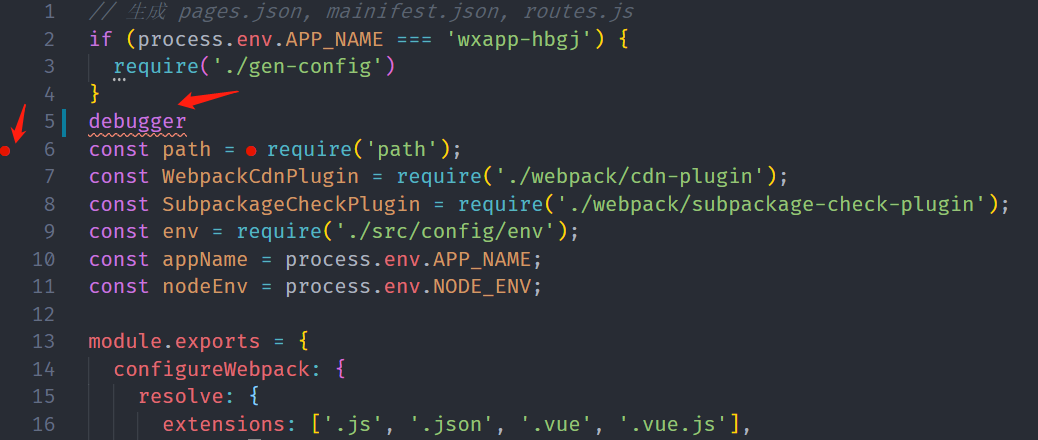
打开vue.config.js,在文件任意位置手动添加debugger,或使用鼠标左键点击文件行号的空白位置(会出现红色小圆点)。同时按下Ctrl+Shift+D,或者鼠标点击 vscode 编辑器左侧运行按钮后,点击开始调试,即可进入debug模式。