


惯性聚合 高效追踪和阅读你感兴趣的博客、新闻、科技资讯
阅读原文 在惯性聚合中打开

推荐订阅源

K
Kaspersky official blog
Hacker News - Newest:
Hacker News - Newest: "LLM"
Cyberwarzone
Cyberwarzone
S
Securelist
S
Schneier on Security
V
Vulnerabilities – Threatpost
Latest news
Latest news
G
GRAHAM CLULEY
C
CERT Recently Published Vulnerability Notes
T
The Exploit Database - CXSecurity.com
Scott Helme
Scott Helme
Know Your Adversary
Know Your Adversary
雷峰网
雷峰网
S
SegmentFault 最新的问题
Jina AI
Jina AI
A
About on SuperTechFans
GbyAI
GbyAI
F
Full Disclosure
T
Tenable Blog
博客园 - 聂微东
P
Privacy International News Feed
Recorded Future
Recorded Future
PCI Perspectives
PCI Perspectives
MongoDB | Blog
MongoDB | Blog
L
LINUX DO - 热门话题
NISL@THU
NISL@THU
Microsoft Security Blog
C
Check Point Blog
The GitHub Blog
The GitHub Blog
IT之家
IT之家
S
Secure Thoughts
Cloudbric
Cloudbric
S
Security @ Cisco Blogs
D
Darknet – Hacking Tools, Hacker News & Cyber Security
Exploit-DB.com RSS Feed
博客园_首页
N
News | PayPal Newsroom
有赞技术团队
有赞技术团队
I
Intezer
cs.CV updates on arXiv.org
大猫的无限游戏
大猫的无限游戏
The Register - Security
WordPress大学
WordPress大学
Hugging Face - Blog
Hugging Face - Blog
Martin Fowler
Martin Fowler
小众软件
小众软件
人人都是产品经理
人人都是产品经理
C
Cyber Attacks, Cyber Crime and Cyber Security
宝玉的分享
宝玉的分享
Schneier on Security

博客园 - Liaofy

前端新范式:用 AI 提效开发,用 E2E 保证迭代质量 把SPA的加载速度提升一倍,有没有搞头? 使用mumu模拟器抓包 andriod app 如何在本地给 vue-router4 扩展功能? Vue3 路由优化,使页面初次渲染效率翻倍 【eslint 插件开发】禁用 location 跳转外部链接 避免使用单个数字作为对象的key 高扩展弹出层组件设计实现(H5&小程序) 轻松搞懂POST与PUT的区别 vite(or rollup) 实现 webpackChunkName webapp项目架构畅想(vue3).md vite试玩:老项目启动从6分钟到秒开 修剪AST树减少webapck打包尺寸 【uniapp】改善中大型uniapp小程序项目开发体验 vscode 调试 webpack 打包 5分钟,搞清 Unicode 与 UTF-8 的区别 deAsync.js 真正让异步变同步 盘的转——使用缓动函数完成动画 多个请求间断失败,如何优雅处理?
vue 项目使用 charles 代理线上页面到本地后显示404
Liaofy · 2022-11-10 · via 博客园 - Liaofy

背景

某app嵌入了航管的H5页面,在测试过程中,发现其中一个页面白屏。最简单的方案就是代理到本机,看看到底是哪里的bug。

线上链接:https://wtest.133.cn/hangban/vue/jipiao/home
本地链接:https://wtest.133.cn/dev/lfy/hangban/vue/jipiao/home

注意,本地链接是通过 nginx 转发到本机 localhost 的。

charles Map Remote 设置

charles 的安装网上有详细教程,不再赘述。

众所周知,charles 的 Map Remote 功能,可以将线上请求代理到本地。点击Tools -> Map Remote 可以打开设置。这里贴出我的规则:
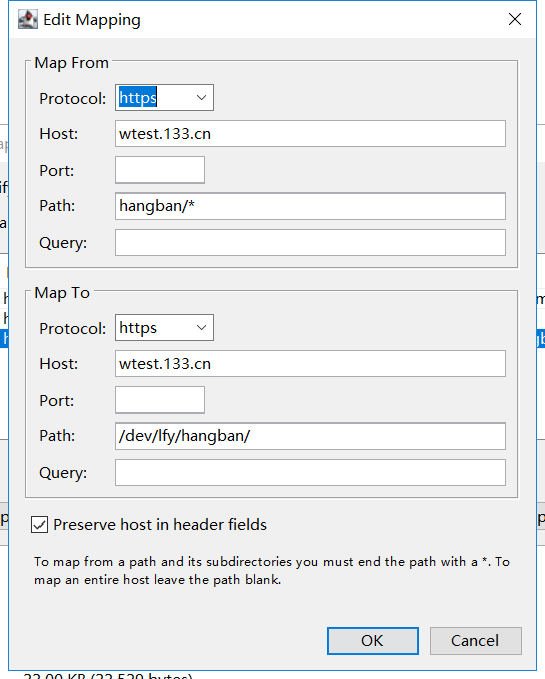
然而,再次访问线上链接,页面 404 了。

代理转发也正确:

URL	https://wtest.133.cn/dev/lfy/hangban/vue/jipiao/home
Status	Complete
Notes	Mapped from remote URL: https://wtest.133.cn/hangban/vue/jipiao/home
Response Code	200
Protocol	HTTP/2.0

那么,页面为什么会 404 呢?

解决

因为已经代理到本地了,查看本地代码就非常容易。在大致看了vue-router的源码后,才发现我们设置的路由base和链接对不上,导致得到的location错误。

export function getLocation (base: string): string {
  let path = decodeURI(window.location.pathname)
  if (base && path.toLowerCase().indexOf(base.toLowerCase()) === 0) {
    path = path.slice(base.length)
  }
  return (path || '/') + window.location.search + window.location.hash
}

如上所示,base值在本机设置为/dev/lfy/hangban/vue,而访问页面的链接是https://wtest.133.cn/hangban/vue/jipiao/home,导致最终的结果返回的是/hangban/vue/jipiao/home,而不是正确的/jipiao/home

所以,需要将本地路由的base同线上保持一致,即改为/hangban/vue(其他部分仍然是/dev/lfy/hangban/vue):

const router = new VueRouter({
  mode: 'history',
  base: '/hangban/vue',
  ...
});