







MCP(Model Context Protocol,模型上下文协议)是一种专为大语言模型设计的开源通信协议,使用 MCP 可以标准化模型与外部数据源、工具或服务之间的交互。也就是说通过 MCP 协议,可以使模型具备调用外部工具的能力,比如获取数据、执行外部操作等。
到这里,可能不少同学会有疑问,MCP 协议听起来和 API 调用差不多,就算不使用 MCP 协议,也可以通过 API 调用来实现模型与外部数据源、工具或服务之间的交互。MCP 协议的意义在于为不同的 API 创建了一个通用标准,就像 USB-C 让不同设备能够通过相同的接口连接一样。
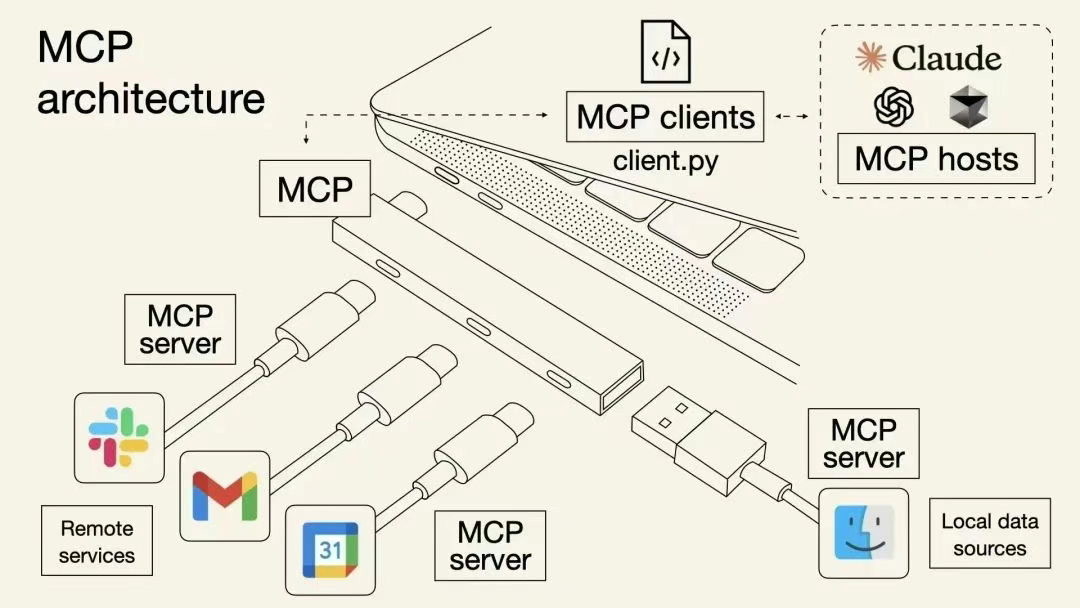
与 API 调用相比,MCP 协议具有一些特性:
MCP 协议通常使用两种方式建立连接。
SSE 是一种基于 HTTP 的通信协议,它使用单向连接,从 MCP 服务端到客户端发送数据流。SSE 适用于需要实时更新的场景,例如聊天应用、股票行情等。在通过 SSE 连接时,你会用到类似 http://localhost:8001/sse 的 URL 地址,因此 SSE 连接更像传统的网络 API 调用。
stdio 通过标准输入输出流进行通信,通常 MCP 服务端是运行在本地的,适用于本地开发和调试。
下面通过一个最简单的实例来演示如何在 LangGraph 中使用 MCP 协议。项目文件结构如下:
.
├── mcp_servers  # MCP 服务器
│   ├── math.py     # 数学计算
│   └── weather.py  # 天气查询
└── main.py      # 主程序
首先安装所需要的包。
pip install langchain-mcp-adapters mcp
然后在 mcp_servers 目录下创建两个 MCP 服务。math.py 使用 stdio 连接,实现了加法和乘法运算,用于解决数学计算问题。weather.py 使用 SSE 连接,实现了天气和时间查询功能。
math.py 代码如下:
from mcp.server.fastmcp import FastMCP

mcp = FastMCP("Math")

@mcp.tool()
def add(a: int, b: int) -> int:
    return a + b

@mcp.tool()
def multiply(a: int, b: int) -> int:
    return a * b

if __name__ == "__main__":
    mcp.run(transport="stdio")
weather.py 代码如下:
from datetime import datetime
from mcp.server.fastmcp import FastMCP

mcp = FastMCP("Weather", port=8001)

@mcp.tool()
def get_weather(location: str) -> str:
    return "晴天"

@mcp.tool()
def get_time() -> str:
    return datetime.now().strftime('%Y-%m-%d %H:%M:%S')

if __name__ == "__main__":
    mcp.run(transport="sse")
接着在 main.py 中引用相关的包。
import asyncio
from contextlib import asynccontextmanager
from typing import Annotated, TypedDict

from langchain.prompts import ChatPromptTemplate
from langchain_mcp_adapters.client import MultiServerMCPClient
from langgraph.graph import END, START, StateGraph
from langgraph.graph.message import add_messages
from langgraph.prebuilt import ToolNode, tools_condition
from langchain_ollama import ChatOllama
编写 load_mcp_tools() 方法,将 MCP 服务转换成 LangChain 中的工具(langchain_core.tools)。
@asynccontextmanager
async def load_mcp_tools():
    """加载 MCP 工具"""
    async with MultiServerMCPClient(
        {
            "math": {
                "command": "python",
                "args": ["mcp_servers/math.py"],
                "transport": "stdio",
            },
            "weather": {
                "url": f"http://localhost:8001/sse",
                "transport": "sse",
            }
        }
    ) as client:
        yield client.get_tools()
加载模型、设置提示词以及定义 LangGraph 图的状态。
model = ChatOllama(model="qwen2.5:7b")
prompt = ChatPromptTemplate.from_template("You are an assistant for question-answering tasks. If necessary, external tools can also be called to answer. If you don't know the answer, just say that you don't know. Answer in Chinese.\n\nQuestion: {question}")

class State(TypedDict):
    messages: Annotated[list, add_messages]
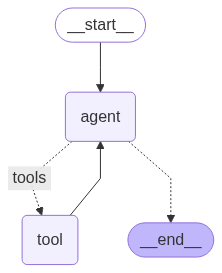
编写 create_graph() 方法,创建一个最简单的图,仅包含一个对话节点和一个工具节点。在 LangGraph 中调用工具,需要将工具转换成工具节点 ToolNode,工具节点会自动处理工具的调用和结果的返回。
@asynccontextmanager
async def create_graph():
    """创建图"""
    def agent(state: State):
        messages = state["messages"]
        state["messages"] = llm_with_tool.invoke(messages)
        return state

    async with load_mcp_tools() as tools:   # 获取 MCP 工具
        print(f"可用的 MCP 工具:{[tool.name for tool in tools]}")
        llm_with_tool = prompt | model.bind_tools(tools)    # 绑定工具并创建模型调用链

        graph_builder = StateGraph(State)
        graph_builder.add_node(agent)
        # 添加工具节点
        graph_builder.add_node("tool", ToolNode(tools))
        graph_builder.add_edge(START, "agent")
        graph_builder.add_conditional_edges(
            "agent",
            tools_condition,    # LangGraph 中预定义的方法,用于判断是否需要调用工具
            {
                "tools": "tool",
                END: END,
            },
        )
        graph_builder.add_edge("tool", "agent")

        yield graph_builder.compile()
最后编写主程序,运行观察一下结果。
async def main():
    async with create_graph() as graph:
        result = await graph.ainvoke({"messages": "徐州天气怎么样"})
        print(result["messages"][-1].content)
        result = await graph.ainvoke({"messages": "现在几点了"})
        print(result["messages"][-1].content)
        result = await graph.ainvoke({"messages": "(3+5)x12等于多少"})
        print(result["messages"][-1].content)

if __name__ == "__main__":
    asyncio.run(main())
可以看到输出结果如下:
可用的 MCP 工具:['add', 'multiply', 'get_weather', 'get_time']
徐州现在的天气是晴天。
现在的时刻是17:22:15。
(3+5)×12等于96。
此内容由惯性聚合(RSS阅读器)自动聚合整理,仅供阅读参考。 原文来自 — 版权归原作者所有。