




惯性聚合 高效追踪和阅读你感兴趣的博客、新闻、科技资讯
阅读原文 在惯性聚合中打开

推荐订阅源

GbyAI
GbyAI
J
Java Code Geeks
雷峰网
雷峰网
WordPress大学
WordPress大学
宝玉的分享
宝玉的分享
云风的 BLOG
云风的 BLOG
V
Visual Studio Blog
V
Vulnerabilities – Threatpost
S
Securelist
The Hacker News
The Hacker News
The Register - Security
Threat Intelligence Blog | Flashpoint
Help Net Security
Help Net Security
G
Google Developers Blog
Hugging Face - Blog
Hugging Face - Blog
CTFtime.org: upcoming CTF events
M
MIT News - Artificial intelligence
AI
AI
让小产品的独立变现更简单 - ezindie.com
The GitHub Blog
The GitHub Blog
freeCodeCamp Programming Tutorials: Python, JavaScript, Git & More
Schneier on Security
N
Netflix TechBlog - Medium
T
The Blog of Author Tim Ferriss
Google DeepMind News
Hacker News - Newest:
Hacker News - Newest: "LLM"
H
Hacker News: Front Page
博客园 - 司徒正美
K
KPMG report finds enterprise disconnect between AI and its ROI | CIO
B
Blog
Microsoft Azure Blog
大猫的无限游戏
大猫的无限游戏
Security Latest
Security Latest
Engineering at Meta
Engineering at Meta
N
News and Events Feed by Topic
cs.AI updates on arXiv.org
酷 壳 – CoolShell
酷 壳 – CoolShell
Cyber Security Advisories - MS-ISAC
T
Threat Research - Cisco Blogs
U
Unit 42
V
V2EX
V2EX - 技术
V2EX - 技术
L
LINUX DO - 最新话题
aimingoo的专栏
aimingoo的专栏
Microsoft Security Blog
Recorded Future
Recorded Future
P
Privacy & Cybersecurity Law Blog
美团技术团队
小众软件
小众软件
F
Fortinet All Blogs

博客园 - Lil-K

VM-16-pro 安装Centos Stream 9 spring-cloud-alibaba-整合spring-cloud-gateway-3.1.4 基于CentOS7.x安装Nginx-1.18.0 Nginx在Windows下的基本介绍安装以及基本使用 window7下 cmd命令行 Mysql导出表结构 + 表数据 【一】Spark基础 【二】Spark 核心 【八】将日志写入log(glog) - Lil-K - 博客园 【七】ab压测 【六】tf和cgi进行联合试验,完成日志服务器 - Lil-K - 博客园 【五】安装fcig - Lil-K - 博客园 【四】搭建Nginx服务器 - Lil-K - 博客园 【三】多语言互通 - Lil-K - 博客园 【二】调通单机版的thrift-C++版本 - Lil-K - 博客园 Spark在实际项目中分配更多资源 - Lil-K - 博客园 Spark实际项目中调节并行度 - Lil-K - 博客园 IDEA中大小写转换快捷键 使用maven下载cdh版本的大数据jar包 【Hive六】Hive调优小结 - Lil-K - 博客园
【一】调通单机版的thrift-python版本 - Lil-K - 博客园
Lil-K · 2018-08-15 · via 博客园 - Lil-K

开发步骤说明

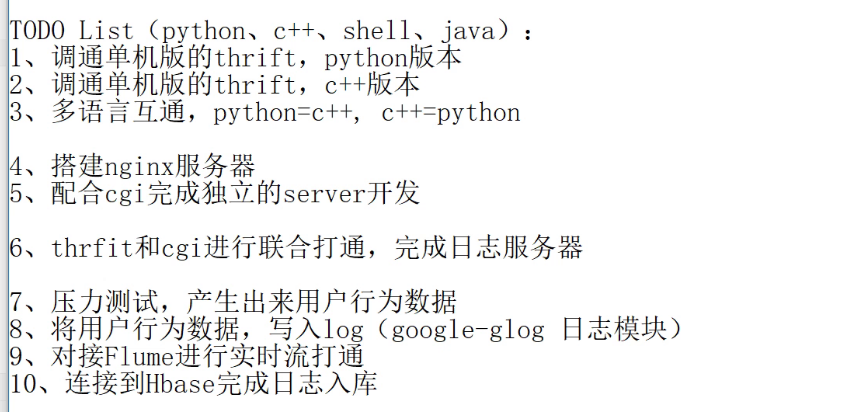
【任务1】调通单机版的thrift-python版本

安装thrift

  • 下载源码包
    wget http://apache.fayea.com/thrift/0.9.3/thrift-0.9.3.tar.gz

  • 安装thrift [进入thrift目录]

    • 运行命令: yum install openssl-devel.x86_64 [可选择是否安装]
    • 运行命令: yum install boost-devel.x86_64 [必须安装]
    • 运行命令: ./configure --with-cpp --with-boost --with-python --without-csharp --with-java --without-erlang --without-perl --with-php --without-php_extension --without-ruby --without-haskell --without-go
    • 运行命令: yum install boost-devel-static
    • 运行命令: make,make isntall
  • 安装thrift对python的支持模块
    pip install thrift==0.9.3

创建thrift模块文件并编译

  1. 创建RecSys.thrift文件 [创建到任意目录]
service RecSys {
    string rec_data(1:string data)
}
  1. 命令:thrift --gen py RecSys.thrift,此时在当前目录中会产生gen-py的文件夹,其中有当前的模块名字

开发python版的client和server

  • 创建 server.py 文件测试
import sys
sys.path.append('../schema/gen-py/')

from thrift import Thrift
from thrift.transport import TSocket
from thrift.transport import TTransport
from thrift.protocol import TBinaryProtocol
from RecSys import RecSys
from thrift.server import TServer
from RecSys.ttypes import *

class RecSysHandler(RecSys.Iface):
    def rec_data(self, a):
        print "Receive: %s" %(a)
        return "I`m OK !!!"

if __name__ == "__main__":

    # 实例化handler
    handler = RecSysHandler()

    # 设置processor
    processor = RecSys.Processor(handler)
        
    # 设置端口
    transport = TSocket.TServerSocket('localhost', port=9900)
                
    # 设置传输层
    tfactory = TTransport.TBufferedTransportFactory()
                        
    # 设置传输协议
    pfactory = TBinaryProtocol.TBinaryProtocolFactory()
    handler = RecSysHandler()

    server = TServer.TThreadedServer(processor, transport, tfactory, pfactory)

    print 'Starting the server...'
    server.serve()
    print 'done'
  • 创建 client.py 文件测试
#coding=utf-8

import sys
sys.path.append('../schema/gen-py/')

from thrift import Thrift
from thrift.transport import TSocket
from thrift.transport import TTransport
from thrift.protocol import TBinaryProtocol
from RecSys import RecSys

if __name__ == "__main__":

    # 设置端口
    transport = TSocket.TSocket('localhost', port=9900)
                
    # 设置传输层
    transport = TTransport.TBufferedTransport(transport)
                        
    # 设置传输协议
    protocol = TBinaryProtocol.TBinaryProtocol(transport)

    client = RecSys.Client(protocol)

    transport.open()

    rs = client.rec_data("are you ok ??")
    print "receive return data: ", rs

    transport.close()