惯性聚合 高效追踪和阅读你感兴趣的博客、新闻、科技资讯
阅读原文 在惯性聚合中打开

推荐订阅源

S
Security @ Cisco Blogs
Scott Helme
Scott Helme
Threat Intelligence Blog | Flashpoint
T
Threat Research - Cisco Blogs
AWS News Blog
AWS News Blog
Spread Privacy
Spread Privacy
D
Darknet – Hacking Tools, Hacker News & Cyber Security
Security Latest
Security Latest
Simon Willison's Weblog
C
Cybersecurity and Infrastructure Security Agency CISA
G
GRAHAM CLULEY
cs.CL updates on arXiv.org
I
Intezer
S
Securelist
Google DeepMind News
S
Schneier on Security
T
Troy Hunt's Blog
Help Net Security
Help Net Security
Microsoft Azure Blog
V
V2EX
Security Archives - TechRepublic
O
OpenAI News
博客园 - Franky
G
Google Developers Blog
Stack Overflow Blog
Stack Overflow Blog
TaoSecurity Blog
TaoSecurity Blog
MyScale Blog
MyScale Blog
P
Privacy International News Feed
K
KPMG report finds enterprise disconnect between AI and its ROI | CIO
Google Online Security Blog
Latest news
Latest news
Vercel News
Vercel News
T
The Blog of Author Tim Ferriss
博客园_首页
S
Security Affairs
PCI Perspectives
PCI Perspectives
WordPress大学
WordPress大学
C
Cisco Blogs
Recent Announcements
L
LangChain Blog
GbyAI
GbyAI
F
Fortinet All Blogs
N
News and Events Feed by Topic
T
Tor Project blog
IT之家
IT之家
P
Palo Alto Networks Blog
D
DataBreaches.Net
小众软件
小众软件
宝玉的分享
宝玉的分享
F
Full Disclosure

博客园 - 不懂123

kafka添加用户管理认证 nodejs升级管理 elastic定时清除索引数据 sftp集成设置 kafka3.9集群部署 nginx扩展编译模块 rancher kafka部署 JumpServer使用示例 rancher kafka多监听配置 jenkins远程动态打包镜像 docker镜像仓库清理迁移 elastic单机多节点集群搭建 fastdfs编译升降版本 监控系统搭建集成实例 rancher服务启动异常 linux使用ssh免密连接windows主机 jenkins pipeline搭建 docker跨平台构建镜像 fastdfs系统异常
mongodb集群用户管理
不懂123 · 2025-06-10 · via 博客园 - 不懂123

用户分类

      mongos用户管理

      shard1用户管理

      shard2用户管理

      shard3用户管理

     这里的4类用户都是需要单独创建的,不能混用。但是可以把用户名和密码设置成相同

数据库权限

     用户不仅分类,而且还必须在指定的数据库下创建用户账号,在use dbname下创建的用户只对dbname数据库享有对应的权限.对db2数据库依然没有权限

创建用户

      mongodb默认启动的时候没有认证授权,这个时候可以随意添加用户和权限


   后期添加管理用户

           由于生产环境已经添加了认证配置,这个时候就不能直接添加用户了

# BEGIN ANSIBLE MANAGED BLOCK
#配置文件内容
#???????????????
pidfilepath = /data/tianyiyun/shard1/log/shard1.pid
dbpath = /data/tianyiyun/shard1/data
logpath = /var/log/mongodb/shard1.log
logappend = true

bind_ip = 0.0.0.0
port = 20001
fork = false

#副本集名称
replSet = shard1

#declare this is a shard db of a cluster
shardsvr = true

#设置最大连接数
maxConns = 8000
# END ANSIBLE MANAGED BLOCK

auth=true
keyFile=/data/tianyiyun/conf/keyFile.key

shard1.conf生产配置

             先修改配置文件,使mongodb服务暂时去掉认证机制再登录mongoshell创建管理用户才行

# BEGIN ANSIBLE MANAGED BLOCK
#配置文件内容
#——————————————–
pidfilepath = /data/tianyiyun/shard1/log/shard1.pid
dbpath = /data/tianyiyun/shard1/data
logpath = /var/log/mongodb/shard1.log
logappend = true

bind_ip = 0.0.0.0
port = 20001
fork = false

#副本集名称
#replSet = shard1

#declare this is a shard db of a cluster
#shardsvr = true

#设置最大连接数
#maxConns = 8000
# END ANSIBLE MANAGED BLOCK

#auth=true
#keyFile=/data/tianyiyun/conf/keyFile.key

shard1.conf注释掉认证

     每个分片节点都要创建用户,mongos节点选择其中一个节点创建即可
     /data/tianyiyun/mongodb/bin/mongod -f /data/tianyiyun/conf/shard1.conf --noauth

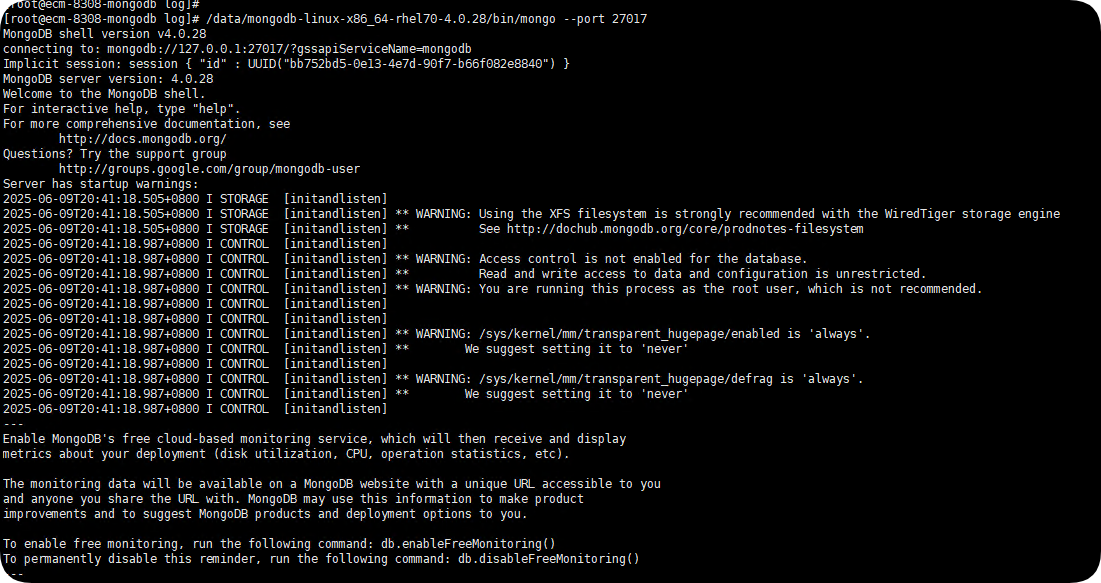
     根据连接端口的不同选择登录mongos或者shard的mongoshell

     /data/mongodb-linux-x86_64-rhel70-4.0.28/bin/mongo --port 27017

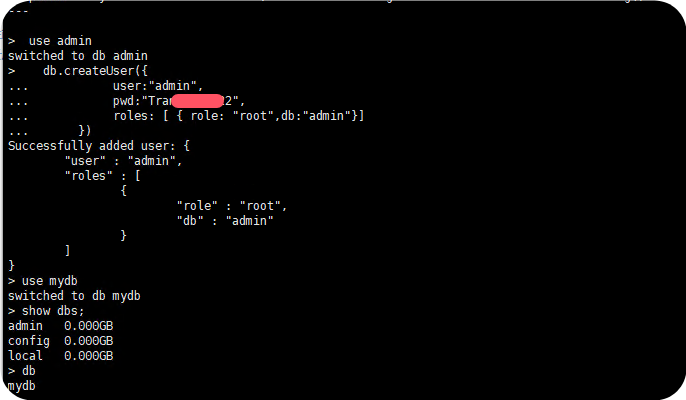
    登录mongoshell后选择给不同的数据库创建管理用户

   给mydb数据库创建管理用户
   use mydb #use哪个数据库就是给哪个数据库创建管理用户,创建管理用户后才能在相应的数据库中执行db.runadminCommand()    否则执行管理员命令的时候一直报认证错误

    db.createUser({
     user:"mydb",
     pwd:"123456",
     roles: [ { role: "dbOwner",db:"mydb"}]
   })

   db.auth("mydb","123456")

   use admin
   db.createUser({
     user:"admin",
     pwd:"123456",
     roles: [ { role: "root",db:"admin"}]
  })