

惯性聚合 高效追踪和阅读你感兴趣的博客、新闻、科技资讯
阅读原文 在惯性聚合中打开

推荐订阅源

I
Intezer
V
Vulnerabilities – Threatpost
Google Online Security Blog
T
The Exploit Database - CXSecurity.com
C
CXSECURITY Database RSS Feed - CXSecurity.com
AWS News Blog
AWS News Blog
G
GRAHAM CLULEY
P
Privacy & Cybersecurity Law Blog
www.infosecurity-magazine.com
C
Cybersecurity and Infrastructure Security Agency CISA
N
News | PayPal Newsroom
T
Tenable Blog
Spread Privacy
Spread Privacy
Threat Intelligence Blog | Flashpoint
S
Secure Thoughts
P
Privacy International News Feed
IT之家
IT之家
Project Zero
Project Zero
T
The Blog of Author Tim Ferriss
Engineering at Meta
Engineering at Meta
大猫的无限游戏
大猫的无限游戏
博客园_首页
GbyAI
GbyAI
奇客Solidot–传递最新科技情报
奇客Solidot–传递最新科技情报
量子位
雷峰网
雷峰网
Apple Machine Learning Research
Hacker News: Ask HN
Hacker News: Ask HN
Google DeepMind News
MongoDB | Blog
MongoDB | Blog
N
Netflix TechBlog - Medium
Martin Fowler
Martin Fowler
NISL@THU
NISL@THU
I
InfoQ
D
DataBreaches.Net
有赞技术团队
有赞技术团队
K
Kaspersky official blog
Security Latest
Security Latest
The Register - Security
Hugging Face - Blog
Hugging Face - Blog
S
Security @ Cisco Blogs
P
Proofpoint News Feed
M
MIT News - Artificial intelligence
H
Hackread – Cybersecurity News, Data Breaches, AI and More
让小产品的独立变现更简单 - ezindie.com
AI
AI
Exploit-DB.com RSS Feed
P
Proofpoint News Feed
Security Archives - TechRepublic
N
News and Events Feed by Topic

博客园 - 朝阳向日葵

AI辅助工作实践报告 Claude Code介绍 AI使用相关 蓝牙 报错处理 iOS IPA体积优化 iOS开发 重要通知(critical-alerts) 关于GPT工具的操作说明 React Native之React基础 React Native之JSX语法 使用TestFlight安装ios SwichBot的测试版本 iOS 防止charles抓包 iOS Charles抓包 转正答辩 iOS设备和模块解耦-方案对比 iOS开发 性能优化 iOS开发 调试技巧 设计模式 项目架构 iOS 常用第三方库及原理
React Navite环境搭建
朝阳向日葵 · 2022-12-15 · via 博客园 - 朝阳向日葵

俗话说“工欲善其事,必先利其器。”所以,我们第一步就是搭建React Native开发坏境。

一、安装Node.js、npm、yarn

1.1 React native需要借助node.js来创建和运行JavaScript代码。

    Node.js是运行在服务端的JavaScript,基于Chrome JavaScript运行时建立的一个平台,基于Google的V8引擎,V8引擎执行Javascript的速度非常快,性能非常好。

1.2 node.js中的npm,npm(即 node package manager )是Node的包管理工具,能解决NodeJS代码部署上的很多问题。

1.3 Yarn是 Facebook 提供的替代 npm 的工具,可以加速 node 模块的下载。

在终端,执行这三个命令,分别安装node、npm、yarn

brew install node
brew install npm
npm install -g yarn

 查看node、npm、yarn的版本信息。
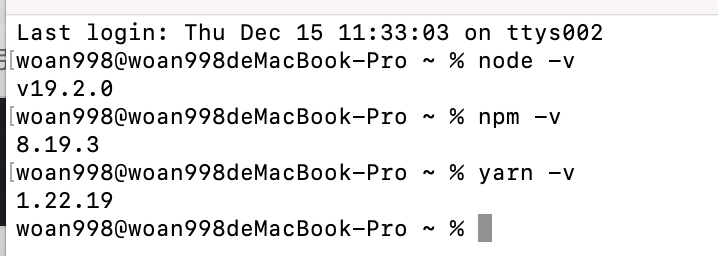
 装brew install node

二、原生开发工具及坏境

2.1.Xcode ,最好通过App Store下载,不然可能发生非法代码植入的可能。

2.2. cocoaPods安装,管理第三方依赖库的工具。

2.3 Homebrem安装,MacOS系统坏境下的软件包管理工具,拥有安装,卸载,更新,查看和搜索软件包的功能。

三、安装React Native及辅助工具

安装React Native

npm install -g react-native-cli

 安装 Watchman ,它是由 Facebook 提供的监视文件系统变更的工具。安装此工具可以提高开发时的性能(packager 可以快速捕捉文件的变化从而实现实时刷新)。

 四、React Native 开发工具

4.1 Visual Studio Code(VS Code)
4.2 WebStorm
4.3 Nuclide
4.4 Flipper

五、初始化项目

 命令行初始化

react-native init chapter2

注意:直接执行命令,可能会出现 TypeError: cli.init is not a function 这个错误,里面仅有node_modules,没有Android、IOS等文件。

解决:指定版本:npx react-native init chapter2 --version 0.68.2

六、运行项目

在终端进入chapter2,在用pod install安装第三方依赖。打开.xcworkspace,和原生运行项目一样的。

也可以直接在终端运行:yarn react-native run-ios

注意: 0.60 版本之后的主项目文件是.xcworkspace,不是.xcodeproj

七、调试项目

7.1 模拟器:Command + D 打开调试功能;真机:晃动设备即可打开调试选项。

八、编辑项目

编辑器打开App.js并随便改上几行,保存就能看到手机上的修改了。

react-native init AwesomeProject