









使用【plus.webview】对象实现右侧弹出菜单栏:
点击菜单图标弹出菜单列表,点击页面其它地方或点击【关闭菜单】收缩菜单。
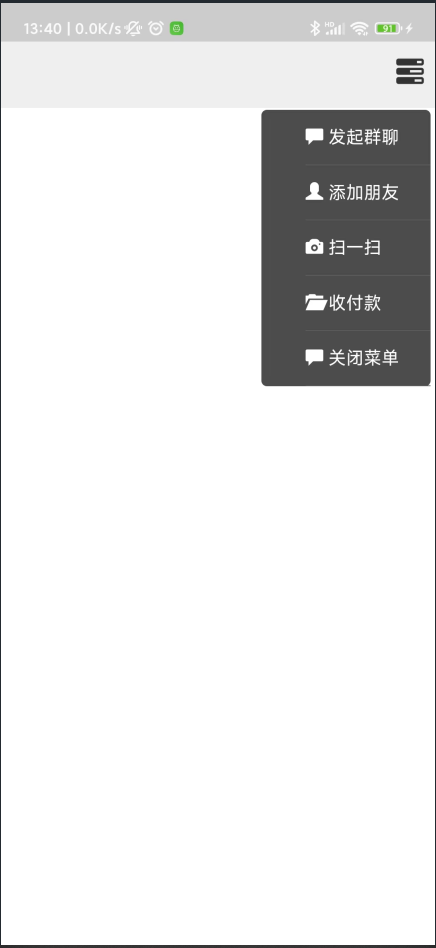
index.html:
<!DOCTYPE html>
<html>
<head>
    <meta charset="utf-8">
    <meta name="viewport" content="initial-scale=1.0, maximum-scale=1.0, user-scalable=no" />
	<!-- 最新版本的 Bootstrap 核心 CSS 文件 -->
	<link rel="stylesheet" href="https://stackpath.bootstrapcdn.com/bootstrap/3.4.1/css/bootstrap.min.css" integrity="sha384-HSMxcRTRxnN+Bdg0JdbxYKrThecOKuH5zCYotlSAcp1+c8xmyTe9GYg1l9a69psu" crossorigin="anonymous">
    <title></title>
    <script type="text/javascript">
   		document.addEventListener('plusready', function(){
   			//console.log("所有plus api都应该在此事件发生后调用,否则会出现plus is undefined。")
   		});
    </script>
</head>
<body>
	<div style="width: 100%;height: 60px;background: #eee;">
		<div style="float: right;height: 60px;line-height: 60px; margin-right: 10px;font-size: 25px;" onclick="OpenMenu()">
			<span class="glyphicon glyphicon-tasks"></span>
		</div>
	</div>
</body>
<script type="text/javascript">
	function OpenMenu(){
		var curr=plus.webview.currentWebview();
		var menu=plus.webview.create("pages/Menu.html","menu",{"width":"40%","left":"60%","top":"62px"});
		curr.setStyle({
			mask:"rgba(0,0,0,0)"
		});
		curr.addEventListener("maskClick",function(){
			curr.setStyle({
				mask:"none"
			});
			menu.close();
		});
		menu.show("zoom-fade-out",200);
	}
</script>
</html>
菜单界面:pages/Menu.html:
<!DOCTYPE html>
<html>
<head>
    <meta charset="utf-8">
    <meta name="viewport" content="initial-scale=1.0, maximum-scale=1.0, user-scalable=no" />
	<!-- 最新版本的 Bootstrap 核心 CSS 文件 -->
	<link rel="stylesheet" href="https://stackpath.bootstrapcdn.com/bootstrap/3.4.1/css/bootstrap.min.css" integrity="sha384-HSMxcRTRxnN+Bdg0JdbxYKrThecOKuH5zCYotlSAcp1+c8xmyTe9GYg1l9a69psu" crossorigin="anonymous">
	<title></title>
    <script type="text/javascript">

   		document.addEventListener('plusready', function(){
   			//console.log("所有plus api都应该在此事件发生后调用,否则会出现plus is undefined。")

   		});

    </script>
</head>
<body>
	<div style="margin-right: 5px;background: #4c4c4c;border-radius: 5px;">
		<ul>
			<li><span class="glyphicon glyphicon-comment"></span> 发起群聊</li>
			<li><span class="glyphicon glyphicon-user"></span> 添加朋友</li>
			<li><span class="glyphicon glyphicon-camera"></span> 扫一扫</li>
			<li><span class="glyphicon glyphicon-folder-open"></span> 收付款</li>
			<li onclick="BackIndex()"><span class="glyphicon glyphicon-comment"></span> 关闭菜单</li>
		</ul>
	</div>
	<style>
	li{
		font-size: 12pt;
		cursor: pointer;
		height: 50px;
		color: #fff;
		line-height: 50px;
		border-bottom: 1px solid #5d5d5d;
		list-style-type: none;
	}
	</style>
    <script type="text/javascript">
		function BackIndex(){
			var menu=plus.webview.currentWebview();
			var index=menu.opener();
			menu.close();
			index.setStyle({
				mask:"none"
				});
		}
	</script>
</body>
</html>
plus.webview.currentWebview();//获取当前webview对象
webviewObj.opener();//获取创建当前webview的webview对象
webviewObj.setStyle();//设置webview对象的样式
webviewObj.close();//关闭webview界面
webviewObj.show();//显示webview界面
此内容由惯性聚合(RSS阅读器)自动聚合整理,仅供阅读参考。 原文来自 — 版权归原作者所有。